
A brand kit is the set of files that makes a business look the same everywhere: logo files, color codes, fonts, and ready-made templates for social media and print. When a printer, a designer, or a new hire asks "can you send me your logo?", the brand kit is what you send.
Most guides stop at a checklist. This one opens a finished kit and goes through it file by file, so you can see what each piece is for.
Brand kit, brand guidelines, and brand identity
Term | What it is |
|---|---|
Brand identity | How your business looks and sounds as a whole |
Brand kit | The actual files: logos, colors, fonts, templates |
Brand guidelines | The rules for using those files |
A good brand kit usually includes a short guide, so the rules travel with the files.
A real brand kit, file by file
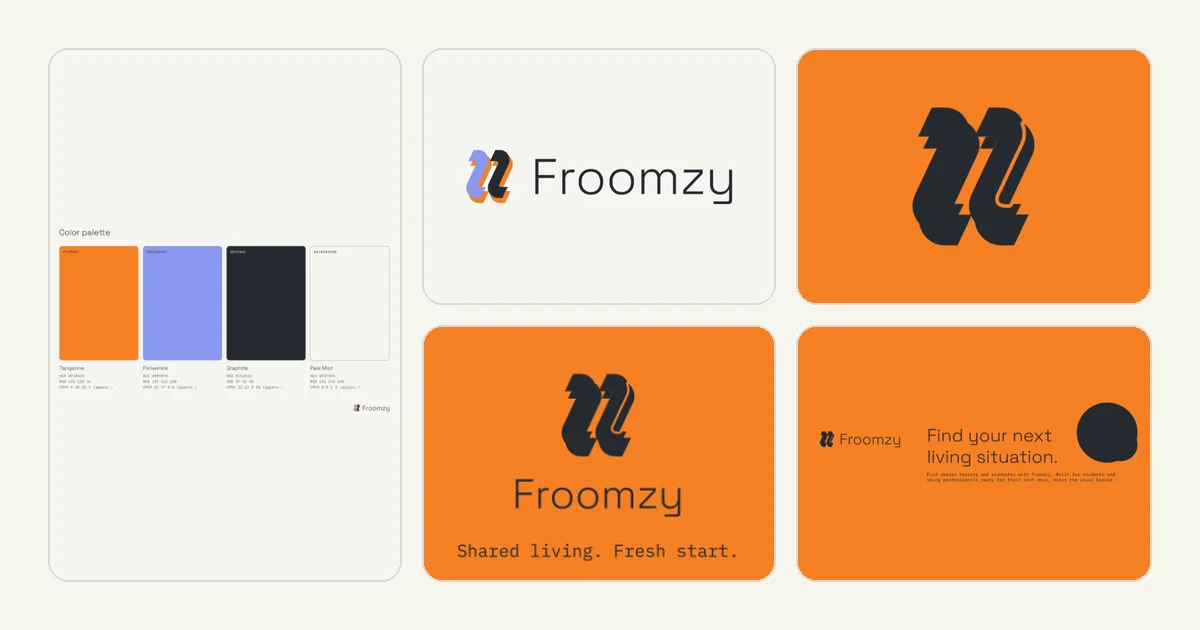
The example is Froomzy, a sample shared-living brand built in MagicShot Brand Studio. Its tagline is "Shared living. Fresh start." The finished kit holds 42 files in a few groups.
Logos (11 files)
Version | Where it goes |
|---|---|
Side by side (icon and name) | Website header, email signature |
Stacked | Square spaces, signs, packaging |
Icon only | Profile pictures, app icons |
Name only | Tight spaces where the icon gets lost |
Black and white | Single-ink printing, stamps, forms |
Dark background | Dark websites, photos, video |
One-color | Embroidery, engraving, vinyl |
No background | Placing the logo over photos or colors |
Website tab icon and app icons | Browser tabs and phone home screens, in several sizes |
Spacing rules | How much empty space to keep around the logo |
The logo downloads as PNG and SVG. Use PNG for everyday work. Send SVG to printers and sign makers, because it stays sharp at any size.
Colors and fonts (6 files)
The Froomzy palette has four named colors, each with a job: Tangerine (primary), Periwinkle (secondary), Graphite (neutral), and Pale Mist (background). Every color lists its HEX, RGB, and CMYK codes. HEX and RGB are for screens. CMYK is for print, and the kit marks those values as approximate, so confirm them with your printer.
Three more sheets cover lighter and darker versions of each color, text and background pairs that are easy to read, and a dark mode palette. Two font sheets show the brand font, Space Grotesk, and a size scale for headings and body text.
Social media (15 files)
File | Size in pixels |
|---|---|
Profile picture | 800 x 800 |
X header | 1500 x 500 |
LinkedIn banner | 1584 x 396 |
Facebook cover | 1640 x 624 |
YouTube banner | 2560 x 1440 |
Five post templates | 1080 x 1080 and 1080 x 1350 |
Three story templates | 1080 x 1920 |
The group also includes highlight covers and a link-in-bio header.
Business cards and print (5 files)
A two-sided business card, a letterhead, an envelope, an invoice header, and an email signature. One thing to check: the letterhead is sized for A4 paper and the envelope is DL, which are international sizes. If you print in the US, ask your printer to adapt them to Letter and #10.
Brand guide
A PDF that explains how to use the logo, colors, and fonts. It can also be shared as a link.
This kit also had a repeating pattern, four slides, a three-page document, and one image of the logo on a real object.
What a small business needs first
You do not need 42 files on day one. Start with these:
Your logo in three versions (side by side, icon only, one-color), each with no background, as SVG and PNG.
Two to four colors with their codes written down.
One or two fonts.
A profile picture and one banner for the platform you use most.
Add print files and templates when you have a real use for them.
Three ways to make a brand kit
Hire a designer. The most custom result. It costs more and takes longer.
Build it yourself from templates. Low cost. Keeping everything consistent is your job.
Use an AI brand kit generator. You get a full matching set quickly. You still need to review it, because the first result is a starting point.
How it works in MagicShot Brand Studio
Describe. Choose "I'm starting from scratch" or "I already have a logo or photo," then describe your business.
Pick a look. Brand Studio shows several complete looks. Each has a name and a "Why this look" note, and you can preview it on light, dark, and in use.
Make it yours. Change colors, font, words, or logo layout, or describe a change in your own words. Undo and History let you go back.
Get your files. Download everything at once, or only the groups you need.
Optional extras, such as a mascot or brand photos, show their price before you start. If you only need a logo, try the AI Logo Generator. For the full kit, create your brand kit in Brand Studio.
What a brand kit will not do
It does not tell you whether your name or logo is legally available. Check that separately before you print.
It does not replace judgment. Look at your logo at the size of a browser tab. If you cannot read it, simplify it.