













Skip to content
MagicShot

Listings that sell, shot on your phone

Brighten and declutter every listing photo, stage empty rooms, and turn stills into walkthrough videos. Market every property like it's your most important listing.

Why agents use it

Marketing your listings deserve, without the vendors

Listing photos that pop

Brighten dim rooms, sharpen every frame, and erase clutter or stray objects so each photo looks like a pro walked through with a camera.

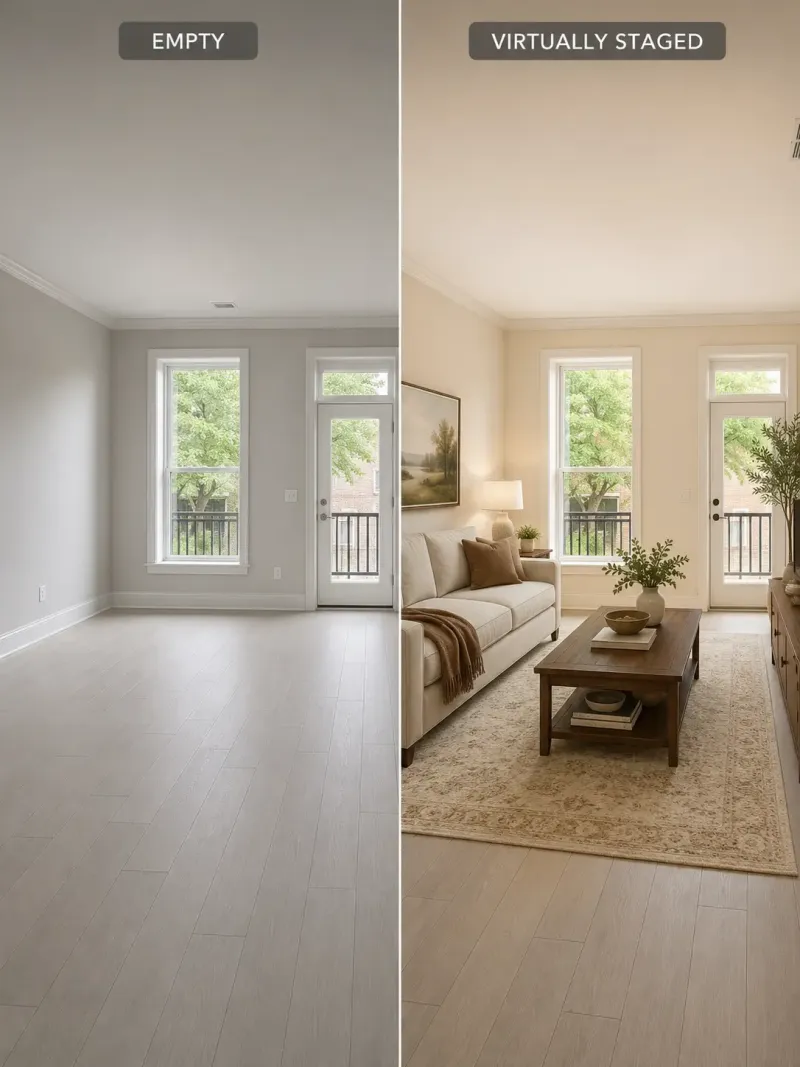
Stage empty rooms

Furnish vacant listings with the Interior Designer tool instead of renting furniture. Buyers picture themselves in a space that feels lived-in, not empty.

Walkthrough videos in minutes

Turn your best listing stills into a smooth property tour for the MLS, YouTube, and social, with no camera crew and no editing suite.

Interiors and exteriors, shot and staged with AI

A listing workflow you can run before the open house

Buyers scroll listings on their phones, and the photos decide whether they tap or keep going. Hiring a photographer, a stager, and a videographer for every property is how agents hand back their commission. MagicShot puts all four jobs in one studio so you can prep a listing the same afternoon you shoot it, straight from your phone.

  1. Fix the photos. Run each shot through Brighten Image, Image Upscaler, and Object Remover to clean up dim lighting, soft focus, and clutter in a few clicks.

  2. Stage the empty rooms. Furnish vacant spaces with the Interior Designer instead of renting furniture, in a style that matches the buyer you are trying to reach.

  3. Make the tour. Turn the finished photos into a walkthrough with the Real Estate Video Generator, or bring a single hero shot to life using Image to Video.

  4. Brand yourself. Grab a polished professional headshot for your yard sign, business cards, and profiles while you are at it.

Start here

Prep every listing photo

Brighten Image

Improve lighting and boost brightness

Image Upscaler

Make small images big — 4K big — without the blur that usually comes with it.

Object Remover

Photobombers, power lines, stray bins — gone, and the photo never tells.

Interior Designer

Preview furniture inside any room

Every ai photo editor tool →

Bring it to life

Property tours without a crew

Image to Video

One photo in. Cinematic motion out.

AI Avatar Video

A presenter who never fluffs a line — paste the script, get the talking-head video.

Every ai video generator tool →

Try it on one listing. You'll want it for every listing after.

The photos that sell a home take time and money you cannot spend on every property, so the good marketing usually goes to the big listings and the rest make do. MagicShot changes the maths. Because it works from your phone photos and charges credits instead of a day rate, the full treatment scales to your whole pipeline. Brighten, stage, and film every listing before the sign goes in the yard, revive the stale ones that are not moving, and give every seller the same professional look.

Everything is yours to use across the MLS, Zillow, and social with a commercial license. See real output in the gallery, then check what a plan includes.

Market every listing you take

The full treatment on every property, before the sign goes up. No crew, no day rates.

Start creating →

FAQ

Agents ask

Most MLS boards and portals allow virtually staged photos as long as they are clearly labelled as virtual staging. MagicShot creates the staged image; always follow your local board and disclosure rules on how to caption it.

Yes. The editing tools work from your own photos, so lighting, sharpness, and clutter improve while the room stays true to what a buyer will actually walk into.

No. You upload a photo or type what you want, and the tool does the work. Most agents prep a full listing in one sitting on their first try.

FAQ

Frequently asked questions

AI tools for real estate agents are software solutions that automate and enhance everyday tasks like generating property photos, staging listings, writing descriptions, and creating marketing visuals. With MagicShot, you can produce polished, professional images and videos that help listings stand out and attract more buyers.

MagicShot lets you generate high-quality photos and videos that make every listing look its best. You can enhance property images, create eye-catching social media content, and produce professional marketing visuals in minutes, helping you capture buyer attention and sell faster.

Yes. With MagicShot's AI photo generation, you can transform empty or dated rooms into beautifully staged spaces that help buyers picture themselves living there. Virtual staging saves you the time and cost of physical furniture while making listings far more appealing.

Not at all. MagicShot is built to be intuitive, so you can create professional-quality images and videos without any prior design or editing skills. Simple prompts and easy controls do the heavy lifting for you.

Most visuals are ready in just minutes. Instead of waiting on photographers or designers, you can generate listing photos, social posts, and promotional videos on demand, keeping your marketing fast and responsive to a moving market.

Absolutely. MagicShot can enhance lighting, sharpen details, and elevate the overall look of your existing property photos. This helps you present every room in the best possible light and make a stronger first impression online.

You can create enhanced listing photos, virtually staged interiors, social media graphics, promotional videos, and branded marketing materials. MagicShot gives real estate agents a versatile toolkit to cover their entire visual marketing needs in one place.

Getting started is simple: sign up for MagicShot, choose the AI tool that fits your task, and begin creating enhanced photos, virtual staging, or marketing videos right away. In just a few clicks, you'll have professional visuals ready to boost your listings.

Ready to create something magical?

Join 500,000+ creators making images, videos and voiceovers in seconds.

Get started

We use cookies to improve your experience and measure traffic. Choose what you allow.