
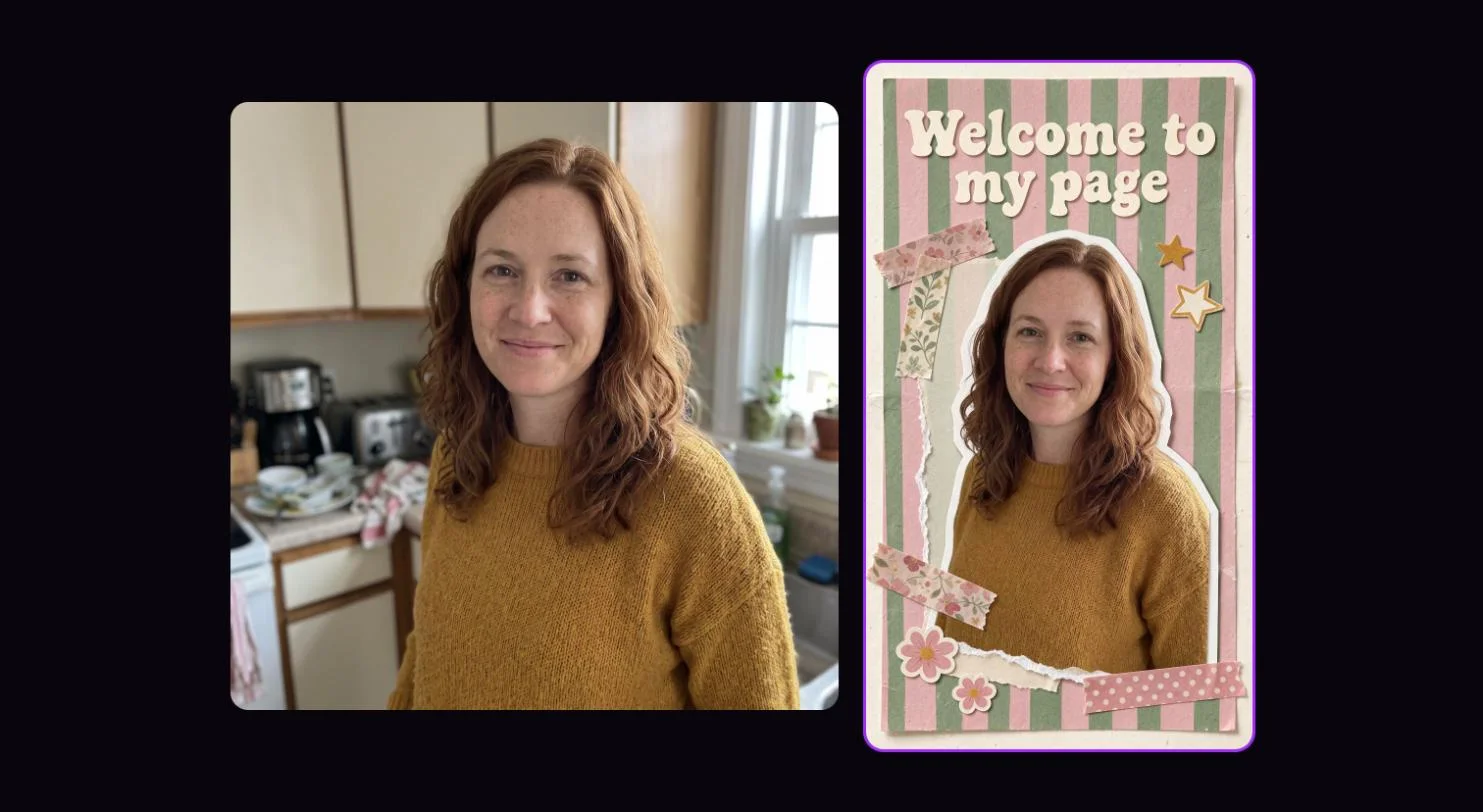
The "Welcome to my page" trend is a TikTok intro format that turns one photo of you into a digital scrapbook page. It shows a cutout of you on a pink and green striped background, with "Welcome to my page" in retro lettering. Virlo's TikTok trend tracker first logged it on November 10, 2026, and listed 135 creators posting it in the seven days ending November 24.
A CapCut template gives you a preset look. An AI image editor lets you choose your own colors, wording, and stickers. The steps below use MagicShot's AI Image Editing and produce a still image, which you then post as a short clip. Tape, stickers, and torn paper edges are optional styling, and a vertical frame suits TikTok. Some creators caption the same format "Welcome to my vlog."
How to make it in MagicShot
AI Image Editing runs on credits. The Generate button shows the cost for the model you picked, and fixing the lettering can take more than one try.
Open AI Image Editing and select "Add your photo." A waist-up or full-body shot gives the cutout more shape than a tight selfie.
Keep "Maintain face consistency" switched on to help the cutout still look like you.
Start with Seedream 5.5. The model picker describes it as having more accurate text. If the lettering is off, try Nano Banana 2.1, which the picker describes as having better text rendering.
Set the aspect ratio to 9:16. With Seedream 5.5 selected, the menu labels it "Vertical · Stories & Reels."
Paste the prompt below and select Generate.
The prompt
We ran this prompt once on November 25, 2026, with Seedream 5.5 at 9:16 and an AI-generated portrait as the source. The first result spelled "Welcome to my page" correctly and kept the face and sweater. The stripes came out as muted dusty pink and sage green, so name brighter shades, such as "bubblegum pink and kelly green," if you want more punch. One run is not a guarantee, so still read the lettering letter by letter.
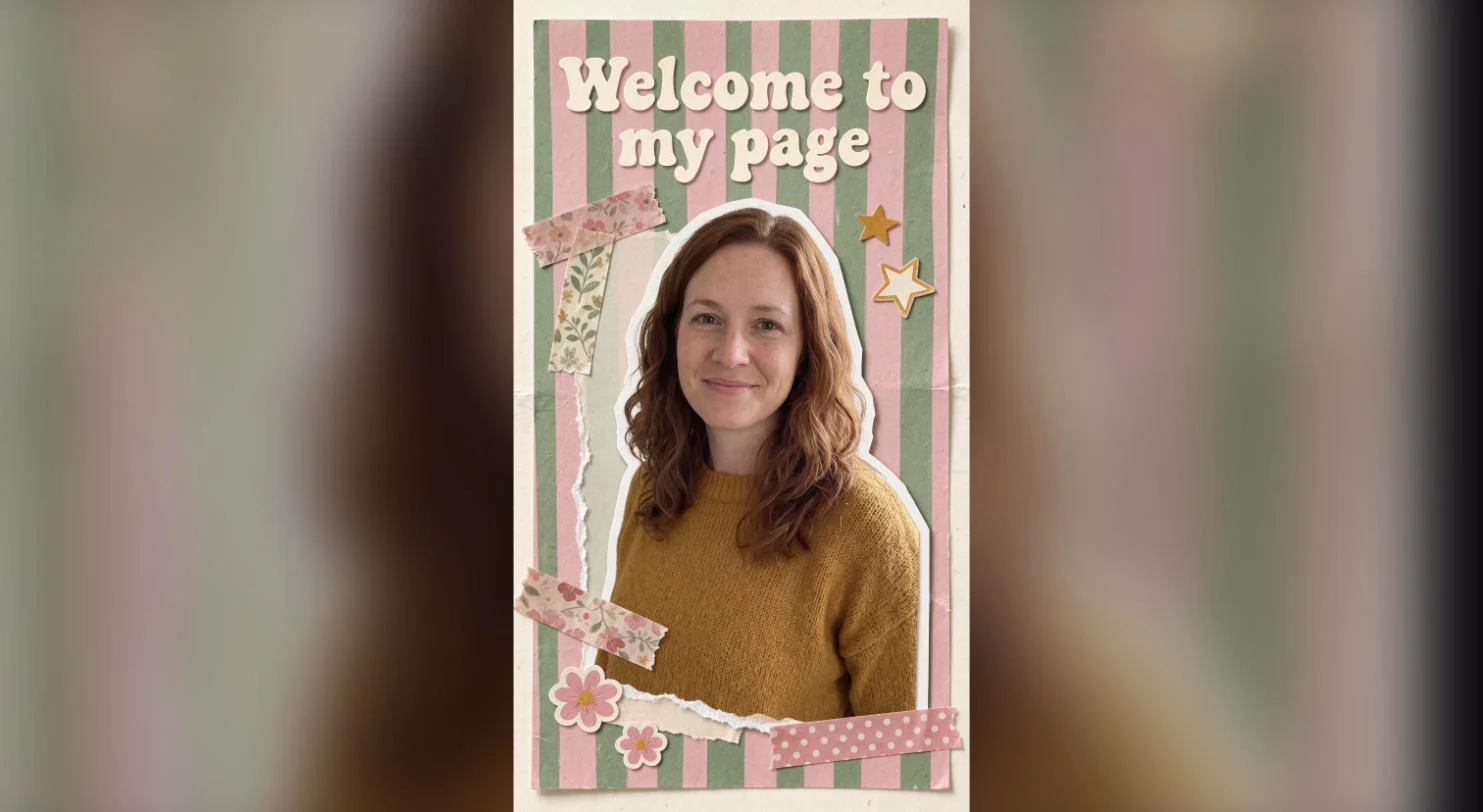
Turn this photo into a digital scrapbook intro page. Cut the person out and place them in the center as a paper cutout with a thin white border and a soft drop shadow. Background: vertical pink and green stripes. Across the top, the words "Welcome to my page" in rounded retro 1970s lettering, cream-colored, written once. Around the cutout add strips of washi tape, a few star and flower stickers, and one torn paper edge. Keep the person's face, hair, and outfit unchanged. No other text.
Variations worth trying
Your own palette. Replace "pink and green" with two colors from your feed.
A different line. Try "Welcome to my vlog" or your handle, and keep it short.
A film-photo touch. Select the Presets button under the prompt box and search for Polaroid or Retro date stamp. A preset adds its instruction to your prompt, and you can edit that text before you generate.
For more looks to try on the same photo, see AI Photo Prompts: 40 Copy-Paste Prompts That Work.
Getting the text spelled right
Lettering is a common weak spot for image models.
Put the exact words in quotation marks and say "written once."
Read the result letter by letter. A doubled or missing letter is easy to miss at a glance.
If the text is wrong twice, change the prompt to "no text" and add the words yourself in TikTok or CapCut. Text you type yourself is spelled the way you type it.
Our AI Christmas card guide has more on getting a greeting spelled correctly.
Posting it as an intro
Creators use the page as a profile intro. One simple route is to upload the still to TikTok as a video post, keep it on screen for a few seconds, and add any sound you like. Pinning the post to your profile keeps it where new visitors will see it.
Before you post
The details here describe what was circulating in late November 2026.
The cutout step can change small things, such as earrings, logos on a shirt, or the pattern on a dress. Check them against your photo.
Use your own photo, or a photo of someone who has agreed to it.
The AI Image Editing page covers the other edits you can make from the same upload.