Reshooting for Every Angle Is Expensive. It Shouldn't Be Necessary.
A listing or campaign rarely needs one shot, it needs a set: front, three-quarter, side, sometimes top-down. Getting that set normally means a studio day, several product repositions, and lighting resets, or a slow back-and-forth with a designer reconstructing angles nobody actually shot. Most AI tools that promise to generate the missing angles introduce a second problem: the product drifts. The label shifts a few degrees, the proportions stretch, the color shifts under a different light, and angle three no longer looks like the same product as angle one. For anyone shipping listings at volume, that's not a shortcut, it's a new quality-control problem.
Why Angle Changes Break Most AI Tools
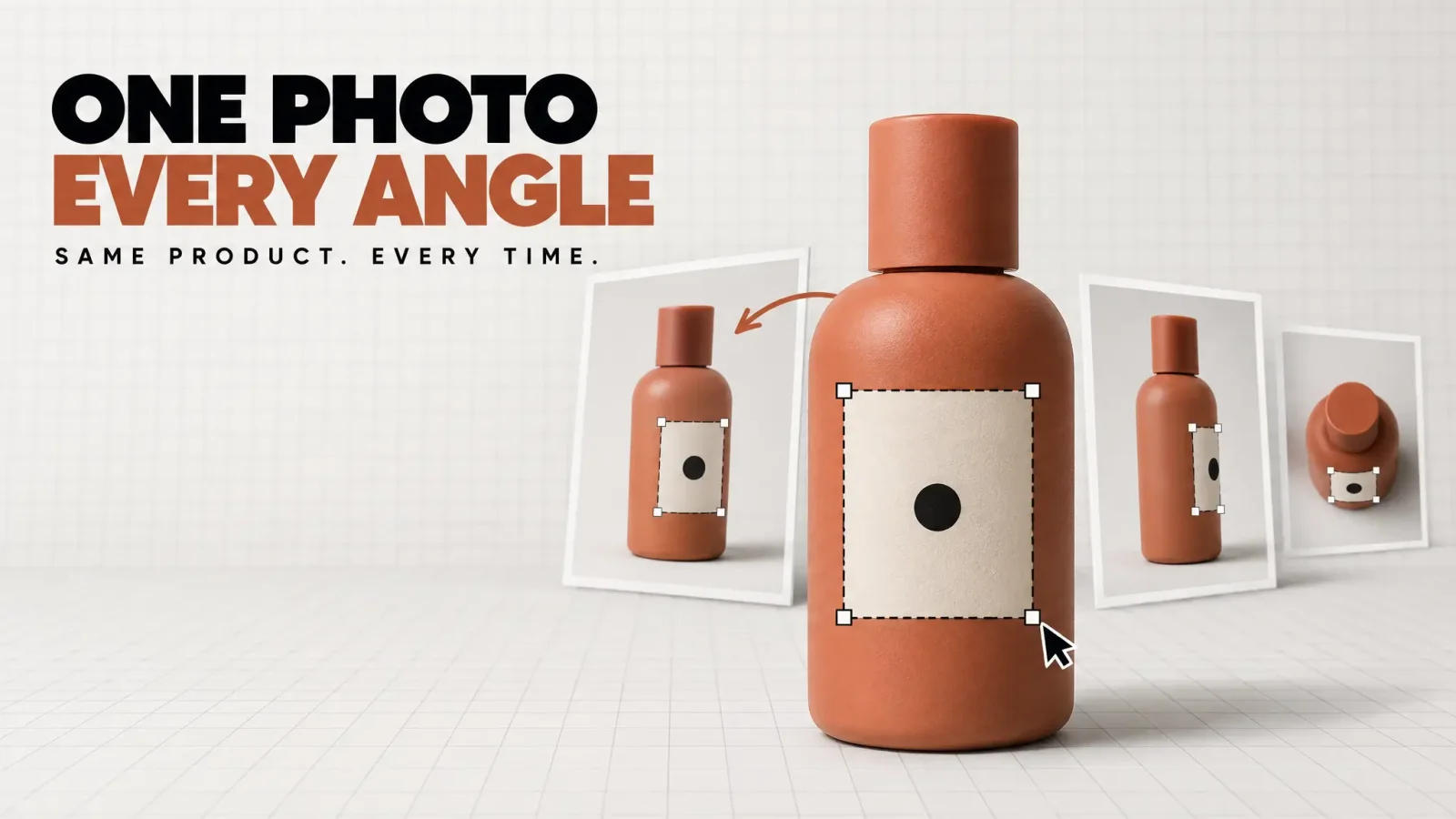
Generating a new camera angle sounds like a small ask: rotate the object, keep everything else the same. It's actually one of the harder problems in image generation. An AI angle changer, or any tool built to generate different angles of an image with AI, is usually good at inventing a plausible new angle and bad at preserving the exact product details: the label text, the logo placement, the stitching, the precise shape, across that change. That's because most models treat the uploaded product photo as a rough visual reference, closer to a mood board than a fixed constraint the generation has to respect. The model redraws a product like this from its own understanding instead of holding the actual product steady while only the camera moves. The result looks fine in isolation and falls apart the moment two angles sit side by side.
What Consistency Actually Requires
Getting a real angle set means separating two things most tools blend together: the product itself, and the direction you're shooting it from. The product's label, text, size, shape, and color need to be locked and enforced on their own, independent of the scene, so changing the angle only changes the camera position and never the product underneath it. That's the outcome to check for in any multiple angles AI tool, not a longer feature list or a bigger model, just a guarantee that what ships in angle five is provably the same product as angle one.
Where This Gets Used
Ecommerce listings that need a standard angle set (Amazon, Shopify, marketplaces)
Ad campaigns that need angle variety without a reshoot per variant
Catalog work where every SKU needs the same angle coverage for consistency
How to Generate Multiple Angles From One Product Photo
Here's the process end to end. It works the same whether you need a full angle set or just a quick side view generator pass for one listing:
Upload one clear product photo. A clean, well-lit shot is enough, no studio setup required.
Choose the angles you need: front, side, three-quarter, top-down, or any combination your listing template calls for.
Generate, review the set side by side, and export. Check every angle against the original before it goes live.
FAQ
How do I get multiple camera angles from one product photo?
Upload one photo of the product and generate the additional angles you need instead of reshooting the whole set. This works from a single reference image because the product's shape, label, and color stay fixed while only the camera direction changes.
Can AI change the camera angle without changing the product itself?
Yes, if the tool enforces the product as a fixed constraint instead of treating it as a loose reference. Look for a generator that locks label, shape, size, and color across every angle it produces.
What's the best AI camera angle generator for product photos?
The right tool is the one that keeps the product identical across every generated angle, not the one with the most angle presets. Test it on a labeled product first, front and side, and check that the text and proportions match before relying on it for a full listing set.
How do I keep a product looking consistent across different angle shots?
Use a generator built to lock product details, not just repaint the scene. Consistency comes from the tool enforcing label, shape, and color as fixed constraints and generating only the camera change, not from prompting harder or picking a consistent style preset.
Can I turn a single product photo into a full angle set for a listing?
Yes. Upload the one photo you have, generate the angles your listing template requires (front, three-quarter, side, top-down), and export the set together so every image traces back to the same original product.
Upload a product photo and generate the full angle set.
Need the angles in motion instead of stills? A multi angle video generator like Product to Video can turn the same product shot into a rotating clip once you have the angle set.