
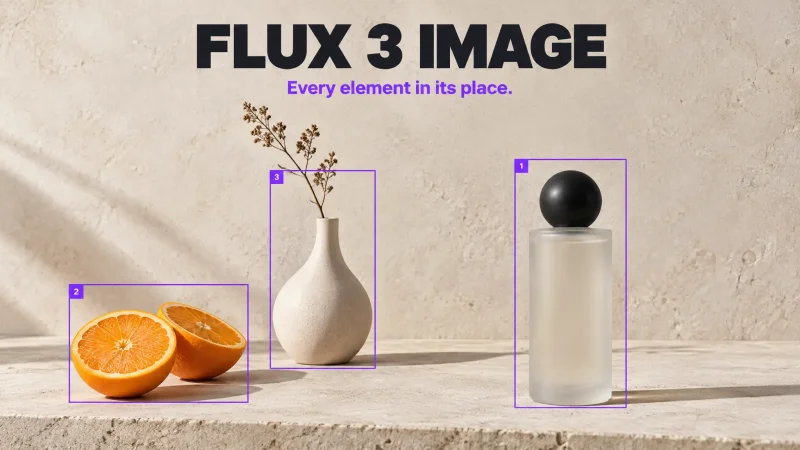
What is FLUX 3 Image?
FLUX 3 Image is the image model in FLUX 3, the multimodal model family from Black Forest Labs, the team behind the earlier FLUX image models. Black Forest Labs describes FLUX 3 as covering video, audio, images and actions. The image model generates pictures from text and edits finished ones, and it was trained from the start to understand image layout and composition.
On MagicShot, FLUX 3 Image runs in Image Editing and the AI Image & Art Generator. It draws from the same credit balance as every other tool in the app, so choosing it carries no separate fee. It is included on MagicShot's paid plans, and the commercial license that comes with them covers what you make with it. The video side of the family is on MagicShot too, as Flux 3.
How FLUX 3 Image reads a prompt
FLUX 3 Image works from a layout. In Black Forest Labs' prompt format, one caption describes the whole scene and a table of elements follows it. Each element gets an id, a bounding box and a description. The canvas is a 0 to 1000 grid on both axes whatever the aspect ratio, and each box is written as top, left, bottom, right.
Black Forest Labs' own Playground and API accept that format directly. MagicShot's tools take a plain-language prompt, so the habit to copy is the same one in words: name each element and say where it sits. "Headline across the top third, bottle in the lower right, open space on the left" gives FLUX 3 Image a layout to work from.
Edits that change one thing
Black Forest Labs built the model so an edit can target a single element. You can recolor it, replace it, move it or remove it, and everything you did not touch is meant to stay where it was. In the company's examples, one request turns a tiger and a butterfly pink, another swaps a wolf, a log and a bird for three new subjects in a single pass, and another recolors a jacket while the poster text around it is left alone.
In MagicShot's Image Editing you upload up to 9 images, write the change and wait about a minute. Name the change, then name what must stay: "Change the jacket to blue. Keep the headline, the sky and the lighting exactly unchanged." The second sentence matters most. Black Forest Labs writes its own edit instructions the same way, with a list of what to keep at the end.
Combine references into one image
Refer to each reference by its position and say what it contributes. In Black Forest Labs' example, image 1 is a record spinning on a turntable and image 2 is a van on a highway. The prompt asks to replace the cartridge from image 1 with the van from image 2 and to adjust the lighting so the van sits in the scene. The API accepts up to 10 references per request, and MagicShot's Image Editing accepts up to 9 uploads.
Sizes, ratios and grounding
Through its API, Black Forest Labs lists output sizes from a 768 square up to 4K and 15 aspect ratios from 21:9 to 9:21, plus an auto setting that follows the first reference image. The API can also ground a prompt before generating. With grounding on, the model searches the web and images first, which helps with real products, posters and places. In the company's own test, a request for this year's official Oktoberfest poster came back as an invented vintage poster with grounding off, and as the 2026 poster with its real dates and landmarks with grounding on.
In MagicShot, the ratios on offer are listed in each tool: Auto, 1:1, 16:9, 9:16, 3:4, 4:3, 2:3 and 3:2 in Image Editing, and 1:1, 16:9, 9:16, 4:3 and 3:4 in text to image.
Where FLUX 3 Image fits among MagicShot's image models
Reach for FLUX 3 Image when placement matters: ad layouts with a headline and a product, posters, magazine covers, collages, panel grids, editorial spreads and crowded scenes where every figure has its own spot. Those are the uses Black Forest Labs points to for it.
Other jobs have other picks. GPT Image 2.5 Sunburst is the model MagicShot recommends for a precise edit that has to hold up under a close look. Qwen Image 3 handles dense, text-heavy pages such as infographics. Seedream 5.0 Pro can split a render into transparent PNG layers. FLUX.1 Kontext is the earlier FLUX model for edits on a single image.
What it costs on MagicShot
In Image Editing, FLUX 3 Image costs 122 credits a run. For comparison, Flux 2 Max costs 780, GPT Images 2.5 Sunburst 800 and Nano Banana 2 480 in the same tool. In text to image it costs 150 credits. A run in Image Editing usually takes about a minute.