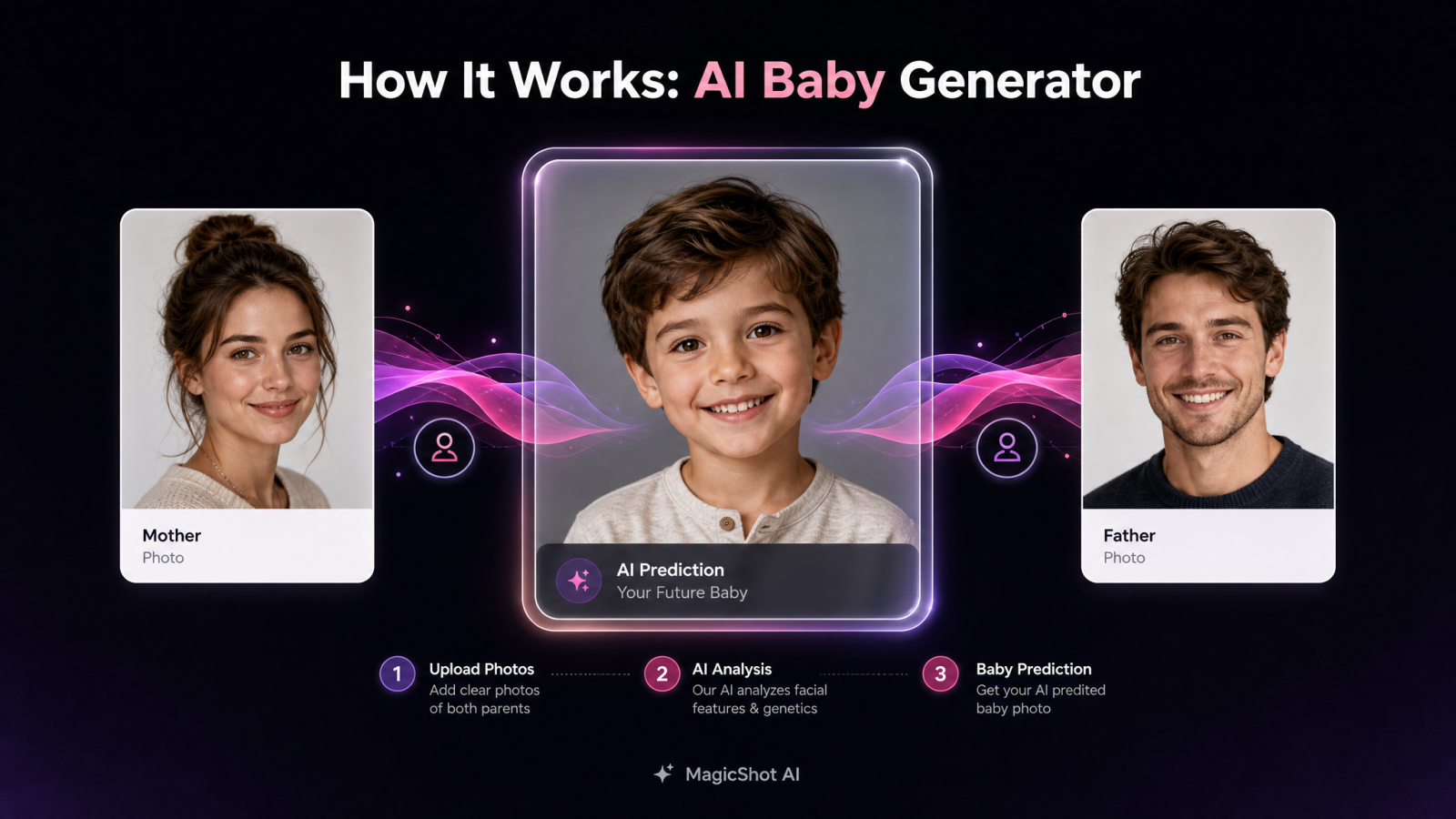
You've probably asked it out loud at least once, or heard your partner ask: what will my baby look like, or what would our baby look like? An ai baby generator gives you an actual image instead of a guess. Upload a photo of yourself and a photo of your partner, and MagicShot's ai baby tool blends both faces into a photorealistic prediction in under a minute. This guide walks through exactly how the MagicShot baby generator works, step by step, so you can reproduce the result yourself before your next family dinner, gender reveal, or baby shower.
Here's what you need before you start: a MagicShot subscription, one clear photo of yourself, and one clear photo of your partner. A solo photo works too if you just want to see a prediction based on one parent. No design skills, no editing software, and no photographer required.
What an AI baby generator actually does
An ai baby face generator reads the facial structure in each uploaded photo, eye shape and color, skin tone, hair texture and color, nose shape, and jawline, then merges those traits into a new, original face. The model isn't copying either parent's photo. It's constructing a new image that carries a believable mix of both, and it analyzes proportions and bone structure closely enough that the result actually resembles two specific people instead of a generic baby stock photo.
It's worth being clear about what this is not. A baby ai tool is not a genetics calculator and it doesn't run any kind of medical or scientific prediction. There's no DNA analysis, no inheritance modeling, nothing tied to actual biology. What you get is a fun, realistic AI guess built from two photos, nothing more, and that's exactly why it's so popular for pregnancy announcements and baby showers rather than anything clinical.
People search for this in a few different ways, and they're all asking for the same thing. Some type in what will our baby look like, others what would my baby look like or what would my kids look like, and others just what will your baby look like out of curiosity about a friend. Whether you call it a baby face generator, a kid generator, an ai kid generator, an ai child generator, a baby picture generator, or a baby look predictor, the underlying feature is identical: two photos in, one blended face out.
Step 1: Upload your photo
Open the MagicShot AI Baby Generator and upload a front-facing photo of yourself. Good lighting and a clear view of your whole face give the model the most to work with, which matters more than resolution or camera quality.
Step 2: Upload your partner's photo
Add a second photo, this time of your partner. Both images should show one face only, no group shots, no side profiles cut off at the edge of the frame. This is the step that turns a single-parent guess into a real ai baby generator couple prediction, since the model now has two sets of features to blend instead of one.
Step 3: Choose boy, girl, or twins
Pick a gender for your predicted baby: boy, girl, or twins. Twins run both faces through the same blend and generate two distinct results side by side, which is a nice touch if you're curious what non-identical siblings might look like.
Step 4: Pick baby, child, or teen
Choose the age you want to see. Baby shows a newborn-stage prediction, child shows roughly a 5-year-old, and teen pushes the same blended features out to around 15. This is what makes it a genuine future baby generator rather than a one-shot newborn photo tool.
Step 5: Choose solo baby photo or family portrait
Decide whether you want just the baby on its own, or a full family portrait showing both parents holding the baby. The family portrait option is the one most couples pick for a pregnancy announcement, since it reads like an actual photo you'd frame rather than an isolated headshot.
Step 6: Fine-tune with a prompt, model, and aspect ratio
If you want more control, add an optional custom prompt to describe a setting, outfit, or mood, switch the underlying AI model, or change the aspect ratio for the platform you're posting to, square for Instagram, vertical for Stories. None of this is required. The default settings already produce a solid result if you'd rather skip straight to generating.
Step 7: Generate, download, and share
Hit generate. MagicShot renders your prediction in a matter of seconds, and you can download the image or share it directly. That's the entire workflow, two photos in, one photorealistic baby photo generator result out.
Try the AI baby generator and run through these seven steps yourself.
Baby, child, or teen: see your future baby at every age
The age setting is one of the more useful parts of the tool because it answers a slightly different question each time. "What will my baby look like" gets one answer at the newborn stage, but "what would our kids look like" as they grow up is a different, and honestly more interesting, question. Toggling between baby, child, and teen on the same two source photos lets you see one consistent predicted face age forward, which is closer to a real future child generator than a single static image could ever be.
Parents often run all three ages in one sitting: baby for the announcement post, child for a "what if" caption, and teen just out of curiosity. Each one uses the same uploaded photos, so you're not re-uploading anything between ages, just switching the setting and generating again.
Solo baby photo vs. family portrait
The photo type setting decides how the final image is framed. Solo baby photo isolates the predicted child on their own, styled like a newborn portrait. Family portrait places the same predicted baby in a scene with both parents, which is the setting most people choose when the goal is an ai generated baby image that looks like it belongs in a real family album rather than a lab result.
If you're planning to use the image for a pregnancy announcement, the family portrait option does more of the emotional work. If you're just satisfying curiosity with your partner on a Friday night, the solo option is quicker and gets straight to the answer.
Tips for a better AI baby prediction
The output is only as good as the two photos you feed it. A few things consistently make a difference:
Use clear, front-facing photos with even, natural lighting.
Skip sunglasses, heavy filters, or photos where your face is partially covered by hair or a hand.
Upload one face per photo. Group shots or photos with someone else in frame confuse which face the model should read.
Pick a recent photo. Old childhood photos of you as a kid won't give the model your current adult facial structure to work from.
None of this requires a professional photo shoot. A recent, well-lit phone photo is usually enough for a solid baby image generator result. If you want a more styled version of the finished prediction, MagicShot's Baby Photoshoot tool can dress the result in different themes and settings afterward.
Why couples use a baby generator app
Most people don't come to a baby generator app looking for certainty. They come for the fun of it. Common reasons couples run the tool:
Pregnancy announcements that show a predicted face instead of just a sonogram or a "we're expecting" caption.
Baby showers, where a printed prediction makes a talking point or a guessing game for guests.
Social posts, since a photorealistic ai baby maker result gets more engagement than a text announcement alone.
Plain curiosity. Long before a baby is due, or even planned, couples run their photos through a baby maker tool just to see what comes out.
None of these use cases need accuracy in any scientific sense. They need a result that's realistic enough to feel like a real photo and fun enough to share.
How MagicShot compares to other baby generators
A lot of tools in this space stop at a single blended headshot. MagicShot's version goes further on a few specific points: full gender options including twins, three age stages instead of just one newborn image, a choice between a solo baby photo and a full family portrait, and control over the underlying AI model and aspect ratio if you want to fine-tune the result. Whether you're after an ai generated baby newborn shot or ai generated kids at the teen stage, it's the same upload, the same account, and the same couple of minutes.
It's also not a single-purpose app. A MagicShot subscription includes access to top models and every tool in one plan, so the same account that runs your ai baby generator app session also covers things like the AI Art Generator or Image to Video tool if you want to turn the finished prediction into a short clip for social.
Troubleshooting your AI baby prediction
If the result leans heavily toward one parent's features, double check that both source photos are clear, front-facing, and well lit. An underexposed or angled photo gives the model less to work with, so it leans on whichever photo is easier to read.
If the image comes out blurry or oddly distorted, the source photo is probably low resolution or partially blocked by hair, a hand, or a shadow. Swap in a sharper photo and regenerate rather than trying to fix it after the fact.
If the baby, child, and teen versions look too similar to each other, add a short custom prompt describing a hairstyle, expression, or setting to nudge more variation into the result. Each run also introduces some natural variation on its own, so a second generation with the same photos won't be identical to the first.
If a generation fails outright, check that your files are standard JPG or PNG images under a reasonable file size, then try uploading again.
FAQ
What will my baby look like according to AI?
Upload a photo of yourself and your partner into the MagicShot ai baby generator, and it returns a photorealistic image that blends both of your facial features, eyes, skin tone, hair, and face shape, into a single predicted face. It's a visual guess built from your photos, not a scientific forecast.
Is the AI baby generator accurate?
It's a fun, realistic AI prediction, not a genetic or medical one. The model blends visible facial traits from your two photos, but it has no way to account for actual inheritance patterns, so treat the result as entertainment rather than a forecast of your real future child.
Can I see what our kids would look like as teens?
Yes. The age setting lets you choose baby, child (around age 5), or teen (around age 15) using the same two uploaded photos, so you can see what would our kids look like at different life stages without re-uploading anything.
Does the baby generator work with one photo?
Yes, a solo photo works if you only want a prediction based on one parent. Uploading photos of both you and your partner gives the model more features to blend and produces a result that reflects both of you.
Can I generate twins?
Yes. Selecting the twins option runs the same blended features through two variations, so you get two distinct predicted faces from the same pair of source photos instead of one.
Is my photo data safe?
Your uploaded photos are used to generate your prediction within the MagicShot platform and are handled according to MagicShot's privacy policy. Review the full policy on the MagicShot website for details on storage and data handling before uploading sensitive photos.
Is there an AI baby generator app?
The ai baby generator runs in your browser on both mobile and desktop, so there's nothing to install to get started. Check the MagicShot website for current app availability if you'd rather use a dedicated app on your phone.
Ready to see it for yourself? See your future baby with MagicShot's AI baby generator.