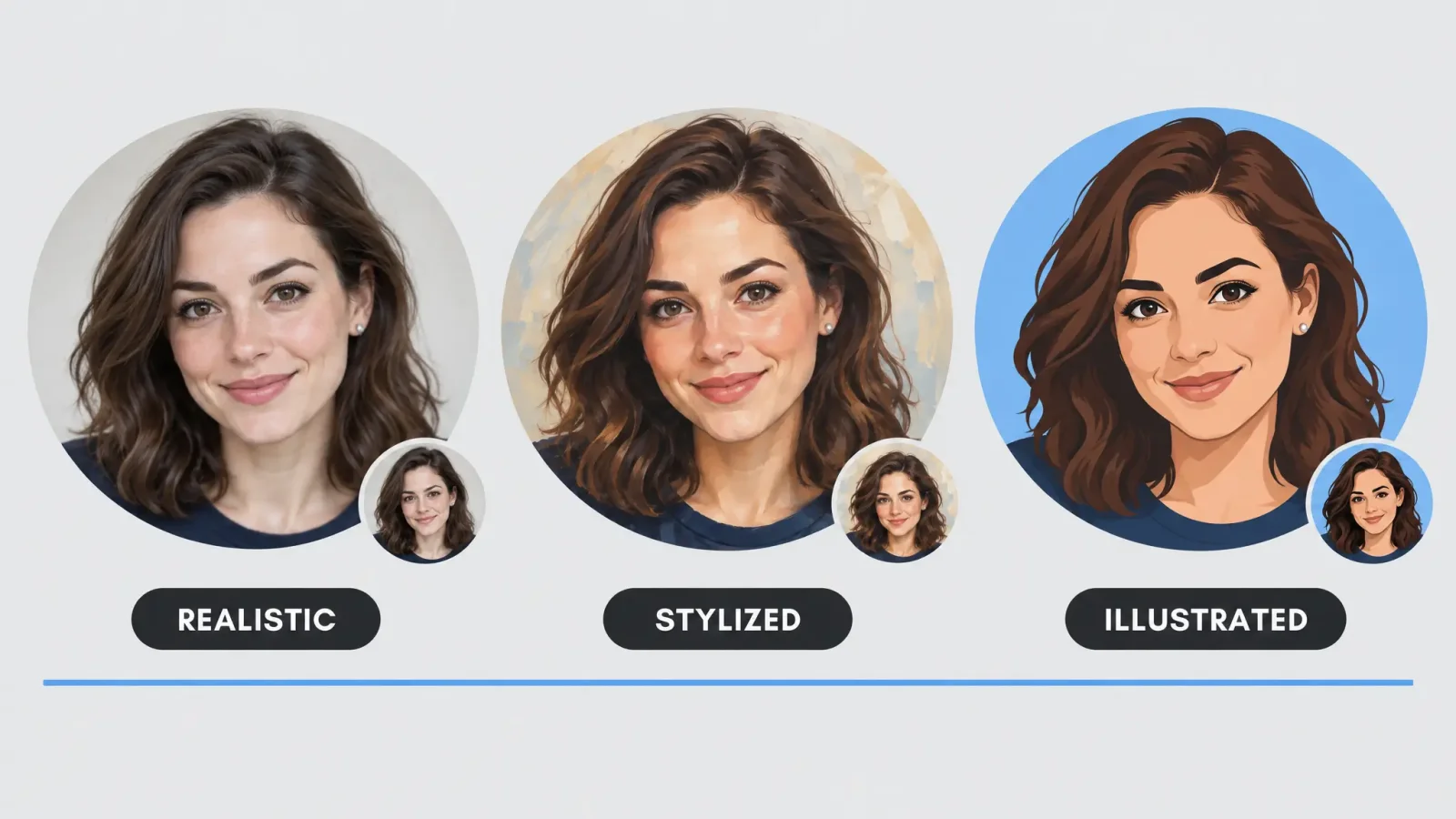
A profile picture lives at about the size of your thumbnail. On Discord it is a small circle, on LinkedIn it is a tight square next to your name, in a feed it is a dot. A good PFP has to survive that, and still look like you. This guide covers three directions, how to match one to each platform, and how to keep a stylised version recognisable, using the Avatar Generator.
Three directions
Realistic. A cleaned-up, well-lit version of your actual photo. The right call for LinkedIn and professional platforms, where an obviously stylised image can read as unserious.
Stylised. A recognisable version of your face in an art style: painterly, semi-realistic illustration or soft 3D. It suits X and personal Instagram, where personality matters more than polish.
Illustrated. Full cartoon or anime-adjacent styles. Common on Discord and gaming communities, where an illustrated avatar is the norm.
Matching style to platform
LinkedIn: realistic. People scan quickly and judge on professionalism.
Discord and gaming: illustrated. Bold, simple shapes survive the small circular crop.
X and Instagram: stylised. A personal feed tolerates and rewards personality.
Work chat tools: realistic or lightly stylised, as colleagues need to recognise you.
Design for a tiny circle
Most platforms crop to a circle or a square with rounded corners, and show the image very small. Frame your face large, with eyes roughly at the upper third. Avoid thin details and busy backgrounds. Use strong contrast between face and background, since fine textures turn to mush at thumbnail size. Platforms commonly recommend something around 400 x 400 pixels or larger for the source image, and Discord shows it far smaller than that. Check the current guidance for each one, and always view the result at the real small size before you commit.
Keeping your face recognisable
The most common complaint is drift. You generate five options, and only two still look like you. Two things help most:
A good source photo. Front-facing, evenly lit, with a clear view of your eyes, brows and jawline. Style transfer leans on those features most.
One source photo for every style. Re-uploading a different photo each time adds variation the model has to guess at.
If you wear glasses, keep them on in the source photo if you wear them in real life, so the result matches how people know you.
Getting several options at once
One upload to the Avatar Generator can produce several outputs across categories in a single session, so you do not need to re-upload for each style. Generate a batch, then choose the one that held on to your features best at the real display size.
Privacy and consistency
Do not use a photo of someone else without their consent.
Use the same PFP across your main accounts so people can find you.
If a platform requires a real photo, such as a professional profile or ID verification, use a realistic one.
Where to go next
For an anime-specific look, see AI anime generator: best styles. For the full avatar workflow, read the AI avatar generator guide, or start directly with the Avatar Generator.