A Discord server icon has to work at a size smaller than a thumbnail, which rules out most logo designs that look great full-screen. Simple shapes, bold color, and no fine detail are the whole brief for a discord logo maker. Build one with MagicShot's logo generator, then check it at actual icon size before you commit.
What a Discord Logo Maker Needs to Get Right First
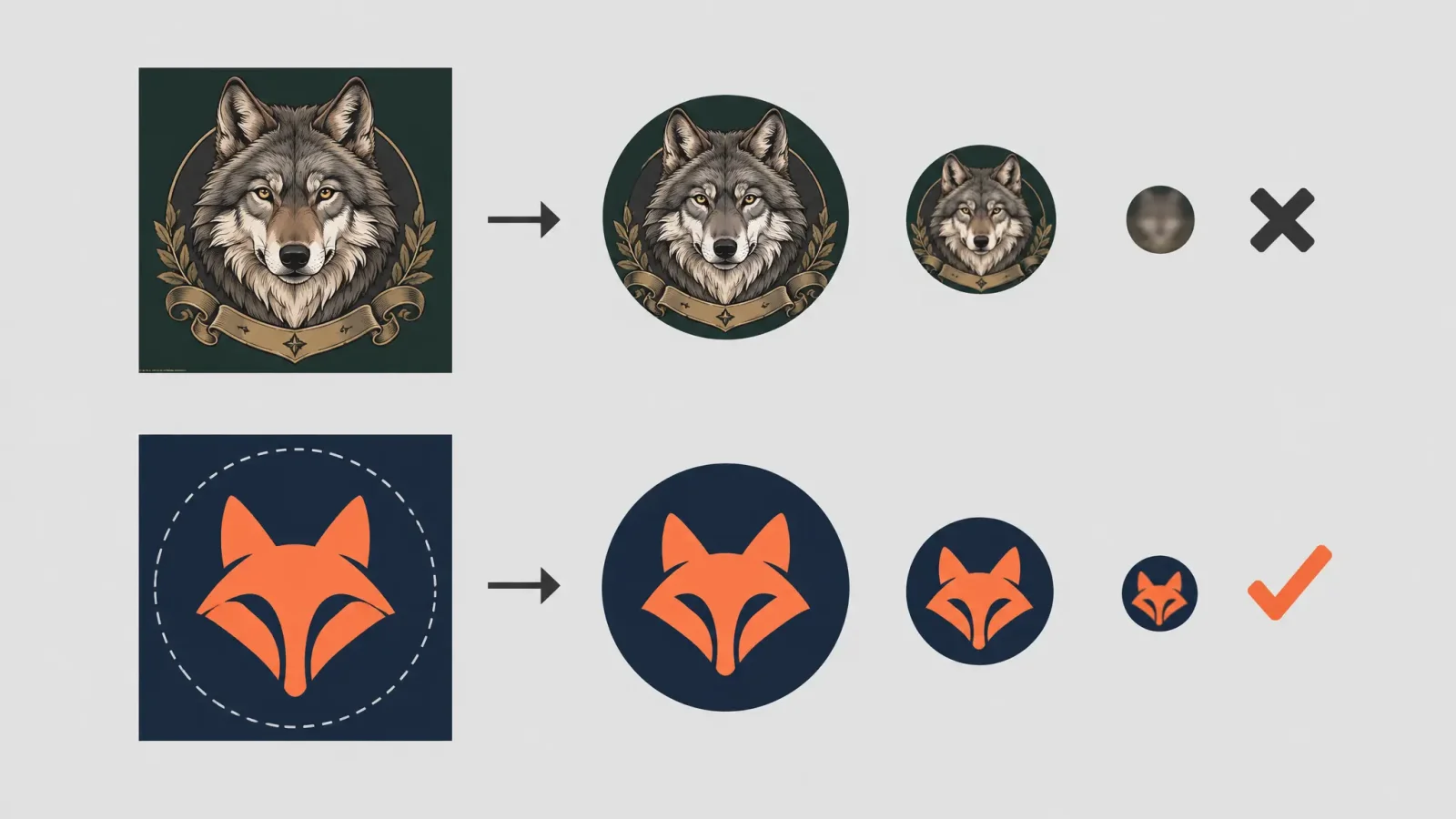
A discord logo maker should target Discord's icon display size, roughly 20 to 40 pixels across in the sidebar, far smaller than the preview image you'll design it on. Thin lines disappear, small text turns into a gray smudge, and subtle color gradients flatten into mud. Design for the smallest size first: one to three shapes, one or two strong colors, and enough contrast that the icon reads as a distinct shape even as a tiny circle.
The Circular Crop Problem
Discord crops every server icon into a circle, which cuts off anything sitting in the corners of a square design. Keep the important part of the logo centered in an inner circle, roughly 80 percent of the canvas, and treat the outer edge as expendable margin. A logo that looks balanced as a square can look off-center or cropped once Discord applies its circular mask, so preview the circular crop before finalizing.
Text Logos at Icon Size
A text logo maker or letter logo maker can work for a server icon, but only with restraint. A single bold letter or a two-letter monogram survives the crop and the shrink; a full server name in a decorative font usually doesn't. If your community's name matters more than an abstract mark, lead with the first letter or initials as the icon, and save the full name for banner art and channel descriptions where there's room to read it.
Style Examples by Community Type
Gaming: a bold mascot or weapon silhouette in one or two colors, high contrast against a dark background.
Fandom: a recognizable symbol from the source material redrawn as an original mark, not a copied logo or character likeness.
Professional community: a simple geometric monogram or abstract shape, closer to a small business logo than a gaming badge.
Matching Banner Art to Your Icon
Once the icon works at small size, generate banner art in the same color palette and style so the server profile reads as one brand rather than two unrelated images. A shared color scheme does more for consistency than reusing the exact same graphic at a larger size.
For more on branding a channel across platforms, see YouTube Channel Logo Maker. MagicShot's logo generator can generate the icon, banner, and any letter-based variations from the same core design.