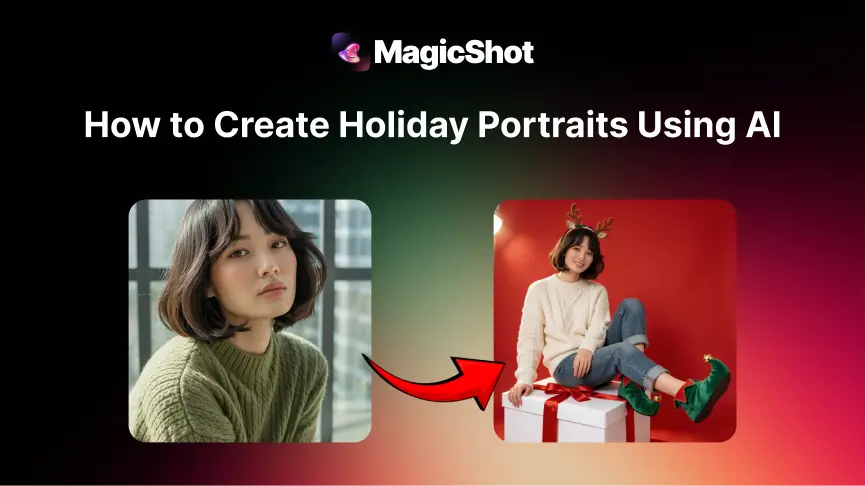
Holiday cards used to mean organising everyone into matching sweaters, finding good light, and hoping nobody blinks. An AI holiday portrait is a lower-stress version: you upload a clear photo and the tool places you in a festive scene, such as a snowy street, a cosy living room with a tree, or a New Year's party. This guide covers how to get a result that looks like you, which uses suit it, and the etiquette worth following when other people are involved. If you also want a short moving version, the AI avatar video tool animates a portrait, and the avatar generator creates stylised portraits.
How it works
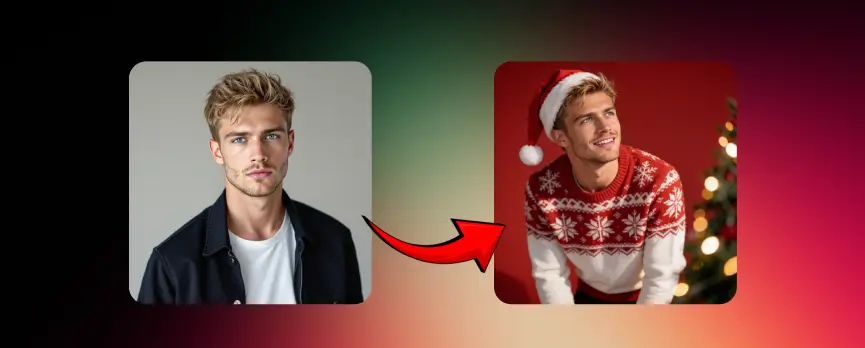
The tool reads your face, pose and lighting from the photo you upload, then generates new images that keep your likeness and change the clothing, background and mood. Quality depends heavily on the photo you start with, so it is worth five minutes to choose a good one.
Step by step
Pick a clear photo. Face fully visible, good light, no sunglasses or heavy filters, and a natural expression. - Choose a holiday style. Christmas, winter, a cosy indoor scene or New Year, depending on your card. - Generate a few versions. Pick the one that looks most like you rather than the most dramatic. - Check the details. Zoom in on hands, faces, text and any decorations. - Download and use. Save it for a card, a profile picture or a social post.
Choosing the right look
Greeting cards. Warm colours and a simple background keep room for a message. - Family announcements. Use a style that suits the whole family, and keep the same style for every person so the card looks like a set. - Profile pictures. A subtle festive touch, such as a scarf or snow, looks better than a heavy costume. - Business and creators. Keep it tasteful, with your brand colours and a clean background that works behind a greeting.
Tips for a result that looks like you
Use a recent photo. A photo from years ago will not match how you look now. - Include variety in what you upload if the tool accepts several photos: different angles and expressions. - Keep prompts simple, such as the season, the setting and the outfit. - Compare with the original. If a friend would not recognise you, choose another version.
AI portrait or photo shoot?
A professional shoot still wins when you want real people together, with real interaction, such as a family with young children, a new baby or a milestone. AI works best when you want a stylised, quick and flexible result, for example a card for friends, a social post or a themed image for a business. Many people do both: a real photo for the family, and AI for fun variations.
Etiquette and safety
Only upload photos of people who have agreed to it. - Be careful with photos of children. Think about where the image will be shared, and who can see it. - Say when an image is AI-made if it could be mistaken for a real photograph, especially on a business page. - Do not alter someone's features in ways they would not like. - Read the tool's privacy policy to understand how uploaded photos are stored and used.
Bottom line
AI holiday portraits are a quick, flexible way to make festive images for cards, profiles and posts. Start with a good photo, choose one style and compare versions against the original. You can try it on MagicShot, where generation uses credits.