What the Skeleton Flash video effect does
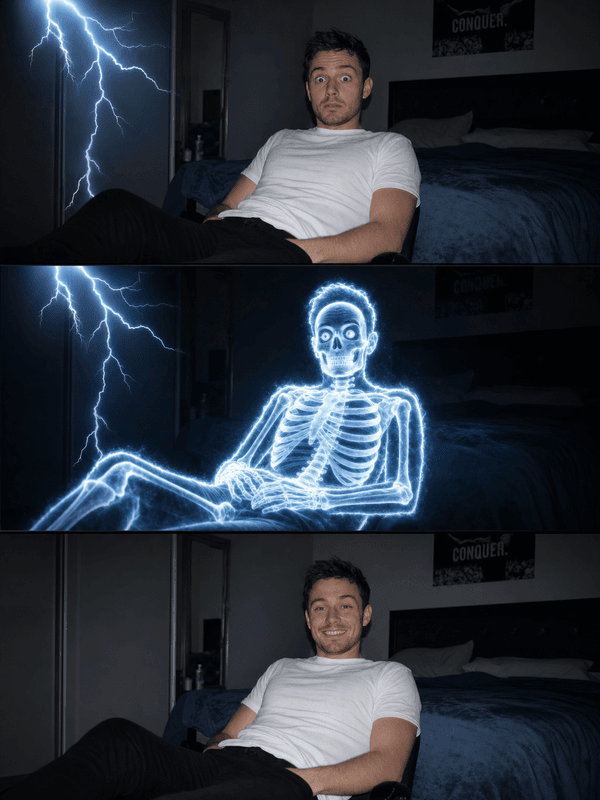
Skeleton Flash alternates between you and your bones. A hard white strobe hits the frame, and for the length of the flash your skin, clothes and hair are replaced by a glowing skeleton in the same pose, down to the hand you are raising and the tilt of the skull. The light drops and you are flesh again. Over the clip the flashes come faster, so the skeleton gets more screen time and the reveal builds instead of repeating. The background stays as filmed, lit by each strobe.
Footage that flashes cleanly
Because the skeleton copies your pose, the clearer the pose, the better the bones. Give the camera your full body and some movement to track.
Full or three-quarter body. Shoulders-only shots still work, but the ribcage, arms and hands are where the effect is most striking.
Move with intent. A dance step, a wave, a point at the camera. Each gesture is echoed by the skeleton on the next flash.
Darker rooms win. The strobe reads brightest against a dim scene, and the bones glow harder.
Where it gets used
Halloween dance videos, beat-synced edits, club and party promos, horror-comedy skits, and the classic cartoon electrocution gag. It also works as a stylised intro for fitness and anatomy content.
How to use it
Open the Skeleton Flash effect in the MagicShot app on your plan.
Upload a short clip with your body in frame and some movement.
Let the AI run the strobe, then download and share.
No x-ray booth, no skeleton suit under your clothes, no frame-by-frame overlay. One upload and the lights do the rest.