What the Shadow Self video effect does
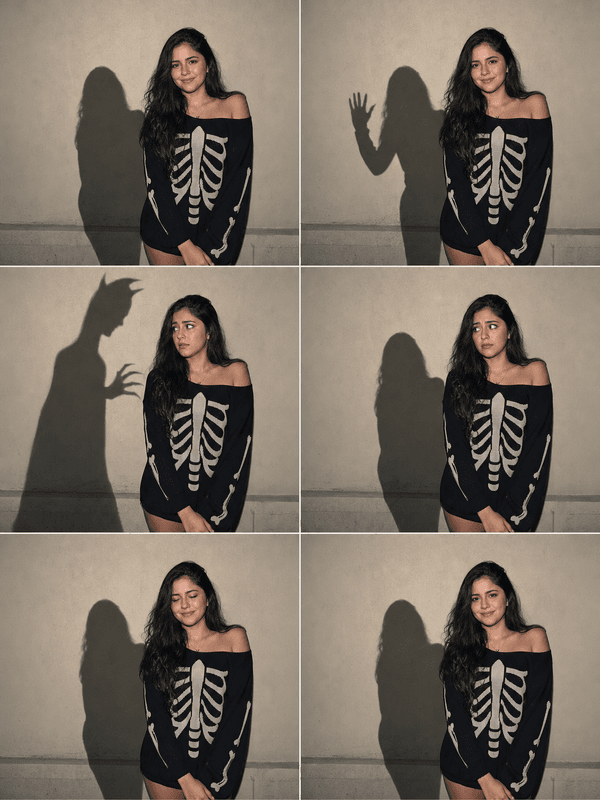
Shadow Self builds a doppelganger out of darkness. It starts as your ordinary cast shadow, then lifts off the floor or wall into a full three-dimensional silhouette with no face and no detail, standing just behind your shoulder. The figure mirrors your motion with a slight delay, turns when you do not, and holds its gaze on the camera. The result is a quiet horror beat rather than a jump scare: nothing explodes, something is simply there that should not be.
Shots that make the shadow land
The effect needs a visible shadow or a dark area to grow from, and room behind you for the figure to stand. A medium shot with a single light source does most of the work.
One light, off to the side. A lamp or window on one side throws a clear shadow the AI can lift off the surface.
Space behind you. Stand a step or two in front of the wall so the figure has depth to occupy.
Small, slow movements. A glance over the shoulder or a slow step forward gives the shadow a moment to react late.
Where people post it
Horror shorts, creepypasta narration, Halloween ambient videos, psychological-thriller edits, and the slow-burn kind of TikTok that rewards watching to the end. It also works as a music-video beat for darker tracks.
How to use it
Open the Shadow Self effect in the MagicShot app on your plan.
Upload a short clip with a clear light source and space behind you.
Let the AI raise the figure, then download and post.
No second actor in a morph suit, no compositing pass, no rotoscoping your own outline for an hour. The shadow does its own standing.