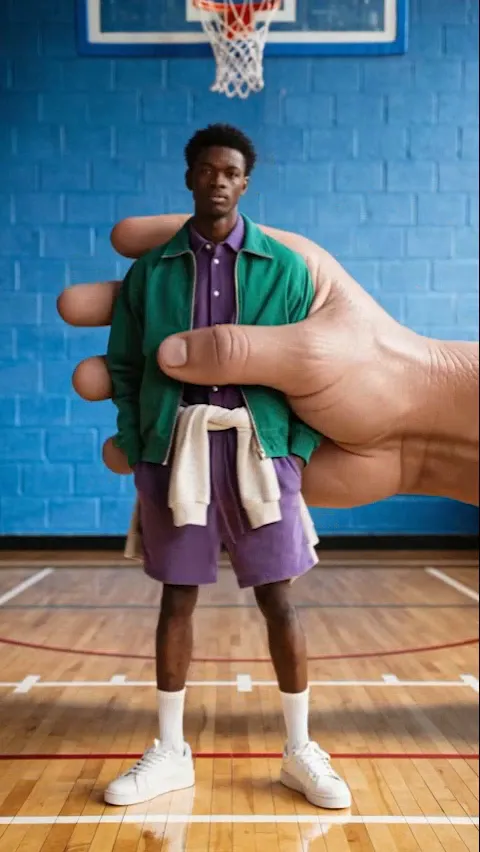
What the Giant Grab video effect does
The Giant Grab video effect takes a normal clip of you standing, walking, or talking to camera, then sends a giant hand in from the edge of frame to close around you and pull you straight up out of the shot. MagicShot's AI reads the depth and lighting of your footage, so the fingers pass in front of and behind you correctly and the scene you leave behind stays put. You get the punchline of a big-budget VFX gag without a compositor, a green screen, or a second take.
The clips it works best on
Feed the AI Giant Grab generator footage where your whole body is visible and there is room around you for the hand to move. A few source clips that land well:
A static, locked-off shot of you standing on a sidewalk, in a parking lot, or in front of a plain wall.
A walk-and-talk that gets cut short mid-sentence, which makes the grab feel like an interruption.
Two people in frame, so only one of you gets taken and the other is left staring.
Outdoor daylight footage, where the hand's shadow has something obvious to fall on.
Where creators post it
It is built for the scroll: TikTok transitions, Reels skits, YouTube Shorts cold opens, and any video that needs a hard exit instead of a fade. Pair it with a sudden audio cut and the gag does most of the work for you.
Using it in MagicShot
Giant Grab is one of the AI video effects inside the MagicShot app, available on a paid plan. Upload your clip, apply the effect, and download the finished video when the render is done. No editing timeline, no keyframes, no plugin to install.