What the Bat Burst video effect does
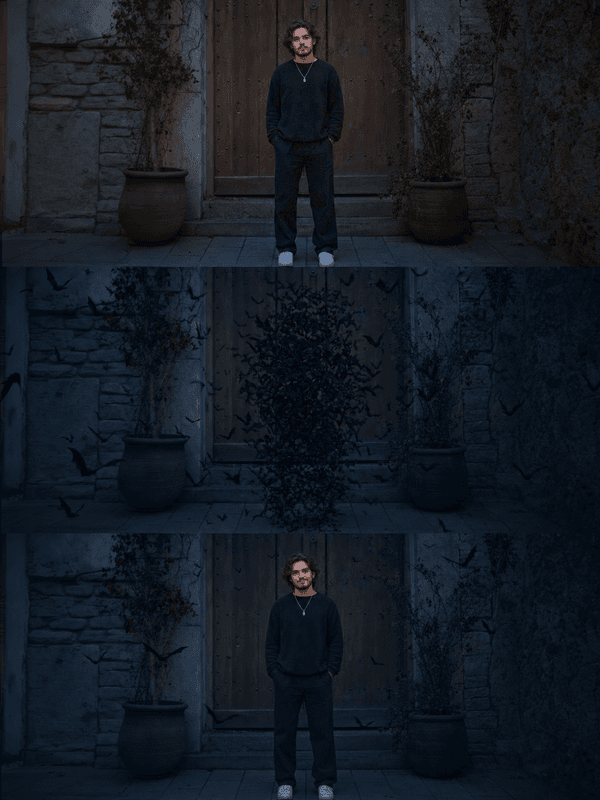
Bat Burst drops a full swarm into your footage in one hit. The bats erupt from a point behind your head or shoulders, surge toward the camera in a dense black cloud with wingbeats and motion blur, then break apart and fly out of frame on all sides. Lighting and shadow on the bats match your clip, so they look like they were in the room rather than pasted on top. It finishes with you still standing there and the frame empty again.
Footage that gives the swarm room
The effect reads the space around you to route the swarm, so a frame with some background depth gives the bats a believable flight path.
Medium or wide framing. Leave room above and beside you. A tight close-up gives the swarm nowhere to go but straight into the lens.
Hold your position. Standing still or turning slowly keeps the burst anchored to you as its source point.
Dark or dusky backgrounds. The bats read best against a darker scene, though they still work in daylight with a bit more contrast.
Where it shows up
Halloween intros, vampire and gothic edits, haunted-house promos, metal and goth music clips, and dramatic entrances for Reels. It is also a fast way to add a beat drop or transition to a video that needs a jolt in the middle.
How to use it
Open the Bat Burst effect in the MagicShot app on your plan.
Upload a short clip with you framed medium or wide.
Let the AI release the swarm, then download and share.
No bat sanctuary, no CGI flock to animate, no particle system to tune at midnight. One upload and the colony clears your frame on its own.