What the Bandage Wrap video effect does
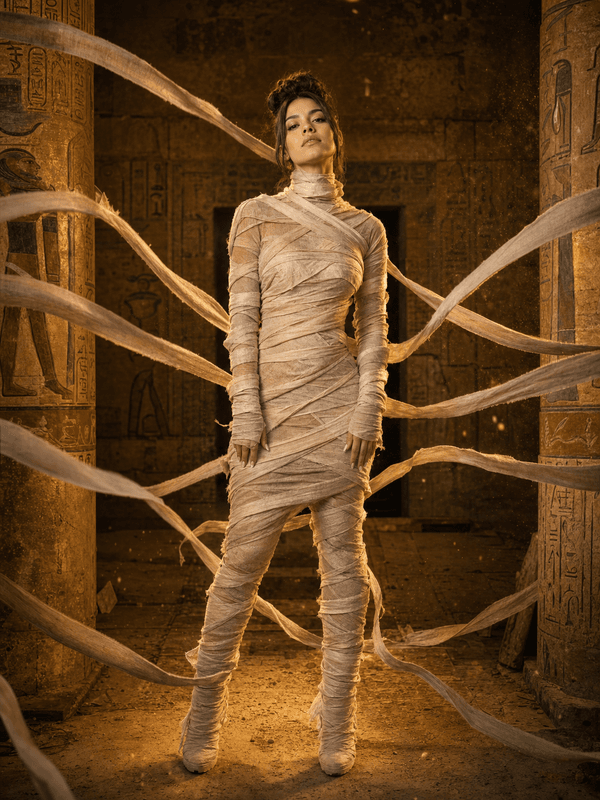
Bandage Wrap runs a mummification on camera. Strips of yellowed gauze appear at the hands and shoulders, cross over the torso, climb the neck and finish across the forehead and jaw, leaving a gap at the eyes. The wrapping follows your limbs through the clip, with frayed ends drifting as you move and dust settling into the folds. It finishes as a tomb-ready silhouette that still moves like you.
What to film
The effect builds around the body, so it wants a frame that shows it. A waist-up or full-body clip with you facing the lens and moving slowly gives the linen somewhere to wrap.
Arms slightly away from the body. A small gap at the elbows lets the strips wind around each arm separately instead of merging into one block.
Fitted clothing. Puffer jackets and loose layers blur the body outline the wrap is tracing.
Slow, deliberate motion. A gentle sway or reach toward the camera shows the bandages reacting without tearing the effect apart.
Where it gets used
Halloween transitions, museum and history content, horror skits, costume-party invites, and the classic rise-from-the-sarcophagus gag for Reels and TikTok. It also works as a reveal for tomb, Egypt or treasure-hunt themed videos.
How to use it
Open the Bandage Wrap effect in the MagicShot app on your plan.
Upload a short clip showing at least your upper body in good light.
Let the AI wrap you, then download and share.
Forty metres of gauze and a patient friend, or one upload. Either way you end up wrapped, only one of them lets you sit down afterwards.