

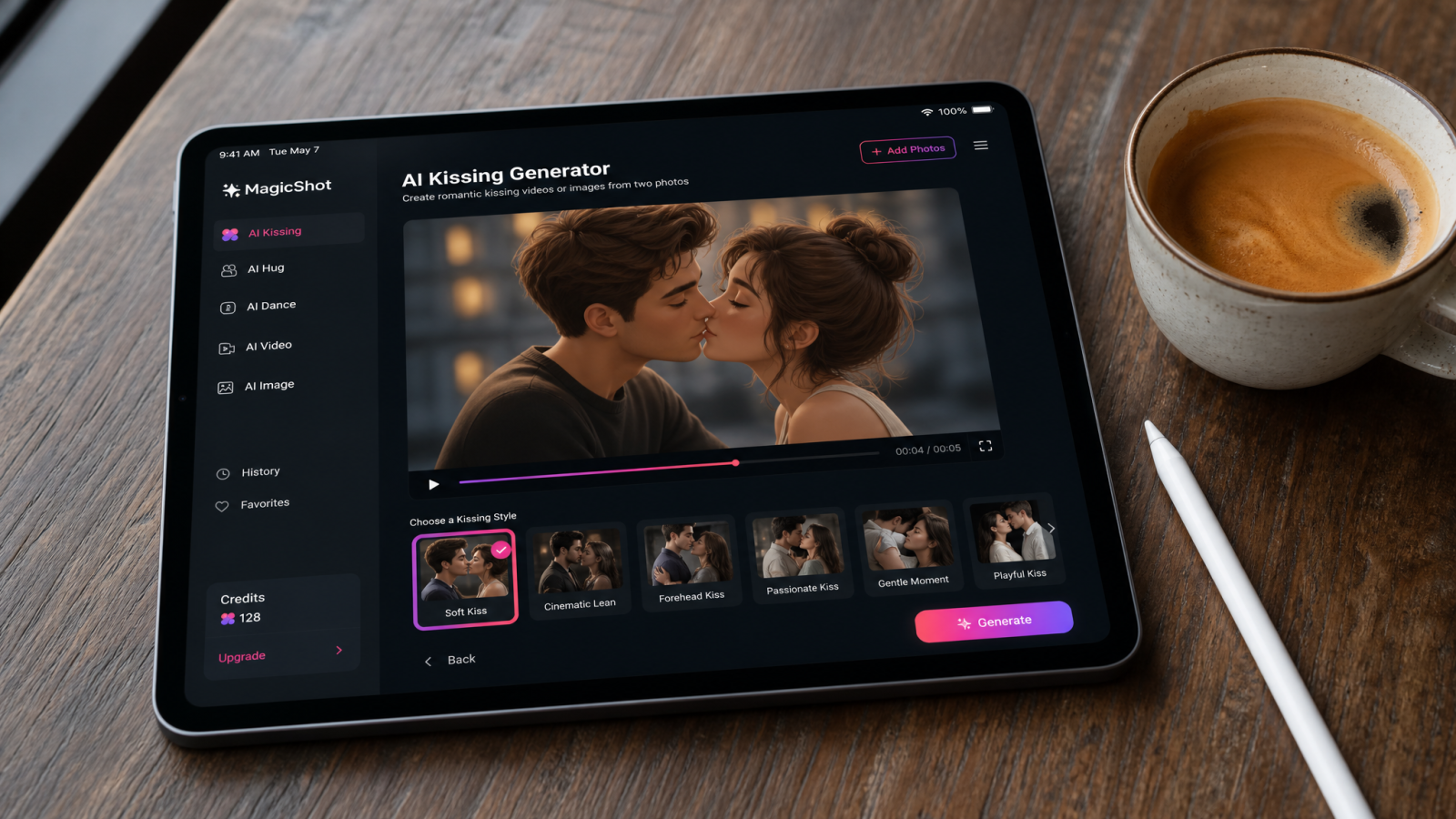
Two photos in, one kiss video out. That's the entire pitch behind the AI kissing generator trend that's been flooding TikTok, Instagram Reels, and couples' group chats for the past few months. No photographer, no second date awkwardly staged for the camera, no film crew standing three feet away while you try to look natural. Just an upload, a few seconds of processing, and a short clip of two people leaning in. It's one of the more specific, and honestly stranger, applications of artificial intelligence kiss technology to break out of research demos and into everyday social feeds.
This piece breaks down what an AI kissing generator actually does, why the format exploded this year, how MagicShot's AI Video Effects Generator handles the motion realistically, and what to know before you try it yourself.
Quick answer: an AI kissing generator uploads two photos of faces and uses image-to-video technology to animate the motion between them, producing a short clip that looks like the two people are leaning in for a kiss. No filming, no actors, no editing timeline required.
What Is an AI Kissing Generator?
An AI kissing generator is a tool that takes two photos, usually close-up shots of two faces, and animates them into a short video where the subjects lean in and kiss. It's a specific application of image-to-video technology: the same underlying tech that turns a still picture into motion is trained and tuned to handle the particular movement of two faces coming together, tilting, and connecting.
Instead of filming a real scene, the model predicts frame-by-frame motion between two static images. Feed it a lip to lip kiss photo setup, or even two separate portraits, and it fills in everything in between: the head tilt, the eye close, the slight blur of movement. That's the difference between a static kissing photo and an actual kissing ai video that plays like a short clip from a film rather than a slideshow with a transition effect.
Why the AI Kiss Video Trend Took Off
A few things collided at once. Short-form video platforms reward anything with an emotional hook, and a couple kissing is about as universal as content gets. Long-distance couples started using kiss generators to create a moment they physically couldn't film together in person. Wedding and engagement accounts started turning still photos into short "first kiss" style clips to tease a full gallery before it's delivered. And meme culture got involved too, with people feeding in old movie stills, cartoon characters, even pet photos, just to see what an AI kiss video generator would produce with something it was never trained to expect.
The other driver is simple accessibility. You don't need two people in the same room, a tripod, or a reason to explain why you're filming a kiss scene. You need two photos and a few minutes, which is a very different bar than booking a videographer or scheduling a reshoot because the first take looked stiff.
What an AI Kissing Generator Actually Replaces
It's worth naming what this tool is standing in for, because that's the actual value. Before this category existed, getting a short romantic video clip meant one of a few things: hiring a videographer for a mini engagement shoot, asking two people to awkwardly perform a kiss on camera for a scripted ad, or manually splicing together two photos in an editor and hoping a crossfade looked convincing. None of those are quick, and the last one rarely looks like real motion.
An ai kiss generator skips all of that. There's no crew to coordinate, no multiple takes because someone laughed or blinked, and no editing timeline to fight with. You're trading a shoot that could take an afternoon for a process that takes minutes, using photos you likely already have.
How MagicShot Handles Realistic Kissing Motion
The hard part of any AI kiss generator isn't detecting faces, it's making the in-between motion look believable. A realistic french kissing face requires natural head rotation, correct occlusion (one face partially covering the other as they get close), and timing that doesn't feel rushed or robotic. MagicShot's AI Video Effects Generator is built around exactly this kind of templated motion effect, where you pick a preset animation style and apply it to your own uploaded photos rather than starting from a blank prompt and hoping for the best.
Under the hood, this sits alongside MagicShot's broader Image to Video tool, which handles the general job of animating a still picture into motion. The kissing effect is a more specific, pre-tuned version of that same technology, optimized for close-up facial movement rather than wide scenes or landscapes, which is why it holds up better on faces than a general-purpose animator would.
How to Turn Two Photos Into a Kiss Video
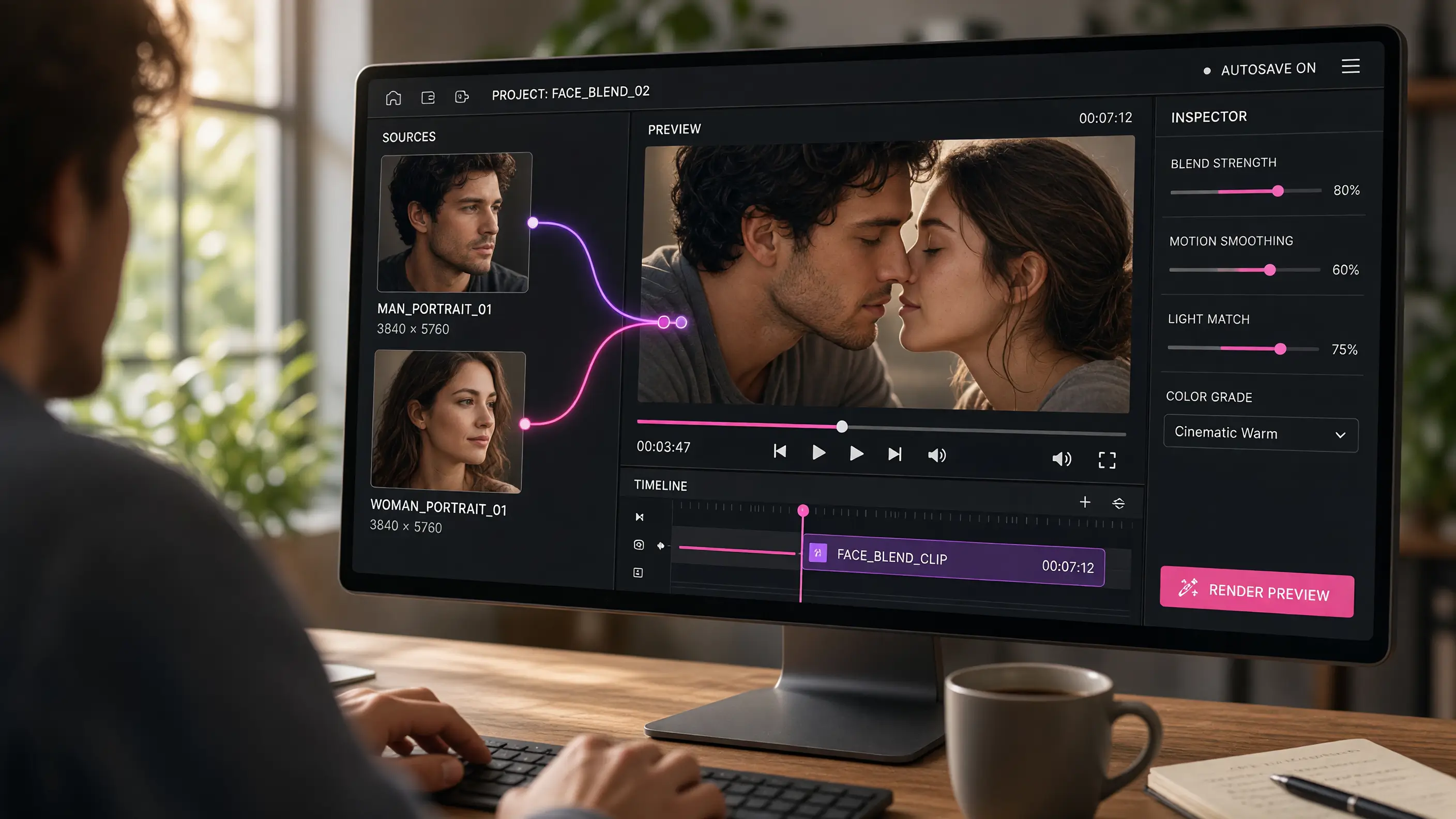
The workflow behind most AI kiss video generators, MagicShot included, follows the same basic pattern:
Upload two clear photos. Front-facing shots with good lighting work best. Two people, two pets, even two illustrated characters can work, since the model is mainly reading facial position and angle.
Pick the kissing effect. Choose the preset animation from the effects library rather than writing a prompt from scratch, so you know roughly what motion style you're getting before you generate anything.
Generate and download. The tool renders the motion between the two images and outputs a short video clip, ready to post or share directly.
Creative Ways People Are Using AI Kiss Generators
Once you look past the novelty angle, there are a handful of genuinely practical uses stacking up:
Couple content for social media. An ai couple photo turned into a short clip performs differently than a static post, and plenty of couples are using it for anniversaries or "how we met" style Reels instead of another static carousel.
Wedding and engagement teasers. Photographers are experimenting with turning a still engagement shoot into a short animated teaser before the full gallery is edited and delivered.
Dating profile content. Some users are pairing this with animated profile shots, though for the actual profile photos themselves, MagicShot's Dating Profile Photos tool is the better starting point for the still images.
Fictional and fan content. Fans have fed in stills from favorite shows and movies just to see two characters interact in a way the source material never actually showed.
Pet content, purely for fun. Yes, people really do upload two pet photos to see what happens, lions included. If you want a more polished version of that idea, MagicShot's Pet Portraits tool is built specifically for turning pet photos into professional-looking shots.
Other AI Kissing Tools You Might Have Seen
The category has grown fast enough that several names now show up in searches alongside MagicShot: Vidu, Pollo AI, Fotor, Vidnoz, Dreamface, Clipfly, Easemate, and Deevid have all released some version of an AI kissing video generator. Each one approaches the same basic problem, two photos to one motion clip, with its own interface and preset library. If you're comparing options, the thing worth testing isn't the marketing page, it's whether the output actually looks like natural motion or a warped, uncanny blend once you slow the clip down.
Getting a Believable Result: Photo Quality Matters
The single biggest factor in output quality isn't the tool, it's the input photo. A blurry, low-resolution, or oddly angled picture kiss will produce a blurry, warped kiss video, no matter how good the underlying model is. A few things that consistently improve results:
Use forward-facing photos. Extreme side angles confuse the model's read on where the mouth and jawline actually sit.
Start with sharp source images. If your original photo is low-res or slightly soft, running it through Image Upscaler first can noticeably clean up the fine detail the animation relies on.
Clear the background if it's distracting. A cluttered background won't ruin the kiss motion itself, but it will pull focus in the final clip, so a quick pass through Background Remover can help if you want a cleaner frame.
Match lighting between the two photos. Two faces lit completely differently (one warm indoor light, one harsh flash) will look stitched together instead of blended.
Keep both faces roughly the same size in frame. A close-up next to a full-body shot forces the model to guess proportions, which shows up as warping around the mouth and chin.
Using AI Kissing Generators Responsibly
Worth saying plainly: an AI kissing generator is meant for photos you have permission to use, your own, your partner's, a couple who's asked you to make something for them. Using someone else's likeness, especially a public figure or a photo of a stranger pulled from the internet, without their consent isn't what these tools are for and isn't something MagicShot supports. If you've seen odd viral claims about celebrities or fictional scenes generated this way, treat them the same way you'd treat any unverified clip online: skeptically, and without assuming it's real.
Used the way it's intended, on your own photos or with clear consent, an ai kiss generator is a low-effort way to add motion to a moment that would otherwise just sit as a still photo in a camera roll.
Where This Fits Into a Bigger Content Toolkit
The kissing effect is one preset inside a much larger library. The same AI Video Effects Generator that powers it also handles dozens of other motion styles, so once you've made one clip, it's worth browsing the rest of the effects rather than treating this as a one-off gimmick. Pair it with tools like the upscaler or background remover beforehand, and the difference between a rough test clip and something you'd actually post starts to show.
The trend isn't slowing down, and it's not hard to see why. A kissing photo is a memory frozen in one frame. A kissing ai video adds the seconds before and after, which is usually the part people actually remember.