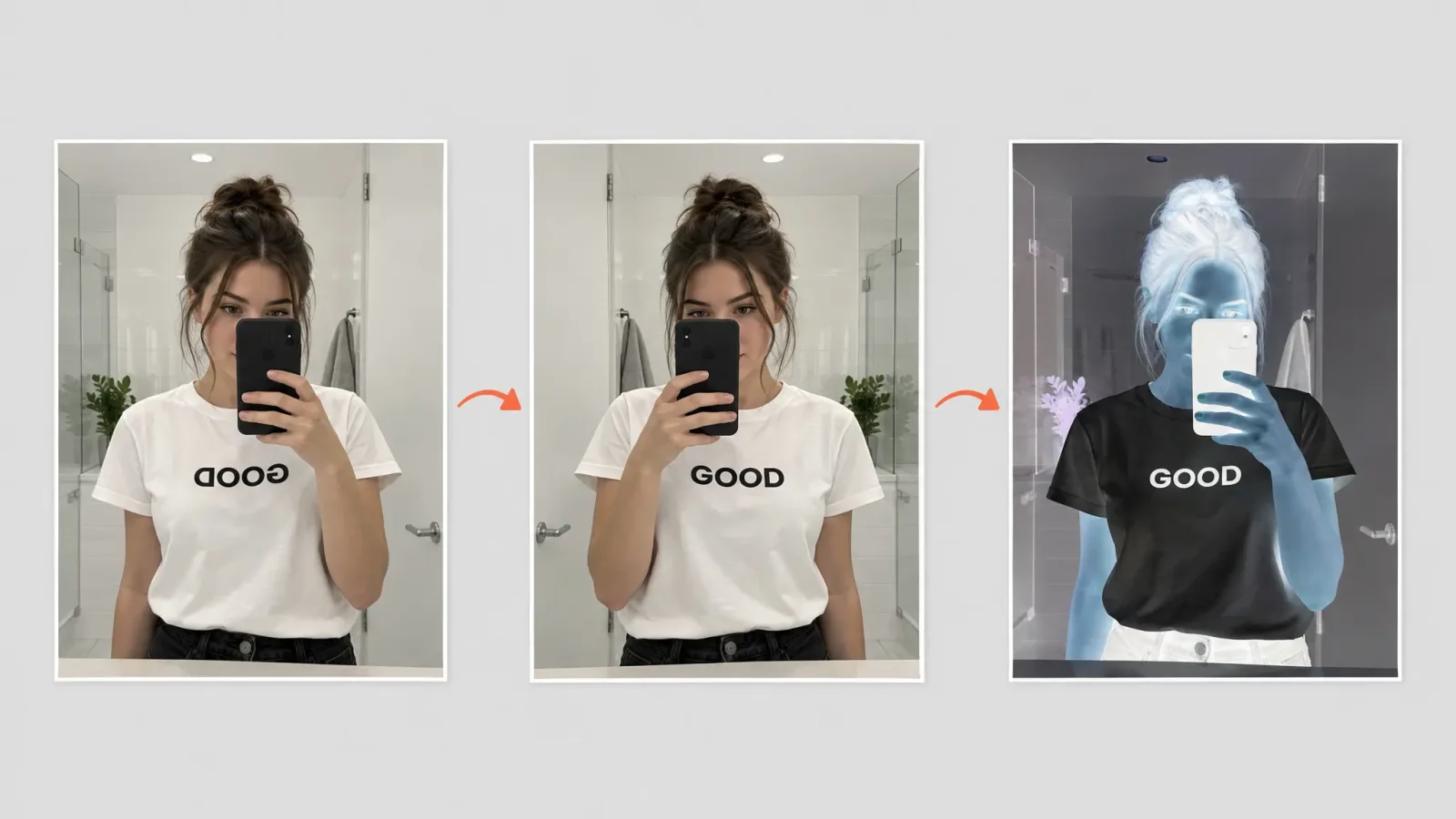
You took a mirror selfie, and the text on your T-shirt reads backwards. Or you want that stark negative look for a poster. Both are one-click edits, and they solve different problems: a flip fixes orientation, an invert changes colour for effect. Here is what each does, when to use it, and the one thing people get wrong about quality.
Fixing a backwards mirror image
A mirror shows you the world flipped left to right, and a photo of a mirror keeps that reversal. Any text on clothing, a bag, a sign or a poster in the frame reads backwards. Flipping the picture horizontally in the image editor puts it right again. It is a single step, and it does not change anything else in the picture.
Two cautions. First, a flip also reverses you. Your parting, a mole or a watch will swap sides, and you may look slightly different from how people actually see you. Second, if the text only matters in one small spot, consider whether you want to flip the whole image at all.
Front cameras on some phones save selfies mirrored by default, and many let you turn this off in the camera settings. Check yours if you often end up with reversed text.
What colour inversion does
Inverting swaps each colour for its opposite. Light becomes dark, dark becomes light, and each hue shifts to its complement, so blue turns orange and green turns magenta. The result looks like a photographic negative.
It is a style effect, not a repair. If a photo is too dark, too warm or faded, inverting makes it look strange, not better. For that, use the enhance and quick-fix tools in the image editor.
Where inversion is actually useful
Scanned film negatives. Inverting a scan of a negative gives you a rough positive to work from, though colour film needs extra correction because of its orange base.
Posters and album-art looks. A high-contrast negative portrait is a classic graphic style.
Dark-mode versions. Inverting a black-on-white screenshot or diagram gives a quick light-on-dark version.
Spotting detail. Inverting can make faint marks or text easier to see in a pale scan.
Accessibility checks. It helps you see how much a design relies on contrast.
Flipping only part of a photo
Flipping the whole picture is easy. Flipping one element, like a logo on a bag, is a more targeted edit that works best when you isolate the element first. That is similar to the workflow for removing text from a photo or screenshot.
Do these edits affect quality?
A flip or an invert does not blur or shrink a picture. The pixels are rearranged or recoloured, not resampled. The thing that can cost you quality is saving: each time you export as a JPEG, the file is compressed again, so doing several edits and re-saving after each one adds up. Work from the original, make all your edits, and export once. PNG avoids this loss if file size is not a concern.
Which one do you need?
Text or a sign reads backwards: flip horizontally.
You want a negative or dark-mode look: invert.
The photo's colours or brightness look wrong: neither. Use correction tools.