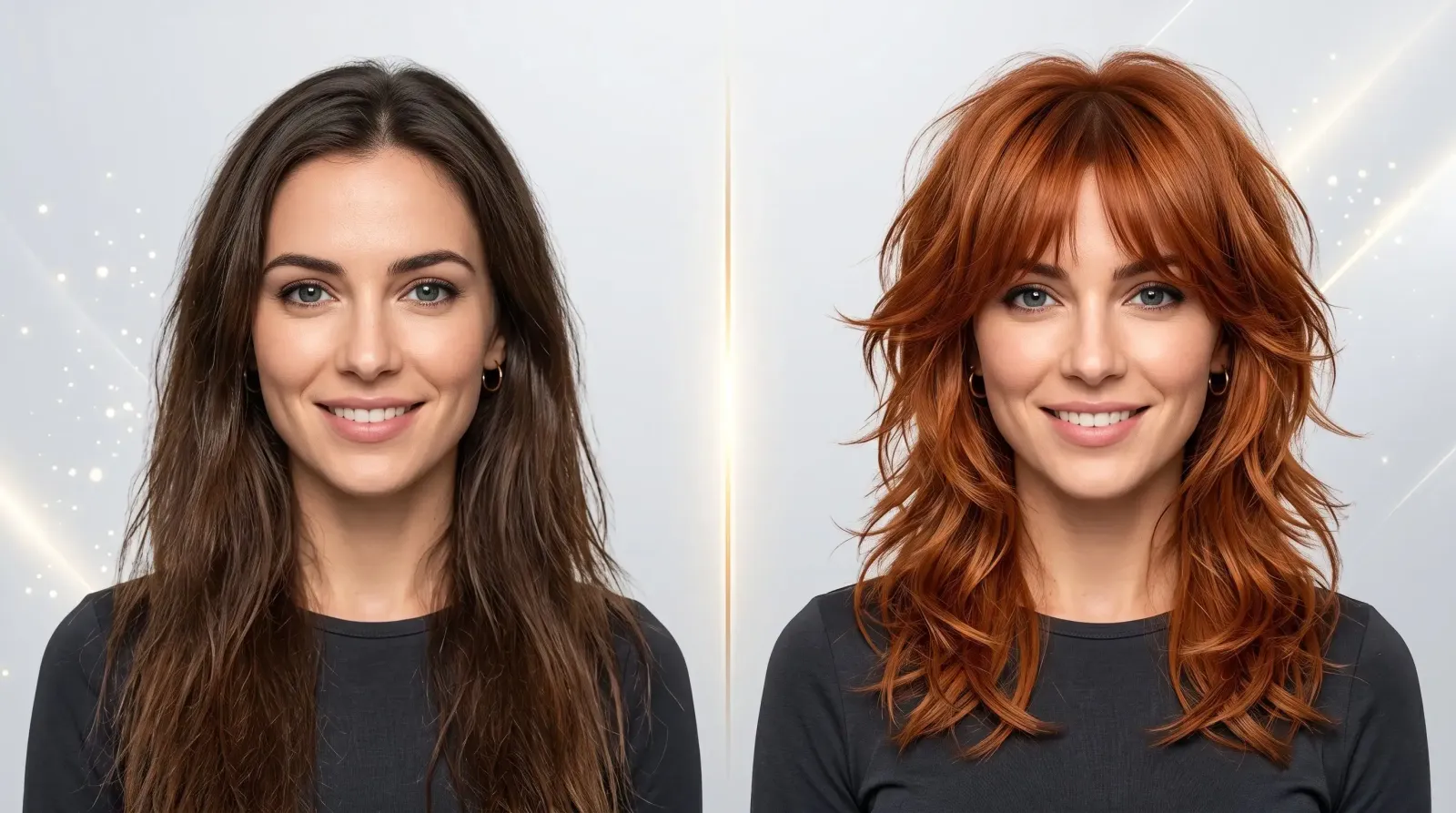
You sit in the salon chair, describe the cut you want, and forty minutes later you are staring at a mirror wondering what just happened. Almost everyone has lived some version of that moment. The good news: you no longer have to gamble. An AI hairstyle changer lets you test a wolf cut, a copper bob, or a platinum pixie on your own face before a single strand is touched. Upload one clear photo, choose a style and a color, and see the result in seconds.
What makes the MagicShot AI hairstyle changer stand out is that it handles the haircut and the hair color together in a single generation. Instead of picking a shape first and guessing at the shade later, you preview the finished look the way it will actually appear on you.
What is an AI hairstyle changer?
An AI hairstyle changer is an online tool that edits a photo of your face to show you wearing a different haircut and hair color. It uses facial mapping to fit the new style to your head shape, hairline, and lighting, producing a realistic preview. You upload a photo, select a style and color, and download the result, no scissors, no dye, and no commitment required.
Think of it as a dressing room for your hair. In the past, the only ways to imagine a big change were flipping through a magazine, holding a photo up to the mirror, or trusting your stylist's imagination. Those methods leave a lot to guesswork, because none of them show the style on your features. A generation tool closes that gap by rendering the look on your actual face, which is why so many people now run a quick preview before every appointment.
How to use the MagicShot AI hairstyle changer in 3 steps
The process is fast and beginner-friendly. You do not need any editing skills.
Upload a clear, front-facing photo. A straight-on selfie in good, even lighting works best. Make sure your full hairline and forehead are visible.
Pick your style and color. Choose a haircut, say a lob or a low taper fade, and pair it with a shade like balayage or auburn in the same step.
Preview and download. Review your new look, tweak the style or color if you want to compare options, and save the version you love.
Photo tips for the most realistic results
Use natural or soft light with no harsh shadows across your face.
Face the camera directly so both sides of your face are visible.
Skip hats, sunglasses, and heavy filters that hide your hairline.
Pull loose hair away from your face so the tool can map the new style cleanly.
Hairstyle and hair color in one tool, the MagicShot difference
Most virtual try-on tools force you to work in two passes: change the cut, then start over to change the color. That makes it hard to judge the real result, because a shape can look completely different once the shade changes. A textured crop reads one way in your natural brown and another entirely in ash blonde.
MagicShot solves this by generating the cut and color together. Want to know how a copper bob or a platinum pixie would actually sit on your face? You see it as one finished image. That single-pass approach also doubles as an AI hair color changer, so if you only want to change hair color online, keeping your current cut and simply testing burgundy or rose gold, you can do that too. It is a genuine virtual hair color try-on rolled into the same tool.
Here is why that matters in practice. Imagine you are drawn to a shag cut and also curious about going honey blonde. Preview them separately and you end up judging a brunette shag against a blonde version of your current style, neither of which is the look you would actually walk out with. See them combined and the decision becomes obvious: the layers might read soft and modern in blonde, or heavy and dark in your natural shade. One image answers two questions at once, and it saves you from the classic mistake of loving a shape in one color and hating it in another.
Trending hairstyles to try in 2026
Not sure where to start? Here are the cuts people are searching for and screenshotting most, split by what tends to suit women and men, though every style is worth testing on your own face regardless.
For women
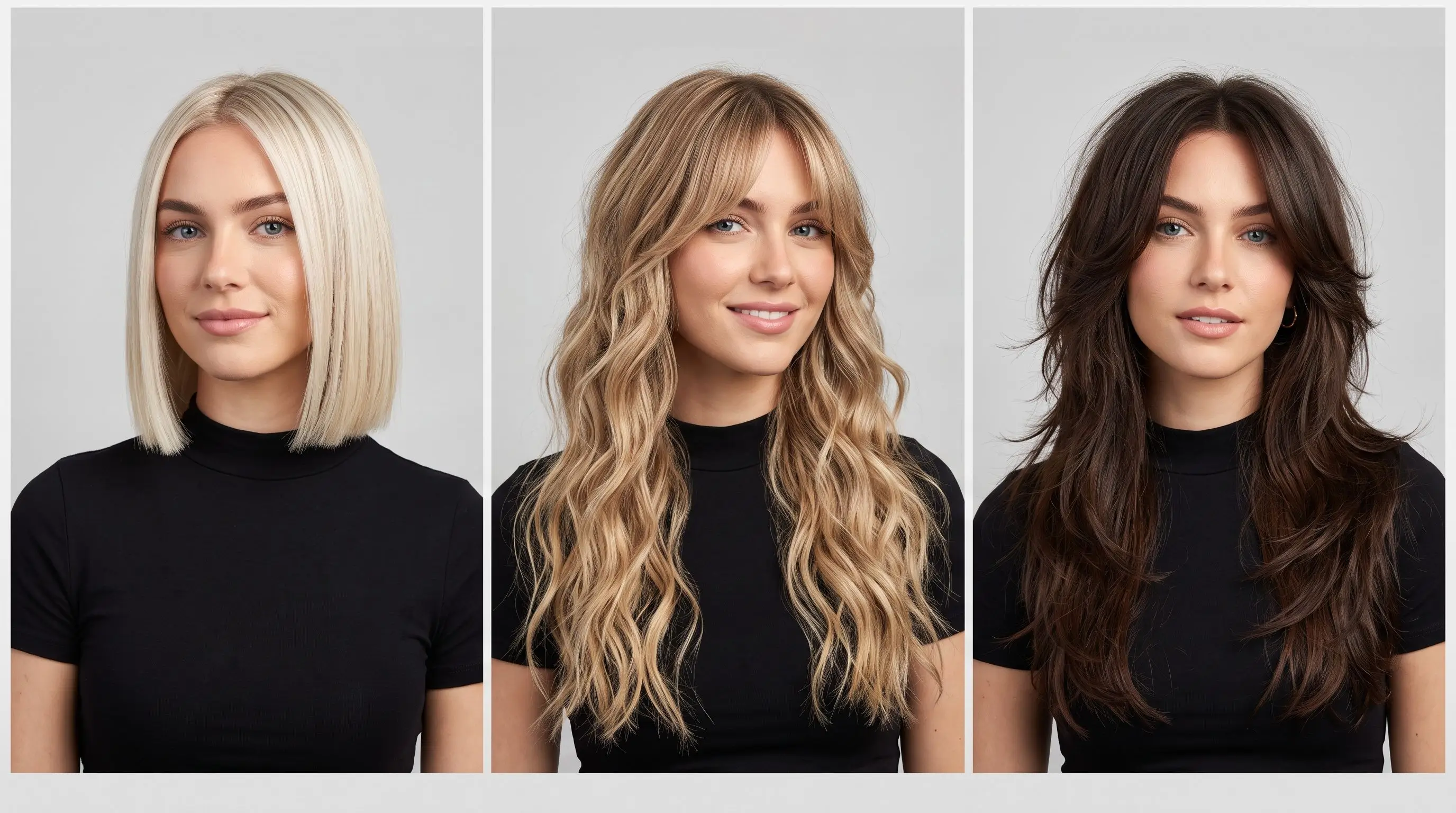
Wolf cut: shaggy, layered, and effortlessly edgy.
Butterfly cut: face-framing layers with plenty of volume.
Curtain bangs: soft, parted fringe that flatters most face shapes.
Bob and lob: the timeless short and long-bob combo.
Beach waves and layers: relaxed texture for everyday wear.
Box braids: protective, versatile, and endlessly stylable.
For men
Low taper fade: clean, modern, and low-maintenance.
Textured crop: short on the sides with tousled length on top.
French crop: a sharp, structured take on the crop.
Korean perm: soft waves that add height and volume.
Trending hair colors to preview
Color is where a preview earns its keep, because a shade that looks incredible on a phone screen may not flatter your skin tone. Test a few before you book. Popular picks worth trying:
Balayage and ombre: gradual, sun-kissed dimension.
Copper and auburn: warm, rich reds that pop.
Money piece: bright face-framing highlights.
Burgundy: a bold favorite, especially popular across India.
Platinum and ash blonde: cool, high-contrast statements.
Rose gold and pastels: playful, creative shades for the adventurous.
Color previews are especially valuable for lightening. Going several shades brighter is a bigger commitment than any cut because it is harder to reverse and often needs multiple salon sessions. Seeing platinum or ash blonde against your skin tone first can spare you an expensive change of heart halfway through the process.
Why a preview beats salon regret
Regret after a haircut is common for a reason: a change happens in minutes but lives with you for months. Growing out a too-short pixie, correcting a botched color, or simply waiting for a fringe to blend back in can take a long, awkward stretch. That pressure is exactly what makes people hesitate in the chair and default to "just a trim."
A realistic preview removes the guesswork before any of that happens. When you can see a look on your own face, three things change. First, your expectations get grounded in reality instead of a model's photo. Second, you can compare options side by side and rule out the ones that do not work for you. Third, you walk into the salon with a clear reference, which makes the conversation with your stylist far more productive. The result is fewer surprises and a much higher chance of loving what you get.
Getting the most out of the tool
Once you are comfortable with the basics, a few habits will sharpen your results:
Test in batches. Generate three or four variations of the same idea, for example a lob in balayage, copper, and burgundy, then compare them together.
Preview seasonal shifts. Cool tones like ash blonde and platinum often feel right in winter, while warm coppers and honey shades suit summer. Try both before you decide.
Mind the commitment level. Use the preview to weigh maintenance: a money piece is easier to grow out than an all-over platinum, and a low taper fade needs more frequent upkeep than a textured crop.
Save your favorites. Download the versions you like so you have a reference on your phone for the salon.
How to know what hairstyle suits your face shape
The most common question before any big change is simple: what hairstyle suits me? The honest answer is that the best way to know is to try it, which is exactly what a preview tool is for. Still, face shape is a helpful starting point. Here is a quick guide to what tends to work.
Round face: Add height and length to lengthen the look. Try a long bob, layers, or a pompadour or quiff for men.
Oval face: The most flexible shape, most cuts work. Curtain bangs, a blunt bob, or a textured crop all flatter.
Square face: Soften the jaw with waves or side-swept layers. A shag or soft, tousled crop balances strong angles.
Heart face: Balance a wider forehead with a chin-length lob or curtain bangs; men can try a fuller fringe.
Long face: Add width and avoid too much height. Waves, a blunt lob, or bangs help create balance.
Use these as a launch point, then confirm with a real preview. Seeing the actual result on your face beats any general rule.
Face shape is only part of the story, too. Hair texture, density, and your natural growth pattern all shape how a cut behaves. Fine, straight hair holds a blunt bob crisply, while thick, wavy hair may want more layering to avoid looking bulky. Curly and coily textures often shine in styles built around their natural volume rather than fighting it. A preview helps here as well, since you can see whether a shape flatters your combination of face shape and texture rather than an idealized version of it.
When to use a hairstyle preview tool
A hairstyle preview is useful in more situations than you might expect:
Pre-salon confidence. Walk in knowing what you want instead of hoping for the best.
A reference for your stylist. Show your hairdresser exactly the cut and shade you mean, pictures beat descriptions.
Content creators and influencers. Test dramatic looks for a shoot or a post without touching your real hair.
Weddings and big events. Plan your look ahead of time; pair it with the MagicShot wedding photo tools to visualize the full moment.
A fresh profile photo. Trying a new hairstyle for a LinkedIn photo or a dating profile? Preview it, then refine the shot with the Professional Headshots and Face Enhancer tools.
You can also carry your new look into other MagicShot tools, build a stylized Avatar or fine-tune the final image in image editing.
Ready to see your next look?
A haircut and color change should feel exciting, not risky. With the MagicShot AI hairstyle changer you can test dozens of cuts and shades on your own photo, together, in one shot, until you find the one that feels like you. Open the AI hairstyle changer and preview your new look now.