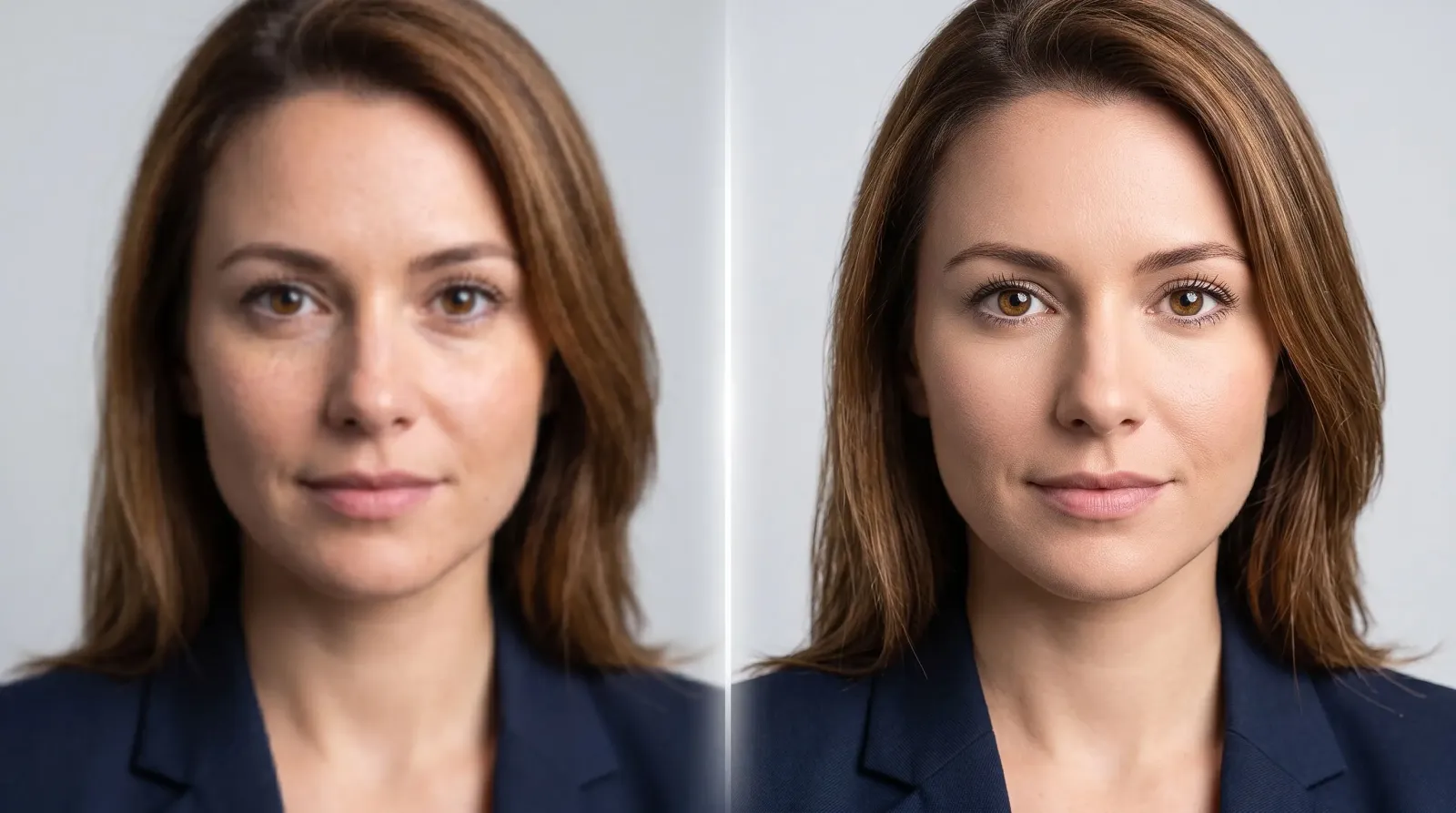
A great photo can be ruined by one thing: a soft, blurry, or grainy face. Maybe the lighting was bad, the camera missed focus, or you zoomed in too far and the pixels fell apart. An AI face enhancer fixes exactly that problem. It uses machine learning to rebuild facial detail, eyes, skin texture, hair strands, and edges, so a face that looked mushy suddenly looks crisp and natural. In this guide you'll learn what these tools do, how to use one, who benefits most, and how to get results that still look like you.
What is an AI face enhancer?
An AI face enhancer is a tool that analyzes the face in a photo and reconstructs missing or degraded detail using a model trained on millions of real faces. Instead of simply sharpening the whole image (which just amplifies noise), it recognizes facial features and intelligently restores them. The result is a clearer, higher-resolution face with realistic skin, defined eyes, and clean edges.
Think of it as the difference between turning up the "sharpness" slider and having an expert retoucher rebuild the face pixel by pixel. Traditional sharpening guesses at contrast; an AI model actually understands what a nose, iris, or eyelash should look like and fills in the gaps accordingly.
What it fixes best
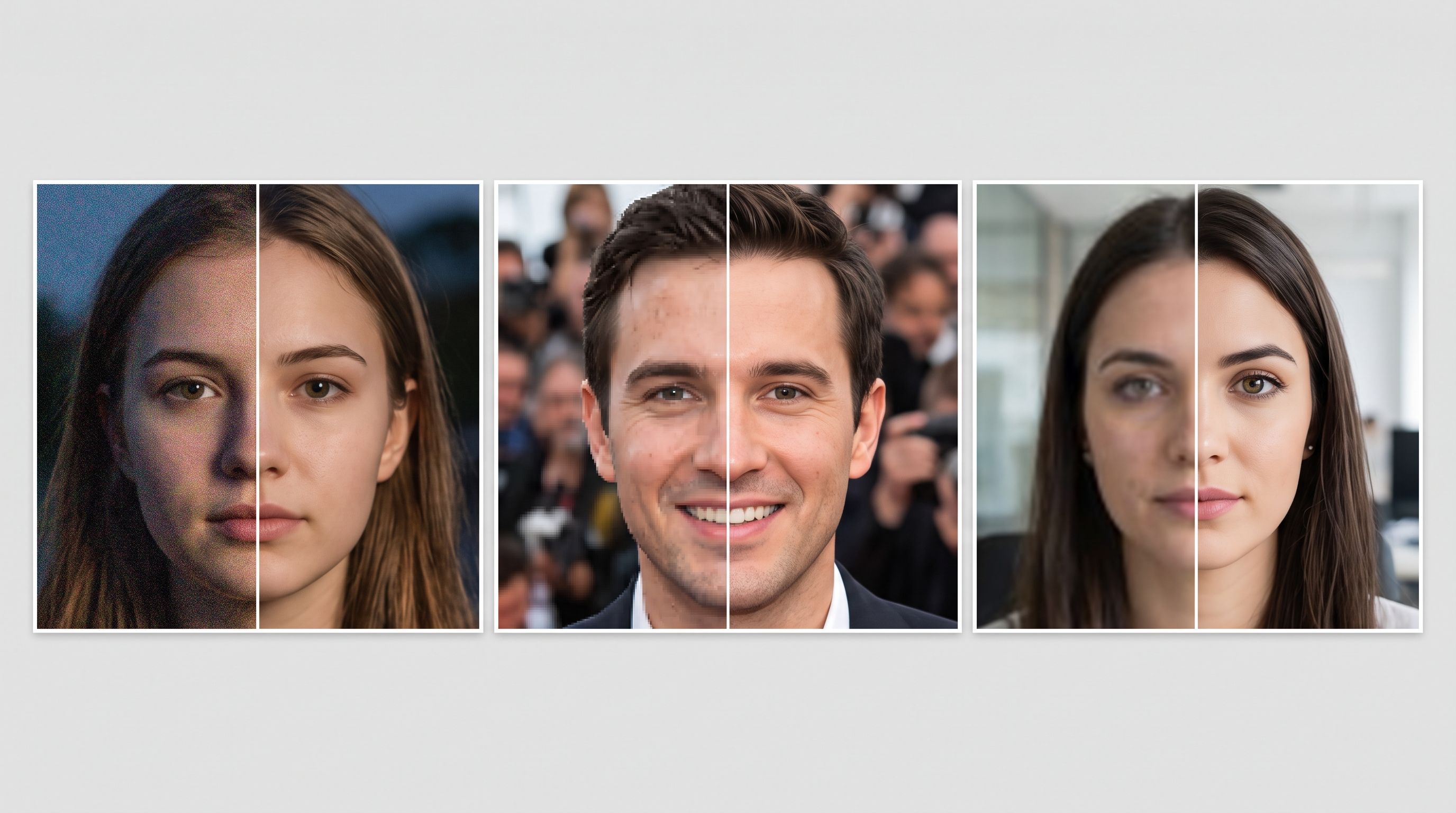
Blur and softness from missed focus or camera shake.
Low resolution in cropped, zoomed, or old thumbnail-sized images.
Compression artifacts from screenshots, messaging apps, and social re-uploads.
Grain and noise from low-light or high-ISO shots.
Faded detail in scanned or aged photographs.
How does an AI face enhancer actually work?
Under the hood, most modern enhancers rely on deep neural networks trained on huge datasets of faces at every quality level. During training, the model sees clean, high-resolution portraits alongside deliberately degraded versions of the same images. Over millions of examples, it learns the relationship between "damaged" and "clean" how a blurry iris should resolve, how compressed skin should recover texture, how a soft jawline should sharpen.
When you upload a photo, the tool detects the face, analyzes the degraded regions, and predicts what the missing detail most likely looked like. This is why the results feel so natural compared to old-school sharpening: the model isn't guessing at contrast, it's drawing on a learned understanding of human faces. It knows eyelashes come in fine strands, that skin has pores, and that eyes have catchlights, so it rebuilds those features rather than just boosting edges.
The trade-off to understand is that these predictions are probabilistic. The AI reconstructs what a face probably looks like based on patterns, which is why identity preservation and a light touch matter, especially on faces that start out very small or heavily blurred.
How to use an AI face enhancer (step by step)
If you've ever wondered how to enhance a face without spending an afternoon in complicated editing software, the process is refreshingly simple. Here's the workflow most people follow with the MagicShot Face Enhancer:
Upload your photo. Choose a clear source file, even a low-quality one works, but avoid heavily filtered images if you want a natural finish.
Let the AI detect the face. The model automatically locates facial features and maps where detail needs to be rebuilt.
Apply the enhancement. In seconds, the tool sharpens the face, smooths uneven skin, and restores fine detail.
Compare and adjust. Review the before-and-after so the result still looks like the real person, not an over-smoothed avatar.
Download in high resolution. Export the finished image and use it wherever you need a crisp face.
The whole thing takes less time than it took to read those steps. That speed is the main reason an AI face enhancer has replaced manual retouching for everyday photos.
Who should use an AI face enhancer?
Practically anyone who publishes photos of people benefits, but a few groups get outsized value:
Professionals and job seekers
A sharp, well-lit face reads as competent and trustworthy. If your only decent headshot is slightly soft or was shot on an older phone, enhancing the face can turn it into a usable LinkedIn or resume photo without a studio session.
Creators and social media managers
Reposting, cropping, and compressing destroy facial detail fast. Enhancing faces keeps profile pictures and thumbnails looking professional across Instagram, TikTok, and YouTube, where a crisp face earns more clicks.
Online sellers and marketers
Lifestyle product shots often feature people. Clear faces make ads and listings feel premium and believable, which supports conversions.
Families restoring memories
Old prints, scanned photos, and faded snapshots frequently have soft or damaged faces. An AI face enhancer can bring a grandparent's portrait back into focus so it's worth reprinting and framing.
AI face enhancer vs. traditional photo editing
Manual retouching in professional software can produce stunning results, but it demands skill, expensive tools, and often 20 to 60 minutes per portrait. You mask the skin, clone away blemishes, dodge and burn to shape light, and sharpen selectively. It works, but it doesn't scale.
An AI face enhancer compresses that entire workflow into a single automated pass. You lose some pixel-level manual control, but you gain speed, consistency, and accessibility. For the vast majority of everyday needs, social posts, profile pictures, product lifestyle shots, restored family photos, automated enhancement gets you 90% of the way there in seconds. For the rare hero image that needs perfection, many people enhance first with AI and then do light manual touch-ups on top.
What to look for in the best face enhancement tool
Not every enhancer produces natural results. When you're comparing options, weigh these factors:
Identity preservation. The best tools sharpen a face without changing who the person is. Watch for enhancers that "beautify" so aggressively that features shift.
Skin realism. Look for retained pores and texture rather than a plastic, airbrushed look.
Resolution gains. A strong enhancer adds genuine detail, not just contrast, so the image holds up when enlarged.
Batch and speed. If you process many images, fast turnaround matters.
An integrated toolkit. Enhancing a face is often step one; being able to upscale, remove backgrounds, or generate new visuals in the same place saves time.
MagicShot approaches face enhancement as part of a full AI photo and video suite, so once your face is sharp you can keep editing, upscaling, or creating without jumping between apps.
Real-world examples of face enhancement in action
To make this concrete, here are situations where enhancing a face changes the outcome:
The screenshot headshot. Someone saves a profile picture off a video call, and it's soft and pixelated. Enhancement recovers enough facial detail to make it presentable.
The zoomed event photo. You cropped tightly to isolate one person in a crowd, and their face got grainy. The tool rebuilds definition so the crop is usable.
The inherited print. A 40-year-old photo is scanned but faded, and the faces have lost sharpness. Enhancing brings features back into focus for reprinting.
The dating profile. A candid shot is flattering but slightly out of focus. A subtle enhance keeps it authentic while cleaning up the softness that would otherwise hurt first impressions.
Tips for the most natural results
An AI face enhancer is powerful, but a few habits make the difference between "wow" and "uncanny":
Start with the best source you have. More original detail gives the model more to work with, even if the photo is small.
Avoid stacking heavy filters before enhancing, since they confuse the model about what real skin looks like.
Enhance, then evaluate at full size. Judge the result at 100% zoom, not on a tiny preview.
Keep expectations realistic for extreme cases. A face that's only a handful of pixels wide can be improved, but detail can't be invented from nothing.
Match the finish to the use case. A dating profile can take a softer, flattering touch; a document photo should stay true to life.
Common mistakes to avoid
The biggest error is over-processing. Running a face through aggressive smoothing repeatedly erases the texture that makes skin look real, leaving a waxy, mannequin-like finish. Another is enhancing a group shot expecting every face to be perfect, tools work best when the face is a reasonable portion of the frame. Finally, don't rely on enhancement to rescue a photo where the subject is turned away or deeply shadowed; the AI needs to actually "see" the features to rebuild them.
Why face enhancement matters more than ever
Faces are the first thing viewers look at. On a profile, a listing, or a thumbnail, a blurry face signals low effort and quietly costs you attention and trust. A clear one does the opposite. Because an AI face enhancer removes the technical barrier, no manual masking, no dodging and burning, anyone can now hold a consistent, professional standard across every photo they publish. That's the real shift: quality that used to require a retoucher is now a few clicks away.
Wrapping up
An AI face enhancer takes the single most important element of a photo, the face, and makes it sharp, clean, and believable in seconds. Whether you're refreshing a headshot, rescuing an old family portrait, or polishing content for social media, the workflow is the same: upload, enhance, review, and download. Start with a good source, keep the finish natural, and let the model do the heavy lifting. When you're ready to see the difference on your own photos, the MagicShot Face Enhancer is built to deliver crisp faces without the guesswork.