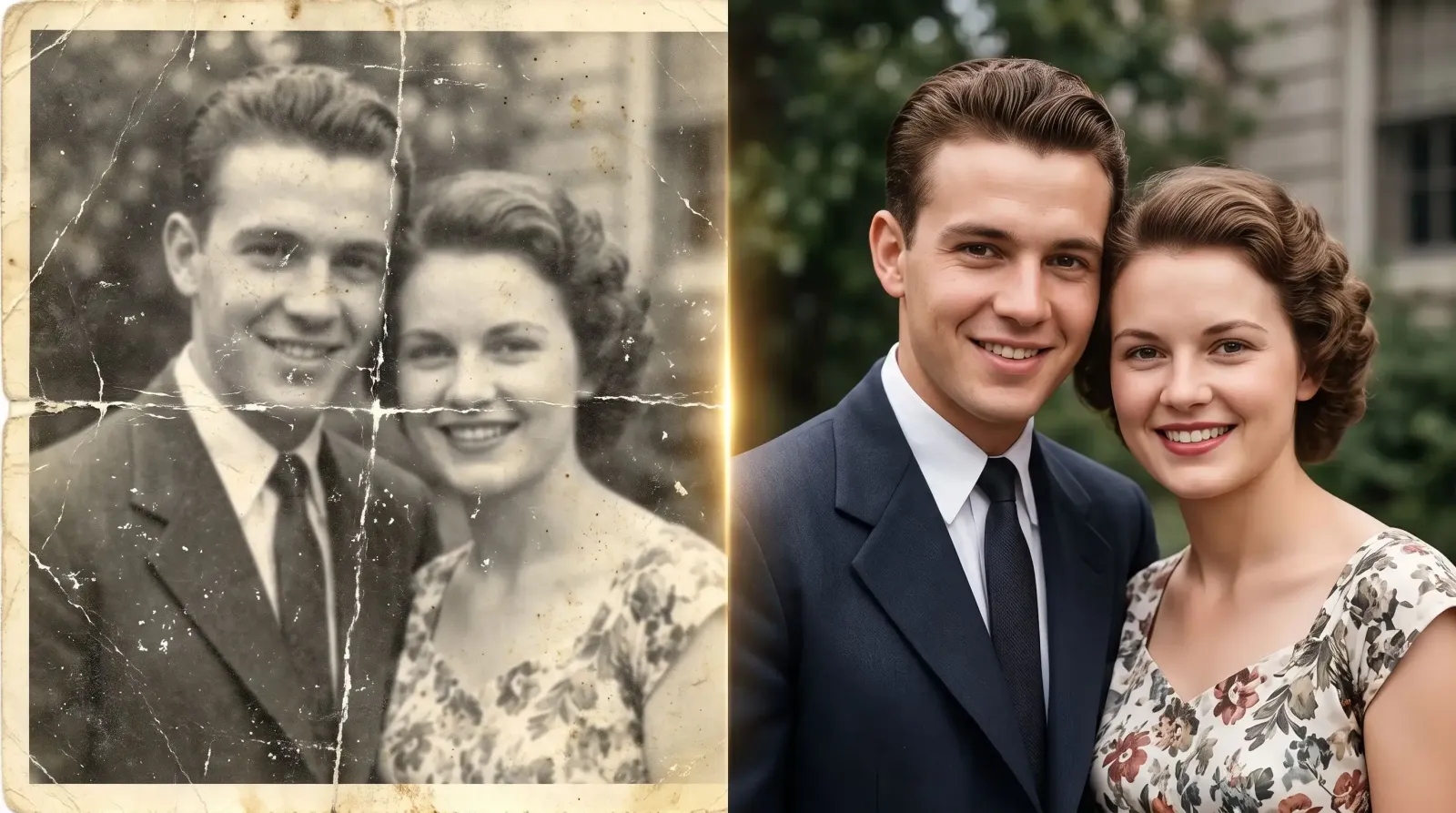
That shoebox of faded snapshots in the closet holds a lot: a grandparent's wedding, a childhood birthday, a pet that's been gone for years. The problem is that paper photographs don't age well. They yellow, crack, fade, and pick up scratches every time they're handled. An AI photo restorer solves this by rebuilding a damaged image pixel by pixel, repairing tears, sharpening blur, and even adding realistic color to a black-and-white print, often in a matter of seconds.
If you've been searching for a fast, reliable way to fix aging pictures without learning complex desktop software, this guide walks through exactly what these tools do, how the technology works, and how to get a clean result you'll actually want to print and frame.
What Is an AI Photo Restorer?
An AI photo restorer is a tool that uses machine learning to automatically repair and enhance old, low-quality, or damaged photographs. Instead of manually cloning pixels and painting over scratches in a photo editor, you upload the image and the model analyzes the damage, predicts what the original looked like, and reconstructs the missing or degraded detail.
The key difference from a basic filter is understanding. A filter applies the same adjustment to every pixel. A restoration model recognizes that a white streak across someone's face is damage, not part of the photo, and fills it in with skin texture that matches the surrounding area. That contextual awareness is what makes results look natural rather than smeared.
What kinds of damage it can fix
Scratches, creases, and tears from years of handling or poor storage.
Fading and discoloration caused by sunlight and aging chemicals.
Blur and softness from old lenses, camera shake, or low-resolution scans.
Missing black-and-white color, which can be reintroduced through colorization.
Low resolution, where the image is enlarged and sharpened without turning blocky.
Dust and noise speckling introduced during scanning.
How an AI Photo Restorer Actually Works
Under the hood, most restoration tools rely on neural networks trained on enormous libraries of paired images, a damaged version alongside its clean counterpart. By studying millions of these pairs, the model learns the patterns of degradation and how to reverse them.
Here's the process in plain terms:
Detection. The model scans the photo to locate faces, edges, textures, and areas of damage like scratches or blotches.
Reconstruction. It predicts the most likely original detail for damaged regions, drawing on everything it learned during training.
Enhancement. Faces are refined, edges are sharpened, and noise is cleaned so the whole image reads as crisp and coherent.
Upscaling. Many restorers also increase resolution, so a small, grainy scan becomes large enough to print.
Face restoration deserves a special mention. Human eyes are unforgiving about faces, so good tools use models dedicated to reconstructing eyes, teeth, and skin realistically. This is why a well-restored portrait feels like the person again, instead of an eerie approximation.
The goal of restoration is faithfulness, not reinvention. A strong result looks like the photo you remember, only clearer, not like a different image entirely.
Why People Search for a Photo Restorer
The demand is deeply personal. Families want to preserve heirloom pictures before the physical prints deteriorate further. Others are digitizing an entire archive and want each scan to look its best. Common real-world reasons include:
Preparing photos for a milestone event, a wedding slideshow, an anniversary, or a memorial.
Rescuing images from water damage, mold, or a fire.
Turning a faded print into a gift-worthy, framed enlargement.
Cleaning up genealogy research photos for a family tree or archive.
Reviving old professional shots for a portfolio or reprint.
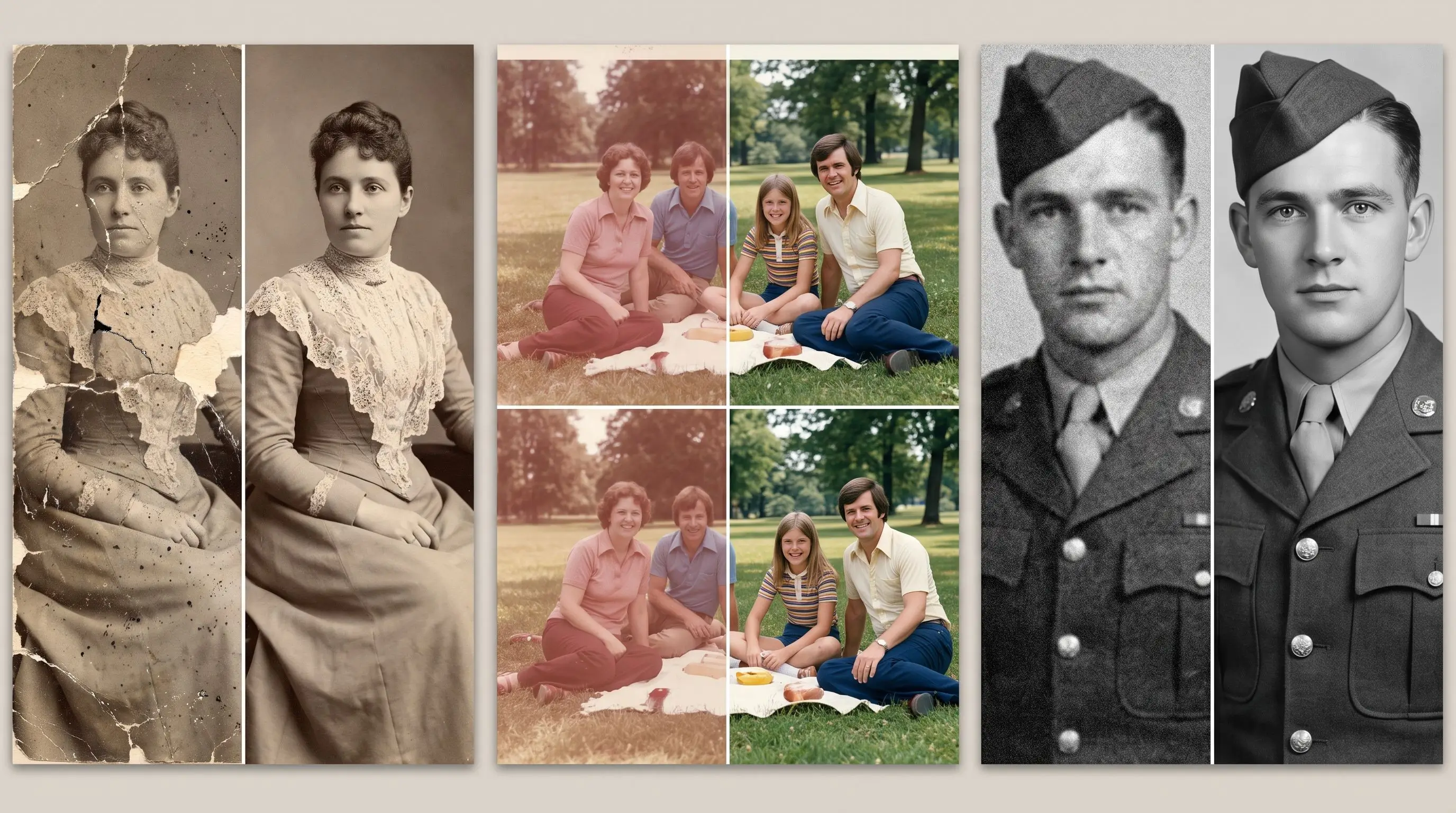
What unites these use cases is urgency and sentiment. The photo often can't be re-taken, so the restoration has to respect the original while making it look its best.
How to Restore Photos With MagicShot
MagicShot's Photo Restorer is built to take the guesswork out of the process. You don't need editing experience, the heavy lifting happens automatically once you upload an image.
Step by step
Upload your photo. Start with the best scan or picture you have. A clean, high-resolution scan gives the AI more to work with.
Let the restorer analyze it. The tool detects damage, faces, and areas that need reconstruction.
Review the result. Compare the restored version against the original to confirm the details look faithful.
Download and share. Save the enhanced image, then print it, frame it, or add it to a slideshow.
Because MagicShot is a full AI photo and video suite, restoration sits alongside other tools you might reach for afterward, upscaling, background editing, and image generation, so you can take a rescued photo further in one place.
Tips for the Best Restoration Results
The quality of your input strongly influences the output. A few practical habits make a noticeable difference:
Scan, don't photograph, when possible. A flatbed scan at 300-600 DPI captures far more detail than a phone snapshot of a print, which adds glare and angle distortion.
Clean the print gently first. Removing surface dust with a soft cloth means less noise for the AI to interpret as detail.
Start from the original, not a copy of a copy. Every re-scan or re-photograph compounds quality loss.
Restore before you colorize. Fixing damage first gives colorization cleaner surfaces to work with.
Keep expectations realistic for extreme damage. If half a face is missing, the AI is inferring, not remembering, review those areas closely.
When to review results extra carefully
AI reconstruction is powerful but not psychic. On heavily damaged or very low-resolution images, the model fills gaps with its best guess. That's usually convincing, but for meaningful photos, especially faces of loved ones, compare the restored version to any reference you have to make sure identities and details stayed true.
AI Photo Restorer vs. Manual Editing
Manual restoration in professional editing software can produce beautiful results, but it demands skill, patience, and hours per image. Retouchers charge accordingly, and a single badly damaged photo can take an afternoon.
An AI photo restorer flips that equation. It handles the repetitive, technical work, scratch removal, upscaling, face reconstruction, in seconds, so you get most of the benefit with almost none of the effort. For large archives, that speed is the difference between restoring a handful of favorites and rescuing the whole collection.
The pragmatic approach many people take: run everything through an AI restorer first, then reserve any hands-on touch-ups for the two or three photos that truly warrant them.
The Bottom Line
Old photographs are memory made physical, and they don't last forever in their original form. An AI photo restorer gives you a fast, approachable way to repair the damage, recover lost detail, and preserve these images for the people who come after you. Start with your clearest scan, restore it, and you'll often be surprised how much of the original moment was still hiding under the cracks and fading.
Ready to see it for yourself? Try MagicShot's Photo Restorer and bring your favorite old pictures back to life.