MagicShot vs Midjourney: Which AI Image Platform Should You Choose?
- Best Tools
- 10 min read
- Published: May 13, 2026
- Harish Prajapat
Two tools. Different philosophies. One subscription budget.
If you’ve spent five minutes researching AI image generators in 2026, you’ve already run into the question. MagicShot AI vs Midjourney – which one actually deserves the monthly charge? I’ve used both. Daily. For about a year now. And the answer isn’t as obvious as either fanbase wants you to believe.
This isn’t a press release. It’s a side-by-side from someone who’s burned credits on both, gotten frustrated by both, and ended up keeping one as the daily driver. Let’s get into it.
[IMAGE: Split-screen comparison showing two AI-generated portraits side by side, one in MagicShot’s clean web interface, one in Midjourney’s grid view, dramatic studio lighting, photorealistic]
What MagicShot Does
MagicShot is an all-in-one AI creative platform. That phrase gets thrown around a lot, so let me be specific. You log in once. You get 56+ tools. Image generation, video generation, headshots, product photography, avatars, face swap, fashion try-on, background removal, upscaling, image-to-3D — all of it sitting in one dashboard.
The image generator runs current models like GPT Image 2.0 and Nano Banana 2 under the hood. You pick the model, type a prompt in plain English, and get results. No flags. No slash commands. No Discord channel.
And then it keeps going. Generated a product shot? Push it into AI Image Editing to change the background. Want to animate it? Send it to Image to Video. Need a matching headshot of yourself in the same lighting style? Headshot Generator, same login, same credits.
That’s the pitch. One subscription, one workflow, no app switching.
What Midjourney Does
Midjourney does one thing. Image generation. (Plus a newer video feature, which I’ll get to.) And historically, it’s done that one thing with a very distinct aesthetic — cinematic, painterly, a little dreamlike. The kind of image that looks good even when your prompt was lazy.
In 2026 Midjourney runs on V7 for general images and Niji 7 for anime work. Niji 7, launched on January 9, 2026, brings a major boost in coherency, particularly on faces and small background details. V7 keeps the cinematic look that made Midjourney famous, plus better prompt adherence than V6.
You can use it on the web now, which is a relief. For years it was Discord-only, which meant typing /imagine into a chat channel and watching your image appear next to a hundred other people’s images. That barrier turned a lot of people off. The web app fixed it. But the underlying prompt language — parameter flags like --ar 16:9, --style raw, --cref — that’s still there. You have to learn it.
The Philosophy Gap
This is where the two tools really part ways.
Midjourney is a specialist’s instrument. It wants you to learn its prompt vocabulary. Reward: a specific look that’s hard to get anywhere else. MagicShot is a generalist’s toolkit. It wants you to ship work fast across formats. Reward: you don’t open three tabs to finish a single project.
Neither is wrong. They’re just aimed at different people.
Head-to-Head: Quality
Let’s talk about the actual images. Because that’s what people care about.
Photorealism. MagicShot wins. Running GPT Image 2.0 and Nano Banana 2, the photoreal output handles skin texture, hands (finally), and product surfaces noticeably better than Midjourney’s default style. Midjourney can do photoreal, but you have to coax it there with --style raw and careful prompting. Out of the box, it leans painterly.
Text inside images. Not even close. MagicShot. Midjourney still struggles with rendering legible text on signs, posters, and packaging. Newer models like GPT Image 2.0 handle text rendering reliably — this matters a lot if you’re making thumbnails, ads, or anything with a tagline baked in.
Stylized art and illustration. Midjourney. Honestly. Its cinematic style, painterly textures, and fantasy aesthetic still have an edge. If you’re making book covers, concept art, or fine-art prints, Midjourney V7 produces work that’s hard to replicate elsewhere without heavy editing.
Anime and manga. Tie, leaning Midjourney for purists. Niji 7 is genuinely excellent at anime-style coherency. MagicShot can produce anime through its Illustration Generator, and for most use cases it’s plenty. But if anime is your entire portfolio, Niji is still the gold standard.
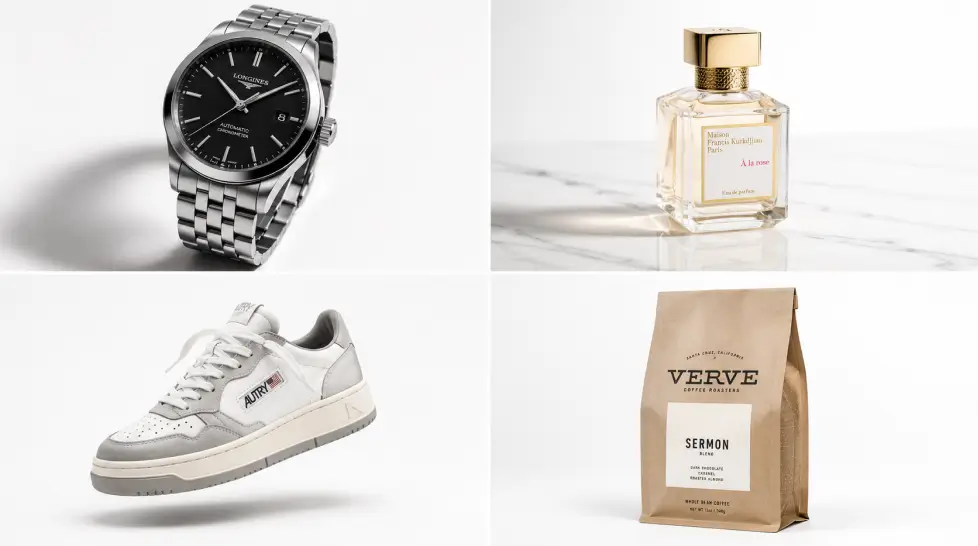
Product photography. MagicShot. Not even a debate. Midjourney isn’t built for clean ecommerce shots with consistent lighting and a white background. MagicShot has a dedicated tool for that, and it’s been refined.
Quality Verdict
For commercial production work — ads, ecommerce, marketing — MagicShot’s models give you the win. For artistic and editorial illustration with that signature aesthetic, Midjourney still holds the crown. Pick based on what you actually make, not what looks cool on someone else’s portfolio.
Head-to-Head: Ease of Use
This is where I have to be blunt. Midjourney is harder.
Even with the web app, you still type prompts that look like this: cinematic portrait of a woman in a red dress, golden hour, shallow depth of field --ar 3:4 --style raw --v 7. Get one flag wrong, and you wonder why your aspect ratio is square. Forget --style raw, and your photo looks like a painting.
MagicShot is built for people who don’t want to memorize syntax. You pick a model from a dropdown, type what you want, hit generate. If you want a wider image, you change the aspect ratio with a button. If you want photoreal, you pick the photoreal preset.
There’s a learning curve to both — every AI tool has one. But Midjourney’s is steeper. The payoff is more granular control. MagicShot’s is shallower. The payoff is shipping faster.
And then there’s the workflow question. With Midjourney, you generate an image. Cool. Now what? If you want to edit it, you upload it to another tool. Animate it? Another tool. Upscale it past 4K? Another tool. Remove a background? Another tool. That’s three, four, five subscriptions stacked up.
MagicShot keeps the whole workflow in one place. Generate, edit, upscale, animate, remove background, swap a face, try on an outfit, build a product video. Same login.
Ease of Use Verdict
MagicShot wins this category cleanly. If you don’t want a side project of “learning how to prompt,” pick MagicShot. If you genuinely enjoy the craft of prompt engineering and want fine control, Midjourney rewards the effort.
Head-to-Head: Pricing
Here’s where it gets uncomfortable for Midjourney. Let’s lay it out plainly.
Midjourney’s plans in 2026: Basic $10, Standard $30, Pro $60, Mega $120. And every plan offers a 20% discount when billed annually: Basic drops from $10 to $8/month, Standard from $30 to $24/month, Pro from $60 to $48/month.
The Basic plan gives you a limited number of fast generations per month. Want unlimited Relax Mode? You need Standard or higher. Want unlimited video generations in Relax Mode? For unlimited video generations with Relax Mode, subscribe to the Pro or Mega Plan. That’s $48 to $96 a month, annual billing.
Now compare that to MagicShot, where a single subscription includes:
- Image generation across multiple top models
- Video generation (Kling Omni, VEO 3.1, Seedance 2.0, Wan 2.6)
- Headshot generator
- Product photography
- Avatar generator
- Face swap, fashion try-on, hair styling, background removal
- Image editing, upscaling, 3D conversion, image-to-video
If you were trying to match that with Midjourney + separate tools for video, headshots, and product photos, you’d be paying $200+ a month. Easily.
The Real Cost Comparison Table
| What You Get | Midjourney | MagicShot |
|---|---|---|
| Image generation | Yes (V7, Niji 7) | Yes (GPT Image 2.0, Nano Banana 2, more) |
| Video generation | Limited, Pro plan+ | Yes (Kling Omni, VEO 3.1, Seedance 2.0) |
| Headshot generator | No | Yes, 50+ background styles |
| Product photography tool | No | Yes, studio-quality |
| Background removal | No | Yes, one click |
| Face swap / try-on / age tools | No | Yes, all included |
| Image-to-video | Limited | Yes, multiple models |
| Entry price | $10/mo Basic | $9/mo |
Pricing Verdict
MagicShot wins decisively if you need more than just text-to-image. Midjourney wins if image generation is literally the only AI tool you use and you’re happy bolting on other subscriptions for everything else.
Use Case Winners
Different jobs, different tools. Here’s how I’d break it down honestly after a year of using both.
Ecommerce Product Photos
Winner: MagicShot. The dedicated product photography tool is built for this exact job. Clean backgrounds, consistent lighting, multiple angles from a single source photo. Midjourney can do it, but you’ll spend an hour prompting your way to one usable shot.
Professional Headshots
Winner: MagicShot. A real face-trained headshot tool with 50+ background styles versus Midjourney trying to generate “a professional headshot of a man, age 35” and getting a stranger. No comparison.
Marketing & Ad Creative
Winner: MagicShot, narrowly. Because text rendering inside images works. Because you can animate the still into a 5-second ad in the same dashboard. Because product photos, lifestyle shots, and social graphics all live in one place.
Concept Art & Illustration
Winner: Midjourney. V7’s cinematic style is still distinctive. If you’re an illustrator, a game designer, a book cover artist, Midjourney’s aesthetic does heavy lifting for you.
Anime & Manga
Winner: Midjourney (Niji 7), narrowly. If anime is your whole thing, Niji has the edge. For occasional anime work, MagicShot’s illustration generator is plenty.
Social Media Content
Winner: MagicShot. Instagram stories, TikTok-ready video effects, viral content tools — these are baked in. Midjourney isn’t built for short-form video pipelines.
Print & Fine Art
Winner: Midjourney. If you’re printing posters, art prints, or anything where the image itself is the product, Midjourney’s painterly quality and resolution serve you well.
Personal & Fun
Winner: MagicShot. Face swap, baby generator, age journey, hug videos, kiss booth, pet dress-up, iconic locations — Midjourney doesn’t even play in this category.
Who Should Choose Which
Let me make this simple. Two short lists.
Choose Midjourney if:
- Your work is illustration, concept art, or fine art
- You love prompt craft and want fine control over style
- You only need image generation and nothing else
- You’re publishing to print, galleries, or art portfolios
- Anime is your primary output and Niji 7 is non-negotiable
Choose MagicShot if:
- You run an ecommerce business and need product photos
- You’re a creator who makes images and video and social posts
- You want photoreal output without prompt engineering
- You need text rendered correctly inside images
- You hate paying for five tools when one will do
- You want headshots, avatars, or character work alongside generation
Honestly, most people fall into the second list. The first list is real, but it’s smaller than the Midjourney marketing makes it sound. If you’re a small business owner, a marketer, a creator, an ecommerce seller — MagicShot is the more practical pick. If you’re a working illustrator, Midjourney still earns its keep.
What Midjourney Does Better
Quick, fair list. Because I’m not pretending this is one-sided.
- Cinematic style out of the box, no preset hunting
- Niji 7 for anime coherence
- A dedicated community that shares prompts and styles
- Fine-grained parameter control for prompt nerds
- That specific painterly aesthetic that defines its brand
Those are real wins. If any of them describe your work, Midjourney is worth the $10 entry price. Just know what you’re getting.
What MagicShot Does Better
And the other side, because credit where it’s due.
- One subscription covers image, video, edit, and 50+ specialty tools
- Plain-English prompting, no flags or syntax
- Newer image models with reliable text rendering
- Built-in tools for product photos, headshots, and ecommerce
- Image-to-video pipeline in the same dashboard
- Photoreal output by default, no
--style rawrequired - Face-related tools (swap, try-on, age, hug, kiss) that Midjourney doesn’t touch
The breadth advantage matters more than people think. Every workflow has friction. Switching tools is friction. Logging into another platform is friction. Paying another invoice is friction. MagicShot removes all of that.
A Real-World Test
Last month I needed five things for a single ecommerce launch:
- A hero product photo
- Three lifestyle shots of the product in different environments
- A headshot of the founder for the About page
- A 5-second product video for Instagram
- A banner graphic with the brand tagline rendered cleanly
In Midjourney, I’d have done the first two (maybe), then opened another tool for the headshot, another for the video, another for text. Four subscriptions, four logins, color matching all over the place.
In MagicShot, all five came out of the same dashboard in about 90 minutes. Same login. Same credits. Color and style consistent across all five assets because they came from the same source.
That’s the part the spec sheets don’t show. Workflow efficiency. (You know, the thing that actually matters when you’re trying to ship a launch by Friday.)
The Verdict
Midjourney is a beautiful tool for illustration and editorial art. Its V7 model and Niji 7 anime variant are excellent at what they do. If your work is fine art, concept art, or stylized illustration, it earns its place in your stack.
For everyone else – and that’s most people – MagicShot is the better 2026 pick. Broader toolkit. Lower combined cost. Easier interface. Newer image models for photoreal and text-in-image work. A full workflow from generation to video in one place.
If you want to test the claim, run a real project through both. Don’t generate pretty pictures of nothing. Pick a real deliverable — a product launch, a social campaign, a headshot for LinkedIn — and try to finish it in each. You’ll know within an hour which tool fits your work.
The tool you’ll actually open tomorrow morning is the right tool. For me, that’s MagicShot. For an illustrator friend of mine, it’s still Midjourney. Both answers are valid.
Want to test it yourself? Try the MagicShot AI Photo Generator and see if it fits your workflow. If you’re shopping more broadly, the breakdown in best AI image generators in 2026 covers the full field. And if you’re still weighing AI against traditional design tools entirely, the AI vs traditional design tools comparison is a good next read.
One subscription. 56+ tools. No Discord commands required.
Frequently Asked Questions
It depends on what you’re making. MagicShot is broader — 56+ tools covering image, video, headshots, product photos, and editing on one subscription. Midjourney is narrower and leans toward artistic, illustrative output. For everyday production work, MagicShot wins on flexibility and price. For purely fine-art aesthetics, Midjourney still has a distinct look.
Midjourney’s Basic plan is $10/month, Standard $30, Pro $60, and Mega $120, with a 20% discount for annual billing. MagicShot bundles image generation, video, headshots, product photography, and editing into one subscription — which usually undercuts running Midjourney plus a separate video tool plus a headshot tool.
On photoreal, product, and editorial work — yes, often better, because MagicShot runs newer models like GPT Image 2.0 and Nano Banana 2 that handle text in images and realistic skin well. On stylized illustration, Midjourney V7 still has a distinct cinematic look that takes longer to replicate elsewhere.
It’s easier than it used to be. The web app removed the Discord-only barrier. But it still uses parameter flags, slash commands, and a prompt language you have to learn. MagicShot uses plain text, sliders, and presets — no commands.
Both allow commercial use on paid plans, but check the current terms before you ship. MagicShot’s all-in-one nature makes commercial pipelines simpler because you can generate, edit, upscale, and turn images into video without leaving the dashboard.