AI Hair Style Try-On: See Your New Look Before Going to the Salon
- MagicShot Features
- 7 min read
- Published: June 2, 2026
- Harish Prajapat
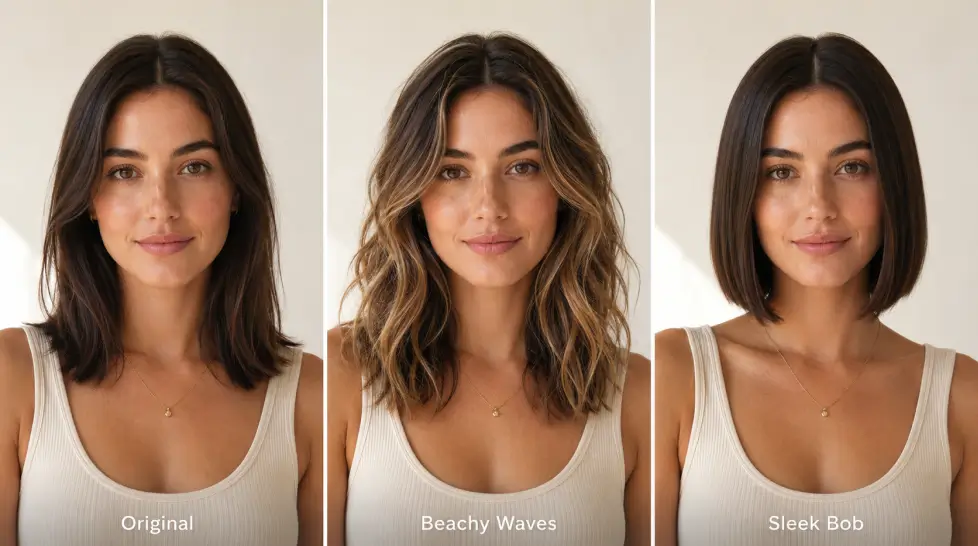
You’re scrolling through Pinterest. You see a blunt bob with curtain bangs and copper highlights. You think, would that even look good on me? Probably not. But maybe. And that’s how people end up with $200 haircuts they hate.
An AI hairstyle changer fixes that. You upload your photo, pick a style, and see yourself with the cut before any scissors touch your hair. No regret. No three-month grow-out. No awkward conversation where you tell your stylist you actually hated it.
Here’s how it works, what to expect, and the small tricks that make AI hair look real instead of obviously fake.
Why trying hairstyles virtually actually matters
Most people pick haircuts based on someone else’s face. That’s the problem. A pixie that looks incredible on a celebrity might wash you out. Bangs that suit a heart-shaped face can swallow a round one.
Trying a haircut virtually solves a few things at once:
- You see the cut on your face shape, not a model’s
- You test color against your skin tone before committing
- You catch styles you assumed wouldn’t work (sometimes they do)
- You walk into the salon with a reference, not a vague “shorter and lighter”
Honestly though? The biggest reason is money. A balayage in a major city runs $250 to $400. A bad one means another $150 to fix. Trying it on a photo first costs nothing and takes 47 seconds.
How an AI hairstyle changer actually works
Quick technical bit, then we move on. The AI looks at your photo and identifies your face, your hairline, your existing hair, and your skin tone. Then it replaces the hair section with a new style while keeping your features locked in place.
The good ones (and there are bad ones, really bad ones) don’t just paste a wig on top. They render strands that follow your actual head shape. They add shadow where hair would naturally cast it. They match the lighting in your photo so the result feels like a real picture, not a Photoshop job from 2009.
The not-so-good ones smudge your forehead, change your eye color for some reason, or give you that uncanny mannequin look. You’ll know it when you see it.
Step-by-step: trying a new hairstyle on your photo
I’ll keep this simple. Here’s the flow that gets the cleanest results.
Step 1: Pick the right source photo
This matters more than anything else. A blurry selfie from a club bathroom won’t give you a realistic preview. What you want:
- Face the camera straight on
- Natural light or even indoor light (no harsh shadows)
- Hair pulled back or visible (both work, but pulled back gives the AI more room)
- No hats, sunglasses, or filters
- High resolution if possible
If your photo is grainy, run it through a face enhancer first. Sharper input means sharper output. Always.
Step 2: Upload and choose a style
Open the hairstyle tool, drop in your photo. You’ll see options for length, cut style, color, and texture. Some tools give you presets (“long layers,” “shaggy mullet,” “platinum blonde”) and some let you type your own prompt.
Both work. Presets are faster. Custom prompts are more specific. If you want something like “chin-length French bob with wispy curtain bangs and honey highlights,” type it. The AI handles detailed prompts better than people expect.
Step 3: Generate and review
Click generate. Wait maybe 15 to 30 seconds. You’ll get a result.
Don’t accept the first output. Generate 3 or 4 versions of the same style. AI hairstyle generators introduce small variations each time, and one of them will almost always look better than the others. Pick that one.
Step 4: Try variations
Now the fun part. Once you’ve nailed one style, try the same cut in different colors. Then try the same color with different cuts. You’re basically running A/B tests on your own face. Free ones.
I usually do 6 to 8 versions before deciding. Sometimes the cut I was sure I’d love looks weird, and the one I almost skipped looks great. Happens constantly.
Styles you can try: length, cut, color, texture
Here’s a breakdown of what most AI hair tools handle well, and where they sometimes struggle.
| Category | Works well | Sometimes tricky |
|---|---|---|
| Length | Bob, lob, shoulder-length, long | Buzz cuts on people with very long hair |
| Cut | Layers, blunt, fringe, curtain bangs, shag, pixie | Mullets, asymmetric cuts (hit or miss) |
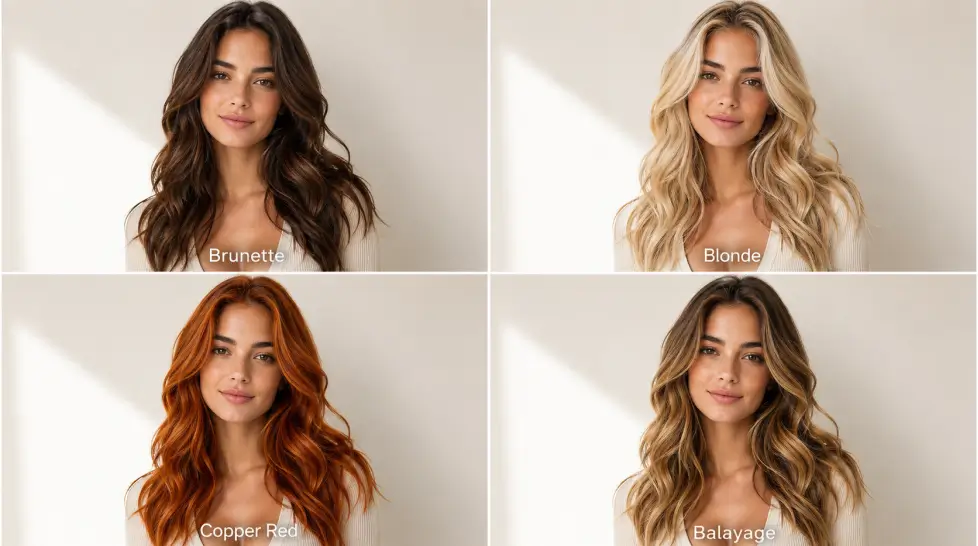
| Color | Brunette, blonde, red, black, balayage, ombre | Vivid pastels can look painted |
| Texture | Straight, wavy, loose curls, sleek | 4c coils, mermaid waves, extreme volume |
Length
Cutting off 12 inches virtually is the safest experiment you’ll ever run. If you’ve had long hair forever and you’re thinking about a bob, this is where AI shines. You see the shape against your jaw before you commit.
Cut
Bangs are the big one. Everyone agonizes over bangs. Now you can see curtain bangs, blunt bangs, baby bangs, side-swept bangs, all on your face in two minutes. Decide. Move on.
Color
The virtual hair color AI stuff is honestly the most useful feature for most people. Going from brunette to blonde is a huge decision. Seeing it first matters. Same with going darker, adding highlights, or trying red (red is rarely what people imagine).
Texture
If you have straight hair and you’re considering a perm, see it first. If you straighten your curly hair every day and you’re thinking about embracing it, see what that looks like styled. Texture changes the whole vibe of a haircut more than people realize.
Getting realistic results (the small tricks)
Most AI hair fails are user-fixable. Here’s what actually moves the needle.
Use a recent photo. Not the one from college. Your face shape changes. Your skin tone shifts. A current photo gives a current preview.
Match the prompt to your features. A 50-year-old with silver streaks trying “long Disney princess hair” will get weird results. Realistic styles for your age group look better.
Specify lighting in the prompt if you can. “Soft natural light, salon photography” pulls the result toward something that looks shot, not generated.
Generate multiple versions. I said this earlier. I’m saying it again. The first output is rarely the best one.
Don’t fight the AI on impossible styles. If you have a buzz cut and you’re trying to see waist-length mermaid hair, the AI is essentially inventing 24 inches of hair from nothing. It’ll do its best. But results vary. A photo with longer existing hair gives better long-hair previews.
If you want a deeper walkthrough on prompts and settings, the AI hairstyle generator guide covers the whole prompt-writing side in detail.
How to show your stylist the result
This is the part people skip. Don’t skip it.
Once you’ve picked your favorite generated look, save 2 or 3 versions. Different angles if you have them. Different shades of the color if you’re still deciding between two.
Bring them to your appointment. Don’t describe the cut. Show the photo. Stylists read images way faster than they parse sentences like “shorter but not too short, kinda like a bob but not really a bob.”
A few rules for the salon convo:
- Tell your stylist it’s an AI preview, not a stolen photo of someone else. They’ll factor in what’s realistic for your hair texture.
- Ask if the cut will hold up for your daily routine. AI doesn’t know if you have 5 minutes to style your hair in the morning.
- Be open to small adjustments. “This but slightly longer in the front” is a useful sentence.
One thing the AI can’t tell you: how your hair will actually behave once cut. Density, growth pattern, cowlicks. Your stylist knows. The AI just shows the destination.
What this won’t fix
Real talk for a second. AI hairstyle changers are great. They’re not magic.
They won’t predict damage from bleach. They won’t tell you that going platinum on previously colored hair takes 3 sessions and possibly a small fortune. They won’t account for your natural hair texture rebelling against the style six hours after you leave the salon.
What they will do is save you from the worst kind of haircut regret. The kind where you spent money on something that doesn’t suit your face at all. That’s the wins-on-the-board moment.
For deeper exploration of free options and how to push results further, check out this breakdown on trying new looks without a haircut.
Try it before you cut it
Hair grows back. Slowly. Painfully. Over months.
An AI preview takes 30 seconds. The math is obvious.
Upload a photo. Try the bob. Try the bangs. Try the copper. See what your face actually does with each one. Pick the winner. Show your stylist. Walk out happy.
That’s the whole pitch.
Frequently Asked Questions
Yes. MagicShot lets you try a few hairstyle generations without paying first. After that, a single subscription unlocks unlimited tries plus 55+ other AI features like headshots, video, and product photos.
Pretty close to real if you upload a clear front-facing photo with good lighting. Curls and very long hair can look slightly off sometimes, but short cuts, bobs, fringes, and most color changes look natural enough to share with your stylist.
Yes. You can keep your existing length and shape and just swap the color. The virtual hair color AI handles roots, gradients, and shine so the result still looks like dyed hair, not painted hair.
Yes, though results depend on the source photo. Define your texture clearly in the prompt (4c coils, 3a curls, beachy waves) and the output gets noticeably more accurate.
That’s the whole point. Save 2 or 3 versions, screenshot them, and bring them to your appointment. Stylists prefer reference images over vague descriptions every single time.