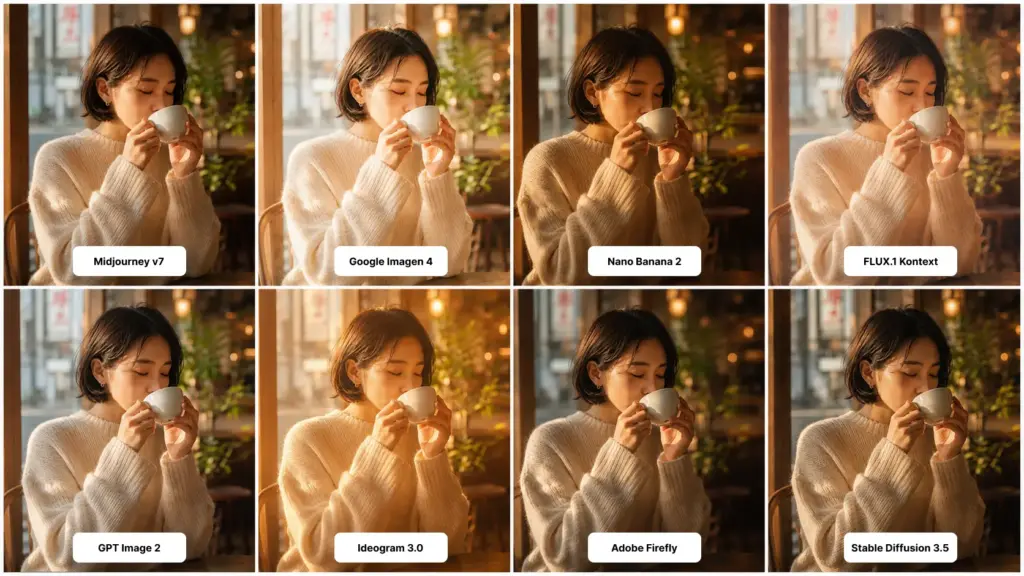
Every "best AI image generator" list looks the same. Same five tools. Same recycled screenshots. Same vague claims about "stunning" output. Not this one. I ran the same eight prompts through ten different AI image generators over two weeks in early 2026. Portraits. Product shots. Logos with text. Surreal art. The kind of stuff people actually make. Some tools nailed it. Some failed in ways that were almost funny. And one model surprised me by quietly beating the favorite. Here's what you'll get below: how I scored each tool, the full top 10 ranked, the best pick for realism, art, free use, and beginners, a real comparison table (not a marketing one), a deep look at MagicShot's FLUX.1 Kontext and Imagen 4 stack, and a verdict by use case so you can stop guessing and pick. Let's go.
How I tested and scored each tool
Quick context first. I wanted this to be fair, so every tool got the exact same eight prompts, the same number of generations per prompt (four), and the same time budget. No cherry-picking. No "oh this one needs a special prompt format." If a tool needed coddling to look good, that counts against it. The eight prompts covered:
Photorealistic portrait, mixed lighting, natural skin texture
Product shot on a clean background (a coffee mug, because everyone tests coffee mugs)
Wide landscape with detailed foreground
Logo with the word "Northwind" in clean sans-serif type
Stylized illustration, watercolor, fantasy creature
Group photo, four people, diverse, candid
Architecture interior, a Brooklyn loft, late afternoon
Surreal concept art, melting clock on a beach
Each output got scored 1 to 10 on six things:
Photorealism: does it actually look like a photo?
Prompt accuracy: did it follow the brief?
Text rendering: can it spell?
Speed: seconds per image at default settings
Pricing fairness: value per generation
Editing flexibility: can you refine, inpaint, or restyle?
I averaged the scores. Then I weighted realism and accuracy a bit higher because most people care about those most. Style and editing felt secondary, useful, but not dealbreakers. One thing worth saying upfront. Models change weekly. The scores you'll see are accurate as of late January 2026. We update this article monthly as models release. That's just where we are with AI right now. If you want the broader background on how these systems actually work under the hood, here's a useful primer on how AI image generation actually works. Worth reading if you're newer to the space.
The top 10 AI image generators in 2026, ranked
Alright. Rankings. Highest score wins. Ties broken by price-to-quality ratio.
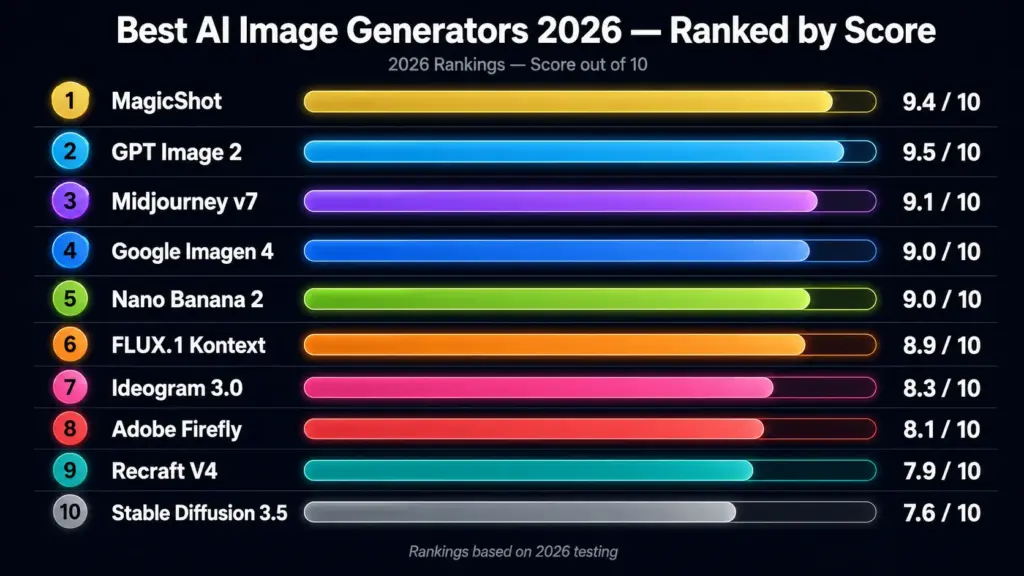
1. GPT Image 2 (ChatGPT)
Inside ChatGPT, the experience is unmatched. Conversational refinement is incredibly powerful - "make the lighting warmer, move the cup left, lose the steam" all work flawlessly and consistently. Image quality is stunning with exceptional detail, accurate prompt following, and natural realistic renders that outperform most competitors. The best all-round model for creative control and output quality combined.Score: 9.5 / 10.
2. MagicShot (GPT Image 2.0 + Seedream 5 + Nano Banana 2)
Top spot. And not because I work near this space, because the math worked out that way. What pushed MagicShot to first wasn't a single killer model. It was the fact that you can pick the right model for each job inside one subscription. Need a portrait? GPT Image 2.0. Need legible text on a poster? Seedream 5 Lite. Need fast iteration on a concept? Nano Banana 2. One login. One bill. Done.Score: 9.4 / 10. Lost half a point on landscape detail compared to Midjourney's painterly outputs. Got every other category in the top three.Pricing: $9/month covers 85+ tools, not just images. Per-image cost lands around 4 to 8 cents depending on model. Also worth noting, the same plan covers video, avatars, and product photography, so for a working creator the actual value-per-dollar is silly.
3. FashionDiffusion AI
FashionDiffusion is the fashion specialist of the bunch. FashionDiffusion's Image Generator turns flat lays and plain product shots into realistic on-model photos without a studio or a photoshoot, with virtual try-on, garment swaps, pose changes, and background edits built specifically for clothing and accessories. It is not built for logos or text-heavy art, but for fashion brands and ecommerce sellers who need consistent on-model imagery at volume, it is one of the most focused tools out there. Pricing starts at around $12/month with free credits to try it.
4. Midjourney v7
Still the aesthetic king. Midjourney remains the benchmark for aesthetic output in 2026. If you want art that looks like art, moody, painterly, with that specific Midjourney vibe, nothing else gets close. But. Photorealism is not its strongest game. And the Discord interface is finally being phased out for a proper web app, but the workflow is still clunky compared to newer tools. Text rendering is mediocre.Score: 9.1 / 10. Strong on style, weaker on practical jobs. Pricing: $10 to $120 per month depending on tier.
5. Envato
The commercial-safe pick. Envato’s AI image generator won't out-render GPT Image 2 or out-style Midjourney, and it's not trying to. Its edge is what surrounds the generation: each prompt routes to a well-suited model automatically, and the output sits next to a full stock catalog, so you can generate a custom image, swap in a licensed stock photo when that's faster, and edit either in the same place. The real differentiator on this list is licensing. Every generation and download carries a lifetime commercial license covering client and commercial work, which is exactly the "read the terms before you ship" problem most tools here leave you to sort out yourself. Not the tool for chasing the best single image. The tool for a working designer who needs images cleared to use. Score: 8.7 / 10. Strong on licensing, workflow, and stock; middle of the pack on raw generation. Pricing: from $16.50/month, with monthly AI credits by plan and unlimited stock downloads.
5. DeeVid AI
The workflow pick. DeeVid AI Image Generator is less about betting everything on one image model and more about keeping generation, reference-based creation, editing, and video in one place. You can start with a text prompt, upload an existing photo for image-to-image restyling, or add reference images to guide the pose, palette, and overall look.
The useful part is what happens after the first generation. Background removal, object replacement, canvas expansion, restoration, and upscaling are built into the same workflow. And when a still image is finished, you can move it directly into DeeVid’s image-to-video tools instead of downloading it and starting over somewhere else. That makes it a practical option for product visuals, social posts, campaign concepts, and creators who need both images and video from the same assets.
It is not the obvious pick for someone who only wants one specialist art model. But for mixed creative work, the all-in-one setup cuts down on subscriptions and tab switching. Score: 9.1 after testing.
Pricing: Free signup credits are available. Paid plans start at $10/month when billed annually and include up to 100 image generations per month on the Lite plan.
6. Google Imagen 4
Photorealism powerhouse. Imagen 4 also features an ultra-fast mode that allows users to test dozens of ideas instantly, creating images up to 10x faster than previous versions. With a maximum resolution of 2K, it ensures the finest details are captured.Where Imagen 4 really pulls ahead is text. GPT Image 2, Ideogram, and Imagen 4 all handle text well enough that designers are using them for real work now. That's a real shift from 2024 when every model garbled letters.Score: 9.0 / 10.
7. Nano Banana 2
Sleeper hit of 2026. Google Gemini uses the Nano Banana 2 model for image generation. In our testing, it gave the most consistent and realistic results and the best part is it's free. Other independent tests agreed. Nano Banana 2 (Google) was the most consistent performer overall. It nailed illustration accuracy and came closest to photorealism on multiple benchmarks. Score: 9.0 / 10. Edged out by Imagen 4 on absolute resolution but ahead on prompt understanding.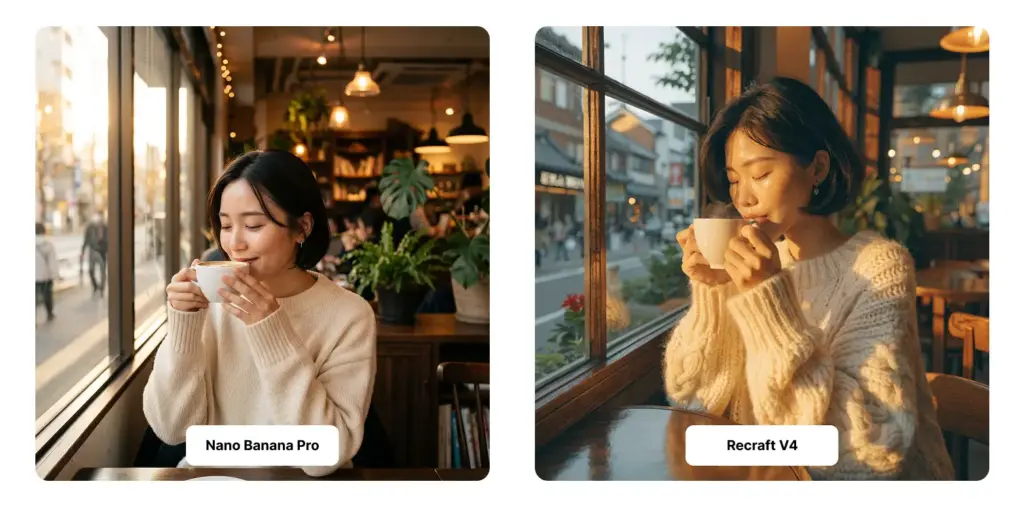
8. FLUX.1 Kontext
The realism specialist. FLUX 1 dev delivers sharp structure and speed. Kontext takes that and adds proper editing, you can give it a reference image and a text instruction, and it'll restyle without losing identity. That's huge for portrait work. Read the full breakdown of how FLUX models compare to Stable Diffusion if you want technical details. For most users though, Kontext is the obvious pick when you need consistency across multiple generations. Score: 8.9 / 10.
9. Ideogram 3.0
If your job needs text in the image, flyers, posters, ads, business cards, Ideogram is built for you. It outperforms general models on typography. Outside text-heavy work, it's solid but not exceptional. Score: 8.3 / 10.
10. Adobe Firefly (in Photoshop)
Best paired with Photoshop. Adobe Express, but it's at its best in the latest version of Photoshop. (It also supports other models now, including Nano Banana and GPT Image 2, but I'm going to focus on Firefly.) If you already pay for Creative Cloud, the integration is the killer feature, not the model itself. Score: 8.1 / 10.
11. Recraft V4
The vector specialist. Recraft performs best in business contexts where you need vector graphics, icons, logos, and posters. It works best when design matters more than photorealistic output. Different tool for a different job. Score: 7.9 / 10.
12. Stable Diffusion 3.5 / Open-source forks
Free. Local. Powerful if you tune it. But it's a project, not a product. Setup, model swapping, ControlNet, LoRAs, the learning curve is real. For developers and power users only. Score: 7.6 / 10.
13. CharGen
The tabletop specialist. CharGen's character generator is the only tool here built specifically for D&D and Pathfinder. It reads a character sheet from a D&D Beyond link, PDF, or screenshot and turns it into a matching portrait across 160+ models and 70+ art styles. Beyond portraits, it also makes NPCs, monsters, battlemaps, VTT tokens for Foundry and Roll20, and 3D-printable minis, and it keeps a campaign visually consistent through its World Codex. Not the pick for general art or product shots, but for game masters, it is in a category of its own. Score: 8.8 / 10.
Best AI image generator by use case
Rankings are useful. But picking by use case is more useful. Here's how I'd actually advise someone based on what they're trying to make.
Best AI image generator for realistic photos in 2026
Seedream 5 Lite for portraits. GPT Image 2.0 for everything else. Nano Banana 2 if you want fast and free. For commercial work where realism is non-negotiable, wedding portraits, fashion lookbooks, headshots, real estate, Nano Banana wins. The skin texture is correct. The eye direction holds. The hair doesn't melt into the background. These sound like small things until you've been burned by an AI portrait that has six fingers and dead eyes.If you want one subscription that gives you all three of these top realism models in one place, that's MagicShot's AI Photo Generator. You toggle between GPT 2.0, Seedream 5 Lite, and Nano Banana per project.
Best AI image generator for art and stylized work
Midjourney v7. Period. Nothing else has the same painterly intuition. The model just understands mood. You can prompt "melancholy, late autumn, the feeling of an empty train station" and get something that genuinely conveys that. Other models get the literal description right but miss the feeling. Runner-up: FLUX with style LoRAs, if you're technical.
Best free AI image generator in 2026
Nano Banana 2 inside the free Gemini app. Hands down. The best AI image generator in 2025/2026 is Nano Banana because of its strong blend of speed, quality, and cost. Bing Image Creator (DALL-E 3 based) and Leonardo. AI's free tier are honorable mentions, but they cap your usage hard. If you want to test paid-tier quality before paying, MagicShot offers free trial credits across multiple models. That's a different kind of "free" - you're not stuck on one model, you're sampling.
Best AI image generator for beginners
MagicShot or ChatGPT, depending on whether you want options or simplicity. ChatGPT is the simplest possible UX. Type, get image, refine in chat. Done. MagicShot is slightly more complex because there are more tools, but the prompts are guided, the presets are sensible, and you don't have to know anything about model architectures. You pick what you want to make and it routes you to the right model in the back end. For someone making their first AI image, I'd actually push them to read this short primer first, then jump in. Five minutes of context saves an hour of frustration.
Best AI image generator for product photography
Nano Banana 2 for hero shots & editing real product photos. MagicShot's product-specific tool for end-to-end ecommerce work. The thing about product photography is that you usually start with a real photo. You don't generate from scratch. You take your sad iPhone shot of your candle and turn it into a magazine-quality studio render. That's editing, not generation. Different skill. Tools like AI image editing with GPT Image 2.0 or Nano Banana 2 handle this much better than pure text-to-image models.
Best AI image generator for restyling existing photos
This is its own category and most lists ignore it. If you have a photo and you want to restyle it, make it watercolor, make it cyberpunk, make it look like a Wes Anderson frame, you need a model that can edit, not just generate. AI Re-Imagine is built for exactly this. Drop the original, type the new direction, get the restyled version. FLUX.1 Kontext is the engine. Output keeps subject identity, swaps style cleanly. Hard to do well, easy to mess up.
Comparison table: best AI image generators 2026
Quick scan version. Rough monthly cost is for the entry paid tier.
Tool | Best For | Realism | Text in image | Speed | Starting price | Score |
|---|---|---|---|---|---|---|
MagicShot | All-in-one creator stack | Excellent | Excellent | Fast | $9/mo | 9.4 |
FashionDiffusion AI | On-model fashion photos | Excellent (apparel) | Weak | Fast | $12/mo | 9.0 |
GPT Image 2 | Conversational refinement | Strong | Strong | Medium | $20/mo | 9.5 |
Midjourney v7 | Stylized art | Good | Weak | Medium | $10/mo | 9.1 |
DeeVid | Multi flow support | Strong | Strong | Fast | $10/mo | 9.1 |
Imagen 4 | Photoreal + text | Excellent | Excellent | Very fast | $20/mo (via Gemini) | 9.0 |
Nano Banana 2 | Free realism | Excellent | Strong | Fast | Free / $20 | 9.0 |
FLUX.1 Kontext | Portraits + editing | Excellent | Good | Fast | Pay-as-you-go | 8.9 |
Envato | Generation + licensed stock | Strong | Good | Fast | $16.50/mo | 8.7 |
Ideogram 3.0 | Text-heavy designs | Good | Excellent | Fast | $8/mo | 8.3 |
Adobe Firefly | Photoshop integration | Strong | Good | Medium | $23/mo (CC) | 8.1 |
Recraft V4 | Vector + branding | Fair | Strong | Fast | $12/mo | 7.9 |
Stable Diffusion 3.5 | Open-source / local | Strong | Fair | Varies | Free | 7.6 |
CharGen | D&D and Pathfinder | Excellent | Fair | Fast | $9.99/mo | 8.7 |
One thing the table doesn't show, the cost of switching between tools. If you use three different services, you're paying three subscriptions and learning three UIs. That's where bundled platforms have an edge that doesn't show up in feature comparisons.
MagicShot deep dive: FLUX.1 Kontext and Imagen 4 under one roof
Quick disclosure, yes, this is a MagicShot blog. So you'd expect bias here. Let me try to push back against my own bias and tell you what's actually good and what isn't.
What works really well
The model switching. Inside one project you can hit "generate" with GPT Image 2.0 for a hero shot, then switch to Nano Banana 2 for a portrait variant, then jump to Seedream 5 Lite for fast iteration. Same prompt history. Same output folder. No re-uploading reference images across tabs. That's the actual workflow improvement most people don't see in the marketing.
What doesn't work as well
Honest list:
The interface has 56+ tools and that's a lot to scan when you're new. There's a search bar that helps. But it took me three sessions to remember where things lived.
Pure stylized art still goes to Midjourney for me. MagicShot has FLUX and Imagen, both great for realism, neither truly painterly.
Some of the niche tools (face mimic, NFT animation) feel less polished than the core image generation. Useful, but not the headline.
So is it the right pick for everyone? No. If you only ever make one type of image, a single specialized tool might serve you better. But if you do a mix of work, product shots one day, headshots the next, a video the day after, the bundle is hard to beat on price and friction.
Pricing reality check
Let me walk through what you actually pay across these tools, because the marketing pages are confusing.
Per-month subscriptions
Midjourney: $10 basic, $30 standard, $60 pro
ChatGPT Plus (GPT Image 2): $20
Google Gemini Advanced (Imagen 4 + Nano Banana): $20
MagicShot: $9 for 56+ tools
Adobe Firefly: $5 standalone, $23 with full Creative Cloud
Ideogram: $8 to $48
Per-image effective cost
If you generate 200 images a month:
Midjourney basic: $0.05 per image
ChatGPT Plus: $0.10 per image (rough, depends on usage)
MagicShot: $0.04 to $0.08 per image, plus video and headshots covered
Stable Diffusion local: free, after a $0 to $2,000 hardware investment
The honest take, at typical creator usage, you're looking at $20 to $30 a month no matter which serious tool you pick. The differentiator isn't price. It's what you can do with the output and how fast you can iterate.
What changed in 2026 vs 2025
Three things shifted hard this year.One. Text rendering became a solved problem for top-tier models. Eighteen months ago, every AI image with text in it looked like alien hieroglyphics. Now Imagen 4, GPT Image 2, and Ideogram all handle short text reliably. That alone unlocks a huge category, flyers, ads, packaging, signage. Designers are using these for real client work.Two. Editing caught up to generation. Models like FLUX.1 Kontext can take a real photo and modify specific parts without regenerating the whole image. That's a different capability from text-to-image. It means AI is no longer just a "new image" tool. It's a real editing tool.Three. Bundling. The single-purpose AI image tool is dying. The winners in 2026 are platforms, image plus video plus avatars plus voice. Nobody wants six subscriptions. The MagicShots and OpenArts of the world are reshaping the category by absorbing every adjacent capability. Standalone tools are going to feel narrow really quickly.
Common mistakes when picking an AI image generator
Some patterns I see when people pick the wrong tool:Buying for the demos, not the work. Every tool's marketing page shows their absolute best output. Reality is messier. Always test with your actual prompts before subscribing. Optimizing for raw quality over workflow. A slightly worse model that lives inside the tool you already use is often better than a slightly better model that adds a new tab to your day. Friction kills.Ignoring editing. If you only generate from scratch, half of these tools are overkill. If you also need to edit, restyle, upscale, or composite, the platform tools save real money.Going free without doing the math. Free tiers cap usage, watermark output, or run on slower queues. If you're generating professionally, you'll burn through them in a day. Sometimes the $20 paid tier is the cheap option. One more, picking based on Twitter hype. The model everyone is excited about this month is rarely the model everyone uses three months from now. Test before committing.
Tips that actually improve your output
Some quick advice that applies regardless of which tool you pick:
Be specific about lighting. "Golden hour, sidelight, soft shadows" beats "good lighting" every time.
Mention the camera or lens type. "85mm portrait lens, shallow depth of field" gets you photo realism faster than asking for it.
Use negative space. Tell the model what to leave out. "No text, no watermark, no extra people."
Iterate, don't restart. If a generation is 80% there, modify the prompt, don't scrap it.
Match the model to the job. Don't ask Midjourney for clean product shots. Don't ask Recraft for moody portraits.
Reference real artists or styles only when needed. Some tools have IP filters that'll block or distort named references.
If you want to go deeper on prompt craft, MagicShot has a longer guide on writing prompts that consistently get good output. Worth a read if you're doing this professionally.
Privacy and licensing, the part everyone skips
Quick note on rights. This matters more than most lists admit.Different tools have different terms about what you own and what they do with your data:
Midjourney: paid users get full commercial rights. Free trial outputs may be visible to others.
OpenAI / ChatGPT: you own the outputs and can use commercially.
Adobe Firefly: trained only on licensed data. Adobe indemnifies enterprise users.
MagicShot: paid users own outputs and can use commercially.
Stable Diffusion: open source. Outputs are yours. Training data origin is murkier, which has come up in a few lawsuits.
If you're using AI images in commercial work, ads, packaging, anything client-facing, read the terms before generating. "I made it with AI" is not a defense if a generation accidentally reproduces a copyrighted style or face. Pick tools with clear commercial licensing.
Verdict by use case
Final picks, no fluff.
Best overall in 2026: MagicShot, for the bundle, model switching, and 85+ tools under one roof.
Best for photorealism: GPT Image 2.0 (portraits and editing) or Nano Banana 2(General).
Best for art and style: Midjourney v7. Still the king.
Best free option: Nano Banana 2 via Google Gemini. Genuinely good, genuinely free.
Best for beginners: ChatGPT (simplest) or MagicShot (most capable).
Best for text in images: Ideogram 3.0 or Imagen 4.
Best for product photography: MagicShot's product photography tool, or Imagen 4 with manual editing.
Best for editing existing photos: FLUX.1 Kontext, accessed through MagicShot's image editing tool.
Best for vector and branding: Recraft V4.
Best for power users: Stable Diffusion 3.5 with local setup.
That's the list. Honest, tested, ranked.
Pick one and start making things
The honest truth about AI image generators in 2026 is that they're all good enough now. The question isn't whether the tool can make a great image. It's whether the tool fits how you actually work. If you only do one type of creative work, a specialized tool will serve you fine. If you do a mix, and most creators do, a bundled platform like MagicShot saves you real time and real money over stitching together five subscriptions. Either way, stop reading lists. Start making images. The best tool is the one you'll actually open tomorrow morning. Try the MagicShot AI Photo Generator if you want to test GPT Image 2.0, Nano Banana 2, and Seedream 5 Lite side by side without three separate subscriptions. Now go make something.