GPT Image 2.0 vs Nano Banana 2: Which AI Image Model Is Better in 2026?
- Comparisons
- 11 min read
- Published: May 9, 2026
- Harish Prajapat
Two models. Same prompt. Wildly different outputs.
That’s basically been my last two weeks. I’ve been running GPT Image 2.0 and Nano Banana 2 head to head inside MagicShot, trying to figure out which one actually deserves a spot in my daily workflow. Spoiler — they both do, but for very different reasons.
This isn’t a spec sheet. It’s what happens when you generate the same portrait, the same product shot, the same poster on both, then stare at the results until your eyes hurt. If you’re trying to pick the best AI image model 2026 has shipped so far, here’s what I found.
The two contenders, quickly
Let’s get the introductions out of the way.
GPT Image 2.0
OpenAI’s newest image model. It’s the one that finally made me stop opening Photoshop for typography-heavy mockups. GPT Image 2.0 is built around tight prompt adherence — meaning when you say “a hand-lettered sign that reads OPEN LATE in cursive, hanging in a diner window at dusk,” it actually puts those exact words on the sign. Most of the time.
It’s also pretty good at understanding spatial relationships. “Cup to the left of the book, slightly behind it, casting a shadow toward the camera.” That kind of stuff. Other models still fumble it. GPT Image 2.0 mostly doesn’t.
Nano Banana 2
Google’s follow-up to the original Nano Banana, and honestly the speed jump alone is worth talking about. Nano Banana 2 (built on the lineage of Imagen and the Banana family) leans into photorealism, fast iteration, and frankly some of the cleanest skin texture I’ve seen out of any image model this year. If you want to read deeper on the Banana family, I covered the previous generation in this Nano Banana Pro deep dive.
It also handles edits really well. Reframes, recolors, swap-the-jacket type stuff — Nano Banana 2 doesn’t melt the rest of the scene the way some competitors still do.
Round 1: Portraits
Same prompt for both. “Studio portrait of a 32-year-old woman with curly auburn hair, soft Rembrandt lighting, charcoal grey backdrop, wearing a cream knit sweater, candid half-smile, shot on 85mm lens.”
Nano Banana 2 nailed it on the first try. Skin texture had actual pores. The hair didn’t have that weird waxy halo issue. Lighting was genuinely Rembrandt — you could see the triangle on her cheek. Pretty.
GPT Image 2.0 took two tries to get the lens characteristic right. The first attempt felt more like a 50mm. But once it locked in, the result had this slightly more painterly quality — almost editorial. Less photographic, more magazine cover.
Verdict: Nano Banana 2 wins for clean, technically-correct portraits. GPT Image 2.0 wins if you want a portrait with stylistic personality.
But. Here’s where it gets interesting. When I asked for a series — same person across five different outfits and lighting setups — GPT Image 2.0 held the face better. Nano Banana 2 drifted by image three. If you’re doing consistent character work, that matters a lot. (For that specific use case, I’d actually point you toward the Portrait Series feature which handles consistency automatically.)
Round 2: Product photography
I tested a ceramic mug. Boring on purpose. If a model can’t shoot a mug, it can’t shoot anything.
Prompt: “Matte black ceramic mug on a white marble surface, soft window light from the left, subtle steam, eye-level angle, e-commerce ready.”
Nano Banana 2 was almost frustratingly good. Crisp edge on the rim. The matte texture read as actually matte, not just dark. Steam looked like steam, not cotton candy. I generated 6 variations in roughly 70 seconds.
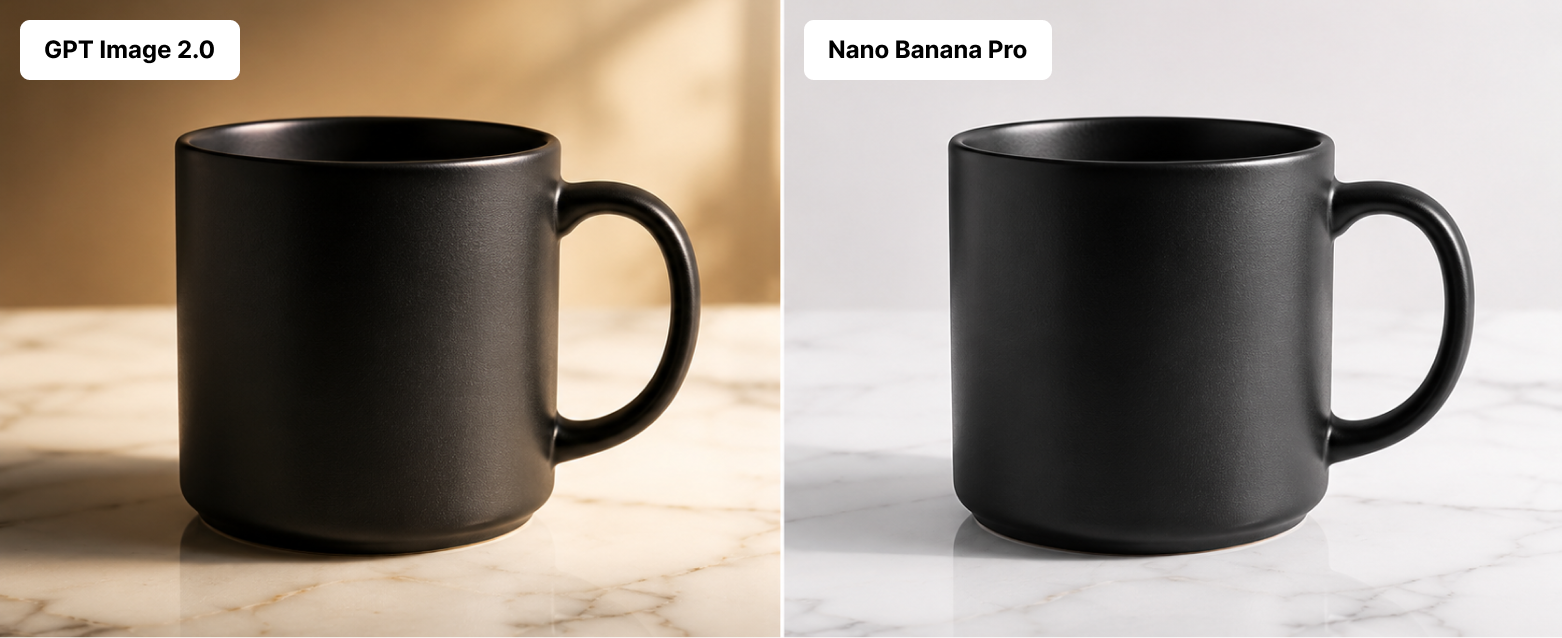
GPT Image 2.0 made a beautiful mug too. But it added vibes. A small linen napkin appeared. A blurred croissant in the background showed up unprompted. Which — fine, sometimes I want that. But when I’m doing pure white-background catalog work, I don’t.
For straight-up clean catalog shots, Nano Banana 2 is the answer. For lifestyle product photography where you want the model to make creative choices, GPT Image 2.0 is more fun. If you’re doing this commercially, the dedicated AI Product Photography inside MagicShot handles the whole pipeline either way.
Quick comparison table
| Use case | GPT Image 2.0 | Nano Banana 2 |
|---|---|---|
| Clean catalog shots | Good | Excellent |
| Lifestyle product | Excellent | Good |
| Speed | 30–40s | 20–30s |
| Texture realism | Strong | Stronger |
| Creative interpretation | High | Medium |
Round 3: Text rendering
This is the one most people care about and where models still embarrass themselves regularly. Wedding invitation. Restaurant menu. Movie poster. If the words come out as garbled letter soup, the image is useless.
I tried: “A vintage cinema poster reading ‘THE LAST TRAIN HOME’ in bold serif type, tagline below: ‘Some journeys never end’, moody noir aesthetic, 1940s style.”
GPT Image 2.0: nailed it. Title spelled correctly. Tagline spelled correctly. Letterforms consistent. First try.
Nano Banana 2: spelled the title right but the tagline came out as ‘Some journeys never edn’. So close. So painful.
I ran this prompt seven more times across both. GPT Image 2.0 was clean 6 of 7 times. Nano Banana 2 was clean 4 of 7 times — better than the older Banana version, but not at GPT Image 2.0’s level yet.
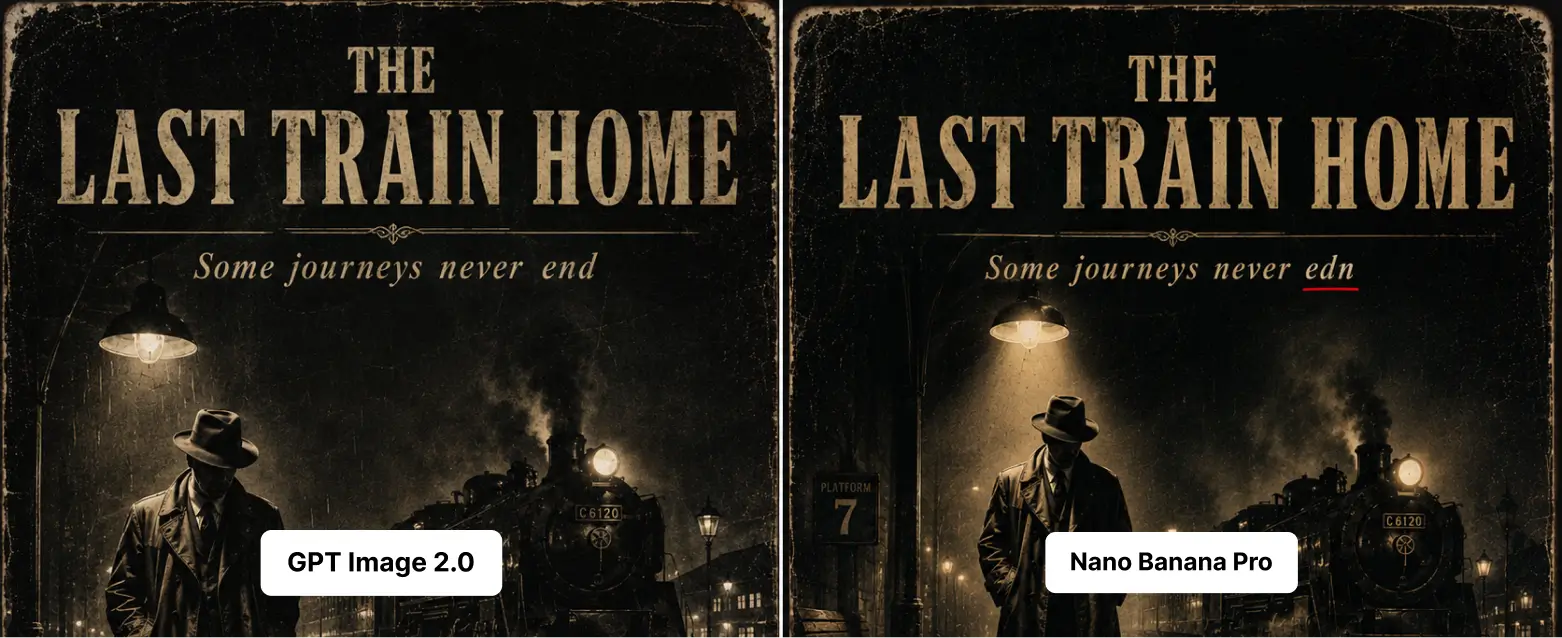
If your work involves typography — book covers, menus, social posts with copy, branded assets — GPT Image 2.0 is the more reliable choice in late 2025 and 2026. If you want a refresher on prompt-writing for text-heavy images, the team’s prompt tips post is genuinely useful here.
Round 4: Speed and cost
Speed isn’t just a vanity stat. When you’re iterating, every extra 15 seconds compounds.
Nano Banana 2: average around 10 seconds per image at standard quality. Fast. Really fast. I generated 40 variations of the same product in about 7 minutes one afternoon.
GPT Image 2.0: average 30 to 40 seconds at high quality, sometimes pushing 30 for complex scenes with text. Slower. But it tends to nail the prompt sooner, so you do fewer rerolls.
Net effect over a real working session? Roughly comparable. Nano Banana 2 generates faster per image. GPT Image 2.0 needs fewer attempts. They balance out unless your specific work massively favors one quirk over the other.
Cost-wise — and this is the part I love about MagicShot — it doesn’t matter. One subscription, both models, plus all the other tools. No API tokens to track, no separate Google Cloud billing, no dashboard juggling. You pick a model from the same dropdown.
Round 5: Which one wins per use case
Let me just lay this out plainly. Here’s what I’d reach for, depending on the job.
Pick GPT Image 2.0 for:
- Anything with text in it. Menus, posters, signage, invites, packaging copy.
- Multi-step prompts where order matters (“first do X, then Y, with Z in the background”).
- Editorial-feeling portraits with personality and styling.
- Scenes with specific spatial relationships between objects.
- Consistent character work across multiple frames.
Pick Nano Banana 2 for:
- Clean catalog product shots.
- Photorealistic portraits where skin and lighting accuracy matter most.
- High-volume iteration when you need 50 variations fast.
- Quick edits and reframes of existing images without melting the rest.
- Short, punchy stylized typography (logos, single-word art, big headers).
Honest limitations to know about
Neither model is perfect. Pretending otherwise wastes your time.
GPT Image 2.0 sometimes adds props you didn’t ask for. It has opinions. Cute when you want vibes, annoying when you don’t.
Nano Banana 2 occasionally loses faces across a series. It also still trips on long text strings — better than before, not yet flawless. And in my testing it sometimes over-smooths skin in ways that read “AI portrait” rather than photo.
Both still struggle with hands in extreme poses (the eternal hand problem isn’t fully solved), tiny background text, and very specific historical accuracy. If you need a 1923 Detroit street scene that’s actually accurate to 1923 Detroit, you’ll still be doing reference work yourself.
How MagicShot lets you use both
The whole reason I can compare these two as easily as I do is that I’m not bouncing between three platforms. Inside MagicShot, the AI Photo Generator includes both GPT Image 2.0 and Nano Banana 2 as selectable options. Same prompt screen, different model — generate, regenerate, switch, compare.
That alone changed how I work. When a prompt isn’t landing on one model, I duplicate it to the other in two clicks. No copy-pasting between tabs. No reformatting prompts for different APIs.
And you’re not just paying for image generation. The same subscription covers AI Image Editing, video models like Kling Omni and VEO 3.1, headshots, product photography, all of it. So when you generate a great shot in Nano Banana 2 and then need to swap a background or animate it into a video, you’re already inside the toolkit.
If you want a wider lens on how the underlying model families compare technically, this breakdown of FLUX and Stability AI models goes deeper into the architecture side.
So which is the best AI image model in 2026?
Honest answer? Neither, by themselves.
Actually, scratch that. The best AI image model in 2026 is the one that lets you use both without thinking about it. GPT Image 2.0 wins clearly on text and prompt adherence. Nano Banana 2 wins clearly on speed and photorealistic finish. Use them like two specialists on the same team.
That’s the boring, true answer. Pick the right tool for the job, ship faster, stop arguing about which logo deserves loyalty.
Try them both. Same prompt, both models, ten minutes. You’ll know within ten minutes which one fits which corner of your workflow. That’s the test that matters.
Frequently Asked Questions
In my tests, GPT Image 2.0 handles long blocks of text more reliably — menus, posters, packaging copy. Nano Banana 2 is closing the gap fast and wins on short, stylized typography, but if your image has a paragraph in it, GPT Image 2.0 is the safer pick right now.
Nano Banana 2 is noticeably quicker for me, usually 20 to 30 seconds for 2k per generation versus 30 to 40 seconds for GPT Image 2.0 at higher quality settings. If you’re iterating on dozens of variations, that speed difference adds up.
Yes. One MagicShot plan covers both GPT Image 2.0 and Nano Banana 2 along with the rest of the 56+ tools. You switch models from the same prompt screen, no separate billing or API juggling.
Nano Banana 2 tends to give cleaner studio looks with crisp shadows and accurate materials in fewer tries. GPT Image 2.0 is stronger when the product needs to sit in a styled lifestyle scene with people or branded text. Pick based on the shot type, not a blanket winner.
Mostly, but not exactly. GPT Image 2.0 reads long, descriptive prompts well and follows multi-step instructions. Nano Banana 2 prefers tighter, visual prompts with specific style keywords. Expect to tweak the same idea slightly when switching models.