Not every headshot needs to look like a LinkedIn post. That's the mistake most people make when they start using AI tools — they pick one safe style, generate 40 versions of the same boring corporate photo, and then wonder why their dating profile feels stiff. Different platforms want different vibes. The fix isn't shooting more. It's picking the right style for the right place.
Here's the breakdown I wish someone had given me before I burned through my first 200 credits on identical navy-blazer shots.
Why headshot style matters more than headshot quality
You can have the sharpest 4K image in the world. If the style doesn't match the platform, it's still wrong. A formal corporate headshot on a Tinder profile looks like a hostage photo. A beachy lifestyle shot on a law firm's About page looks unserious. Same face. Same lighting. Wildly different reactions.
This is the part most AI headshot tools skip over. They give you 'professional' as a single bucket. But.
Professional means something completely different to an investment banker than it does to a tattoo artist. Both are professionals. Both need headshots. Neither should use the same one.
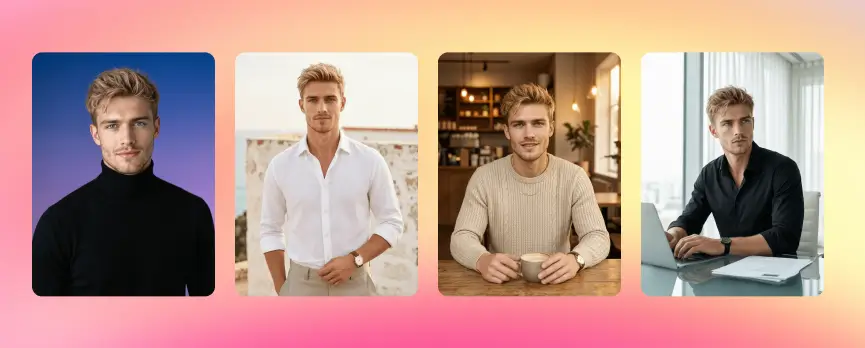
The five AI headshot styles that actually get used
After messing around with hundreds of generations across
headshot generator, these are the five that hold up. Everything else is a variation.
1. LinkedIn headshot style
This is the workhorse. Navy, white, or muted grey background. Soft front lighting. Slight smile, not a grin. Blazer or button-up. Shoulders square to camera or just barely angled.
The best background for a LinkedIn AI headshot is whatever doesn't compete with your face at thumbnail size. LinkedIn shrinks your photo to a tiny circle on the feed. If your background is a busy office with plants and brick walls, all that detail turns into noise. Solid color wins. Always.
Quick prompt formula that works:
- Subject in business attire
- Background: solid navy / white / soft grey
- Lighting: soft, even, slightly directional
- Expression: confident, mouth closed or barely smiling
- Framing: head and shoulders, eyes at upper third
2. Corporate headshot AI background
Different from LinkedIn. Slightly. Corporate headshots — the ones that go on a firm's team page — usually need a hint of environment. A blurred office. A muted boardroom. Something that says 'I work here' without screaming it.
For finance, legal, consulting, and exec roles: stay conservative. Dark suit. Clean blurred background. Neutral expression. No props.
For tech and startups: you can loosen up. Knit blazer over a t-shirt. Modern office with soft bokeh. Slight smile. The vibe is 'approachable but competent.'
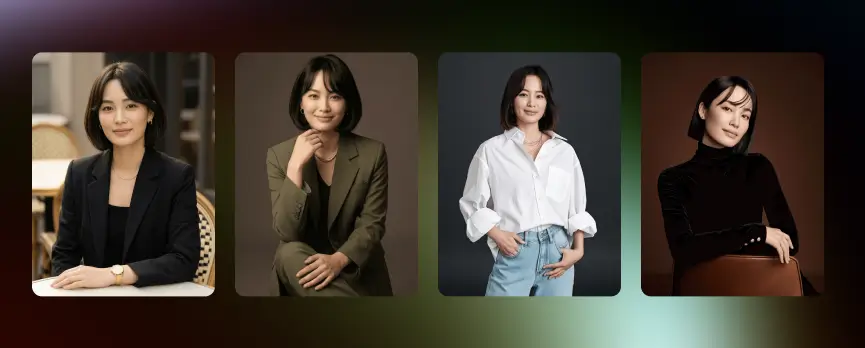
3. Dating app headshot — warm and casual
This one trips people up. They think 'casual' means 'lower quality.' Wrong. Dating headshots should look like a friend with a good camera caught you on a great day. Not a studio shoot.
What works:
- Outdoor light, golden hour ideally
- A real smile (teeth visible, eyes crinkled)
- Background with depth — a park, a street, a cafe — but blurred
- Casual clothes that fit well, not formal
- No suit. No tie. No corporate energy.
The whole point is warmth. If your dating photo could double as a LinkedIn shot, it's too stiff. Generate something that feels like a candid.
Better dating photos pull more matches — there's actual data on this and the gap is bigger than you'd expect.
4. Creative freelancer style
Designers, writers, photographers, makeup artists, stylists — anyone whose brand IS their personality. These need to break the formal mold without going chaotic.
Colored backgrounds work here. Mustard yellow. Terracotta. Deep teal. A textured wall. Something with character. Outfits can have personality — a leather jacket, a printed shirt, statement glasses. Lighting can be moodier.
The trick is consistency. If you're a brand designer, your headshot should feel like your brand. If your portfolio is minimal black and white, don't suddenly show up in a flowery garden shot.
Different rules entirely. Casting directors don't want corporate. They don't want stylized. They want a clear, neutral, expressive read of your face that they can imagine in any role.
Natural light. Plain background (often grey or muted color). Minimal makeup look. Multiple expressions — neutral, warm, intense. The clothes should be simple and not date the photo.
For actors specifically, you usually need a few variations: commercial (warm, smiling, friendly) and theatrical (more serious, dramatic). Generate both.
The Portrait Series tool is built for exactly this — multiple looks from one set of inputs.
Here's a cheat sheet I keep saved.
| Where it's going |
Style |
Background |
Outfit |
| LinkedIn |
Formal |
Solid neutral |
Blazer / button-up |
| Company team page |
Formal-environmental |
Blurred office |
Business attire |
| Personal website |
Casual-pro |
Soft outdoor or studio |
Smart casual |
| Dating apps |
Casual warm |
Outdoor, blurred |
Everyday clothes |
| Speaking / podcast |
Stylized |
Colored or branded |
Personality-forward |
| Acting / modeling |
Natural neutral |
Plain |
Simple, no logos |
| Resume / CV |
Formal |
White or grey |
Conservative |
The thing nobody tells you: most people only need one good headshot. But.
If you're job hunting, dating, AND building a personal brand at the same time? You need three or four. Generating them in one batch is way faster than coming back every few weeks.
Backgrounds that work and ones that don't
Backgrounds make or break the photo. Really. I've seen great faces ruined by terrible background choices.
What works:
- Solid colors — navy, charcoal, soft grey, off-white, deep green
- Soft gradients (very subtle)
- Heavily blurred environments where you can't read individual objects
- Textured neutrals — concrete, brick, plaster — but only when the texture is muted
What doesn't:
- Busy office shots with too much going on
- Pure black (kills depth, looks AI-generated immediately)
- Bright pure white (blows out, makes you look like a passport photo)
- Overly colorful patterns behind your head
- Anything trendy that'll feel dated in 18 months
For a corporate headshot AI background specifically: stick with desaturated colors. Muted. Slightly cool tones photograph as 'serious and trustworthy.' Slightly warm tones read as 'approachable.' Pick based on what you do.
How to generate all five styles in one session
This is where it actually saves you time. Most people generate one style at a time, get bored, and stop. Then weeks later they realize they need a different version for a different platform.
The smarter workflow:
- Upload your reference photos (5–10 selfies, varied angles, good light)
- Generate the LinkedIn-style batch first — that's your foundation
- Switch the prompt to corporate / casual / creative without re-uploading
- Pull the best 2–3 from each style
- Run them through an upscaler if you want print-quality versions
You can do all of this in roughly 15–20 minutes if you've got the reference photos ready. Compare that to a real photoshoot — you're looking at a half-day minimum, plus editing time, plus the awkwardness of pretending to be relaxed in front of a stranger with a camera.
The cost gap between AI and traditional photoshoots is huge once you do the math.
The most common mistakes I see
People over-edit. They turn the saturation up, smooth the skin until they look like wax, and add fake bokeh that doesn't match the lighting. Stop. The best AI headshots look like real photos because they don't try too hard.
People pick the wrong reference photos. If you upload 10 selfies all taken at arm's length with bad lighting, the AI has nothing good to work with. Mix it up — different angles, different lighting, different expressions.
People stick with one style for everything. Already covered this but it bears repeating. One headshot for everything is like one outfit for every occasion. It works. Barely.
And people forget to check the small details. Ear shape. Hair edges. The shape of glasses arms. Hands if they're visible. AI still messes these up sometimes. Zoom in before you commit.
Pick a style. Then pick another.
The whole 'best AI headshot style' question only makes sense once you know where the photo is going. LinkedIn wants navy. Dating wants warmth. Corporate wants quiet authority. Creative wants personality. Actors want range.
Generate a few. Mix them. Update them every year or so. Your face changes. Your style changes. Your headshots should keep up.
Get the formal one done first. Then go play.