Most AI prompts fail before the model even processes them. They're vague. Or stuffed with adjectives that fight each other. Or written like a Google search instead of a creative direction.
And then people blame the AI.
I've spent way too many hours fixing bad prompts (mine and other people's) so this guide is the version I wish I'd had when I started. We're going to cover why beginner prompts fail, the 5-part formula that actually works, ten real examples you can steal, style modifiers, negative prompts, and a few tips specific to MagicShot's
AI photo generator.
No fluff. Let's go.
Why Beginner Prompts Fail (Almost Always)
Here's the pattern. New user types:
'beautiful woman, professional photo'. Hits generate. Gets something that looks like a stock photo from 2014. Then assumes the tool is broken.
The tool isn't broken. The prompt is starving.
Three reasons most beginner prompts flop:
- Too vague. Words like 'beautiful' or 'amazing' mean nothing to a model. They're filler. The AI needs concrete nouns and specific adjectives.
- No style anchor. If you don't say what kind of image you want — photo, oil painting, anime, 3D render — the model picks something average. Average is bad.
- Conflicting descriptors. 'Hyperrealistic cartoon dreamy soft cinematic editorial' is six different vibes shoved into one prompt. The model splits the difference and gives you mush.
Fix those three things and your hit rate doubles. Maybe triples.
One more thing. Why my AI prompts aren't working is sometimes just bad luck with the seed — same prompt, two clicks, different results. Run it three times before you blame yourself.
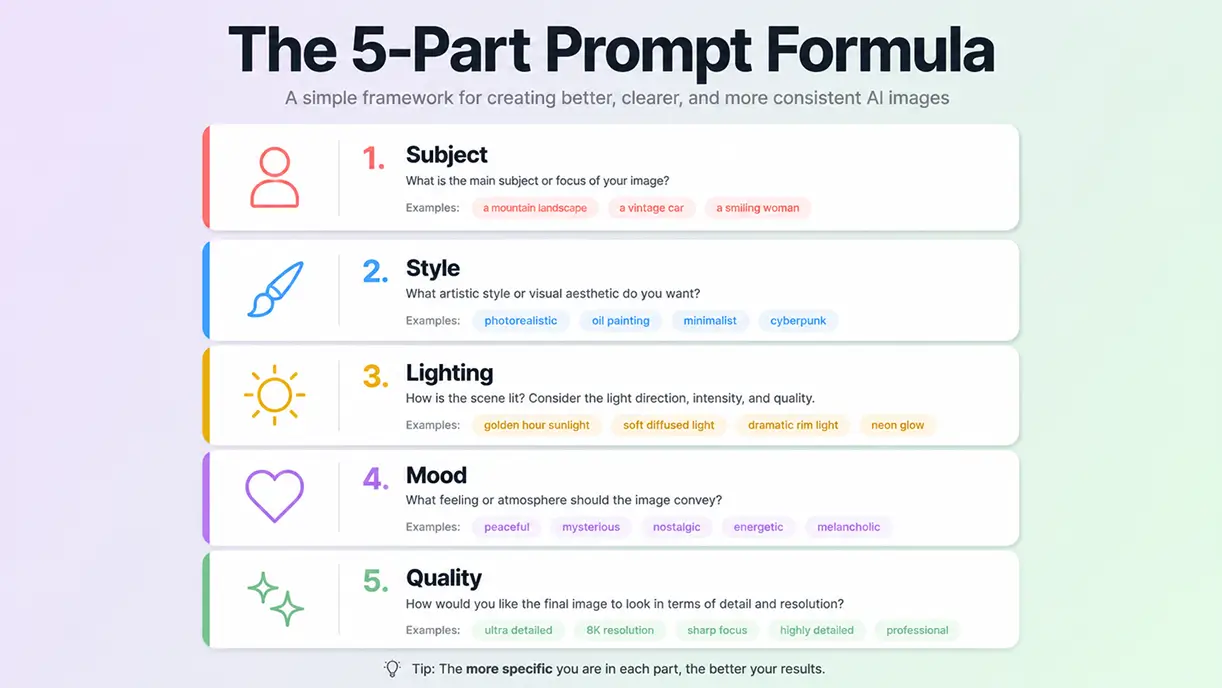
This is the structure I default to for almost every image. Subject, style, lighting, mood, quality. In that order.
It works because it mirrors how a photographer or art director would brief someone. Who is in the shot, how should it look, where is the light coming from, what should it feel like, and how polished does it need to be.
1. Subject
Be specific. Not 'a man' but 'a 35-year-old man with a beard wearing a navy wool coat.' The more concrete, the better the model anchors.
2. Style
Pick one main style. Photograph, illustration, oil painting, 3D render, watercolor, anime, cinematic still. Reference a medium or a known visual genre. 'Editorial fashion photography' is a style. 'Beautiful' is not.
3. Lighting
Lighting changes everything. Golden hour, studio softbox, neon backlight, overcast natural, candlelight, harsh midday sun. Pick one and commit.
4. Mood
One or two words. Melancholic. Joyful. Tense. Dreamy. Quiet. Mood shapes color grading and composition more than people realize.
5. Quality
The technical stuff. '8K, sharp focus, 50mm lens, shallow depth of field' for photos. 'Highly detailed, intricate linework, masterpiece' for illustrations. Don't overload — three to four quality terms is enough.
10 Real Prompt Examples You Can Steal
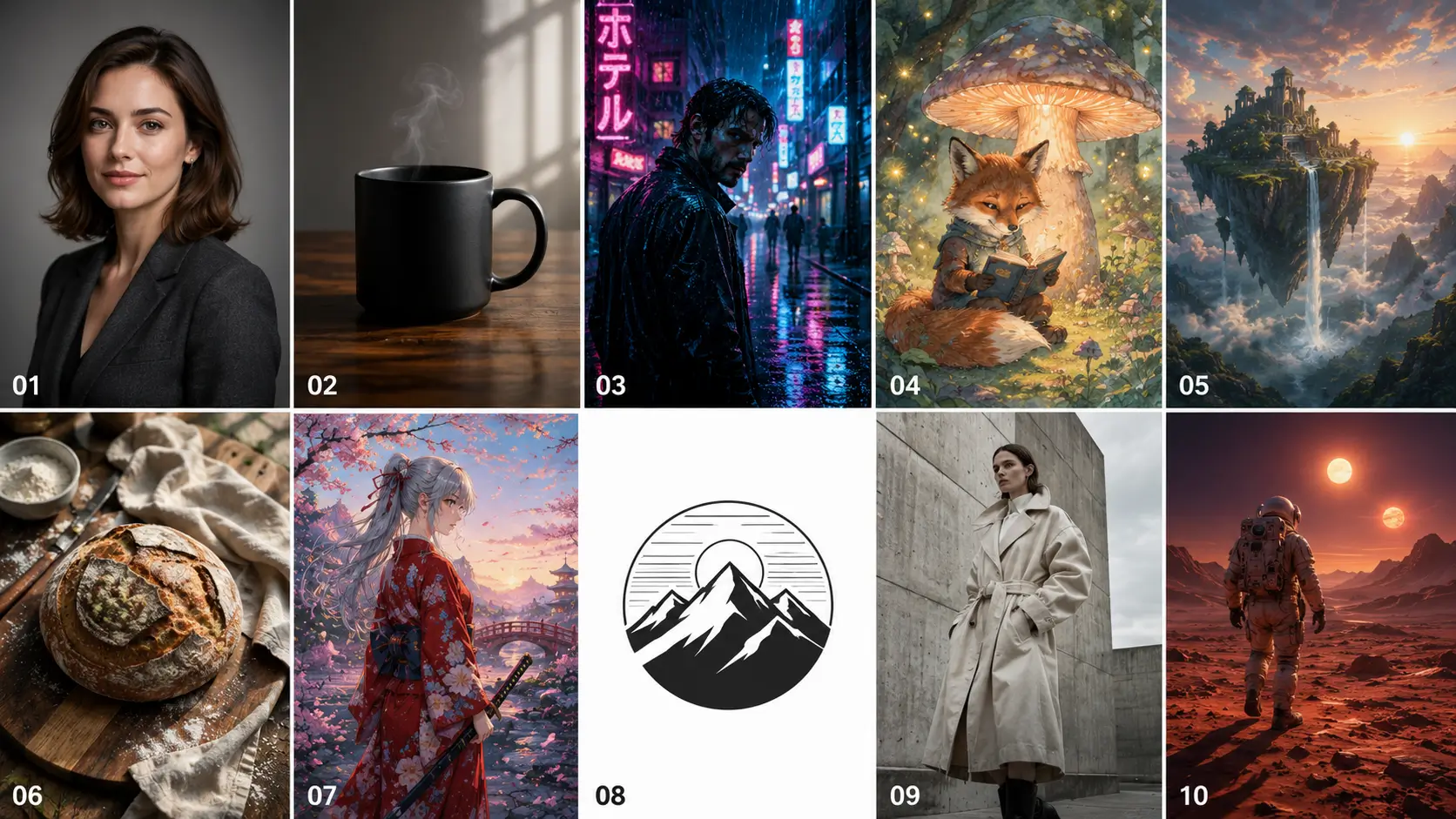
Theory is fine. Examples are better. Here are ten prompts that actually produce good results, sorted by use case.
1. Professional Headshot
'A 30-year-old woman with shoulder-length brown hair, wearing a charcoal blazer, neutral gray studio background, soft three-point lighting, confident calm expression, editorial portrait photography, 85mm lens, sharp focus, 4K.'
2. Product Shot
'A matte black ceramic coffee mug on a polished walnut surface, soft window light from the left, single steam wisp rising, minimalist commercial product photography, shallow depth of field, sharp focus, photorealistic.'
3. Cinematic Portrait
'A man in his 40s standing in a rain-soaked Tokyo alley at night, neon pink and blue reflections on wet pavement, leather jacket, melancholic mood, cinematic still in the style of Blade Runner 2049, anamorphic lens, film grain.'
4. Illustration / Children's Book
'A friendly orange fox reading a tiny book under a glowing mushroom, forest at twilight, fireflies in the background, soft watercolor illustration, warm cozy mood, hand-drawn linework, pastel color palette.'
5. Fantasy Landscape
'A floating island with a waterfall pouring into clouds, ancient stone temple at the center, sunrise breaking through mist, epic fantasy concept art, painterly style, vibrant atmospheric color, highly detailed.'
6. Food Photography
'Top-down shot of a freshly baked sourdough loaf on a linen cloth, scattered flour, a wooden cutting board, natural morning light from a window, rustic kitchen mood, food magazine style, sharp focus, shallow depth of field.'
7. Anime Character
'A young swordswoman with silver hair in a red kimono standing on a cherry blossom bridge, petals falling, dawn light, anime illustration in the style of Makoto Shinkai, soft glow, vibrant colors, highly detailed background.'
8. Logo Concept
'Minimalist line-art logo of a mountain with a sun rising behind it, monochrome black on white background, geometric, balanced composition, vector style, clean lines.'
9. Editorial Fashion
'A model in an oversized cream trench coat, standing in front of a brutalist concrete wall, overcast soft daylight, high-fashion editorial mood, Vogue-style photography, 50mm lens, muted color palette, sharp focus.'
10. Sci-Fi Scene
'An astronaut walking across the surface of a red desert planet, two suns setting on the horizon, footprints behind, dust particles in the air, cinematic sci-fi concept art, warm orange and deep purple color grading, highly detailed.'
Notice the pattern. Subject. Style. Lighting. Mood. Quality. Same formula, different output.
Style Modifiers That Actually Work
This is where prompts go from okay to good. Style modifiers are the words that lock the model into a specific visual language.
Some of these are overused (looking at you, 'trending on artstation'). Some still work great. Here's what's actually pulling weight in late 2025 and into 2026.
Photography modifiers
- Lens types: 35mm, 50mm, 85mm, fisheye, macro, wide-angle
- Film stocks: Kodak Portra 400, Fuji Velvia, Cinestill 800T
- Lighting setups: Rembrandt lighting, golden hour, blue hour, softbox, ring light
- Camera positions: top-down, low angle, dutch angle, over-the-shoulder
Illustration modifiers
- Mediums: watercolor, gouache, ink wash, digital painting, pencil sketch, oil on canvas
- Artists/styles: Studio Ghibli style, Moebius, art nouveau, ukiyo-e, mid-century modern
- Detail level: highly detailed, intricate linework, painterly, loose brushstrokes
Cinematic modifiers
- cinematic still, anamorphic lens, film grain, color graded, shot on 35mm film
- Style references: Wes Anderson symmetry, Denis Villeneuve atmosphere, A24 mood
One rule. Don't stack more than three style modifiers. They start canceling each other out.
Also worth checking out — our deeper breakdown on
10 tips for writing effective AI prompts goes into modifier combinations in more detail.
Negative Prompts: What to Skip
Negative prompts tell the model what NOT to include. Useful, but overrated.
Most people pile on twenty negatives and wonder why nothing changes. The model is already trying to make a good image. You don't need to tell it 'no ugly, no bad, no low quality' — those don't really do much.
Here's what actually helps:
- Anatomy fixes: 'no extra fingers, no deformed hands, no extra limbs'
- Composition: 'no cropped face, no cut-off edges'
- Unwanted elements: 'no watermark, no text, no signature' (unless you want text — more on that in a sec)
- Style exclusions: if you keep getting cartoonish results when you wanted photo, add 'no illustration, no cartoon'
Three to five negatives. That's the limit. More than that and you start fighting the model.
Text in Images: A Quick Note
If you want readable text in your image — a sign, a poster, a logo — most general image models still struggle. They'll generate gibberish letters that look like text but aren't.
For anything text-heavy, use the
AI Ideogram Generator. It's built specifically for accurate text rendering. Way less frustrating than wrestling with a general model.
MagicShot-Specific Prompt Tips
If you're using MagicShot's tools, a few things will save you time.
Pick the right model for the job
MagicShot lets you switch between Nano Banana 2, GPT Image 2.0, and Seedance 5 Lite. They're not interchangeable. Each model has a specific strength - and using the wrong one for the job costs you time, generations, and results.
| Model |
Best for |
Weakness |
| Nano Banana 2 |
Speed, iteration, social media output, consistent realism across benchmarks |
Fine detail in complex scenes |
| GPT Image 2.0 |
Conversational refinement, typography accuracy, photorealistic portraits, branded assets |
Cost adds up at high volume |
| Seedance 5 Lite |
Legible text on posters, flyers, menus, book covers, any text-heavy image work |
Less strong on photorealistic human portraits |
Use the right one and your prompt does half the work. Use the wrong one and no prompt will save you.
Iterate, don't restart
When you get a result that's 70% there, don't rewrite the whole prompt. Tweak one variable. Change the lighting. Or the lens. Or swap one style modifier. You learn what each part of your prompt is actually doing that way.
Save your wins
When a prompt works, copy it. Keep a personal swipe file. After a couple weeks you'll have your own template library that's better than any list someone else gives you.
Common Prompt Mistakes (And the Fixes)
Quick hit list. Things I see all the time.
- Mistake: 'A photo of a man.' Fix: Add age, clothing, expression, setting, lighting.
- Mistake: Listing 15 adjectives. Fix: Cut to 4 strong ones.
- Mistake: Mixing photo and painting in one prompt. Fix: Pick one medium per generation.
- Mistake: Using vague mood words like 'cool' or 'nice.' Fix: Use specific mood words — moody, serene, electric, somber.
- Mistake: Expecting the first try to be perfect. Fix: Generate 4-6 variants and pick the best.
What Good Prompts Have in Common
After thousands of prompts, here's the pattern I notice in the ones that work.
They're specific. They commit to one style. They have one clear subject. They include lighting. They use 4 to 8 visual descriptors, not 30. And they read like a director's brief, not a thesaurus exploded.
If you're new to all this, start with our
beginner's guide to AI-generated images and then come back to this one. The two together cover most of what you need.
And honestly? The fastest way to get better at prompts is volume. Write twenty prompts today. Tweak ten of them tomorrow. Three weeks in, you'll be writing prompts that work on the first try more often than not.
Stop describing what's pretty. Describe what's there.
That's the whole game.