



How to Put Yourself in Famous Landmarks and Locations Using AI
- MagicShot Features
- 8 min read
- Published: June 10, 2026
- Harish Prajapat
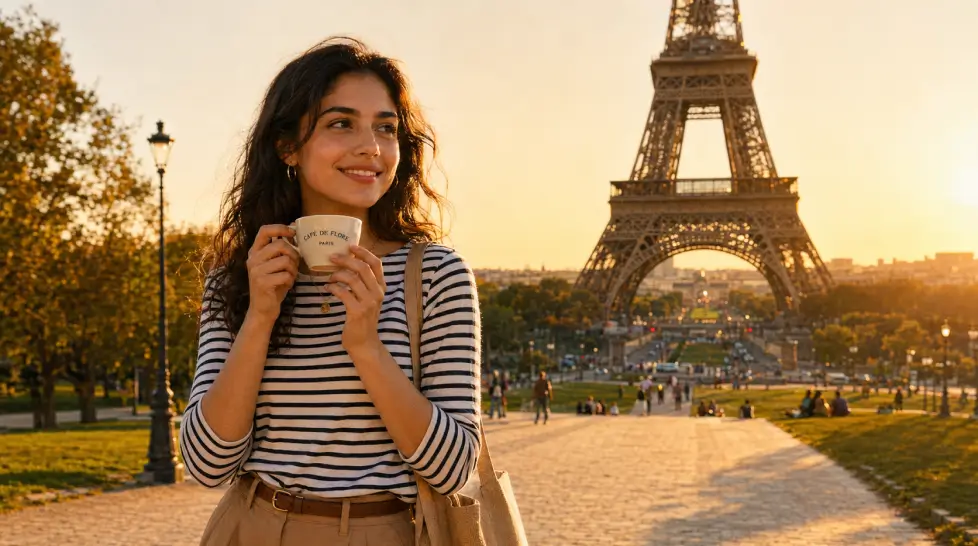
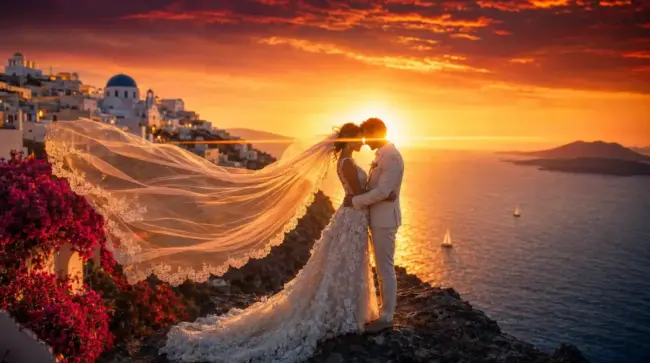
You don’t need a passport to post a Santorini photo anymore.
That’s the wild part. A few years ago you’d have to actually fly to Greece, find that one blue-domed church everyone shoots, fight tourists for the angle, and pay for the trip. Now you upload a selfie, pick the location, and 30 seconds later you’re standing on a cliff above the Aegean. Looking great. With perfect light.
Is it cheating? Maybe a little. But also — who cares.
What an iconic locations AI photo actually is
Here’s the basic idea. You give the AI a photo of your face (or a full-body shot, even better), then you choose a landmark. The model takes your likeness, places it into a generated scene of that location, and matches the lighting, perspective, and shadows so it looks like you were actually there.
It’s not face swap. It’s not a Photoshop cutout pasted onto a stock photo either. The whole image is generated around you, which is why it tends to look more believable than the old paste-and-pray method.
The good models — the ones running inside MagicShot’s Iconic Locations tool — handle the tricky bits. Hair edges. The way fabric catches sunlight. Whether the shadow on your cheek matches the direction of the sun in the background.
That’s where it used to fall apart. Not anymore. Mostly.
Best landmarks you can drop into
MagicShot has a long list, but these are the ones people actually use:
- Eiffel Tower — Paris is still the most-requested. By a mile.
- Santorini — blue domes, white walls, that infinity pool shot
- Times Square — neon lights, yellow cabs, the New York thing
- Maldives — overwater bungalows, turquoise water, hammocks
- Burj Khalifa — Dubai skyline at sunset hits different
- Taj Mahal — the symmetry shots are unbeatable
- Colosseum — Rome at dusk, warm stone
- Tokyo Shibuya Crossing — that crowd, those signs
- Machu Picchu — green mountains, misty mornings
- Northern Lights in Iceland — surprisingly hard to fake well, but this works
Each one has its own preset lighting and camera angle baked in. You don’t have to think about it. Pick the spot, and the AI handles the cinematography.
Step-by-step: how to make one
Three minutes, start to finish. Sometimes less.
1. Pick your selfie
This is the part most people get wrong. Don’t upload the photo where you’re squinting into the sun at a barbecue. Use something clean. Front-facing or slight angle. Good lighting. No sunglasses if you want your eyes in the final shot (and you do, because eyes are what sell realism).
If you have a full-body shot, even better. You can keep your outfit, your posture, all of it.
2. Choose the location
Inside the Iconic Locations tool, you’ll see thumbnails. Tap the one you want. If you’ve ever wondered how AI puts you in tourist locations, this is the moment it happens — your photo gets analyzed and the AI starts building the scene around your features.
3. Pick the vibe
Some tools let you tweak time of day, weather, and crowd density. Golden hour at the Eiffel Tower looks different from blue hour. Empty Times Square versus packed Times Square. Choose what fits the story you want to tell.
4. Generate and wait
About 20 to 40 seconds. Sometimes longer if the servers are busy.
5. Regenerate if needed
First result not perfect? Hit regenerate. The model will give you a variation. I usually try 2 or 3 before settling.
Realism tips that actually matter
Here’s where most AI travel photos go wrong: the lighting doesn’t match. Your face was shot indoors with flat overhead light, and now you’re supposedly standing on a cliff in Mykonos at sunset. Brain notices. Even if it can’t say why.
So.
Match the light direction. If the location is a golden hour shot, use a selfie taken in warm, low-angle light. If it’s a moody Tokyo street at night, use something with cooler tones or shot in low light.
Don’t over-filter your input. Heavy Instagram filters on your source photo confuse the model. It can’t tell what your real skin tone is, and the composite ends up looking plastic. Raw photos work better.
Watch the angle. If you’re supposedly looking at the Eiffel Tower, but your head is tilted down at a phone, something’s off. Pick a selfie where you’re looking forward or slightly up.
Consider your outfit. A hoodie in front of the Taj Mahal is fine. A hoodie in front of a Maldives overwater bungalow looks weird. Match the climate, basically.
Check the shadows. If the generated scene has a sun coming from the left, your face shadow should fall to the right. Most modern AI handles this automatically, but it’s worth a final glance before posting.
One more thing — if you want a polished, lifestyle-influencer feel, try running the result through Face Enhancer after. It sharpens the eyes and cleans up any softness the generation might have introduced.
Social media use cases
People use this for more than vanity. Well. Mostly vanity. But also for actual stuff.
Travel bloggers use AI iconic locations to mock up content schedules before a trip, or to fill gaps in their feed when they’re between destinations. Or — and let’s be honest — to pretend they went somewhere they didn’t.
Dating profile photos. A few “travel” shots in your lineup work harder than another mirror selfie. Strategic. Effective. Maybe a little dishonest. Your call.
Brand collabs and pitch decks. If you’re pitching a travel brand or hospitality company, having on-brand visuals ready makes the pitch hit harder.
Birthday cards and gifts. Drop your grandma in front of the Colosseum. She’ll lose her mind. Print it big.
YouTube thumbnails. Travel vloggers fake-shoot thumbnails all the time. AI just makes it faster.
Holiday cards. If you’re doing themed family photos, AI iconic locations pair nicely with holiday portrait generation. Same selfie, different vibes.
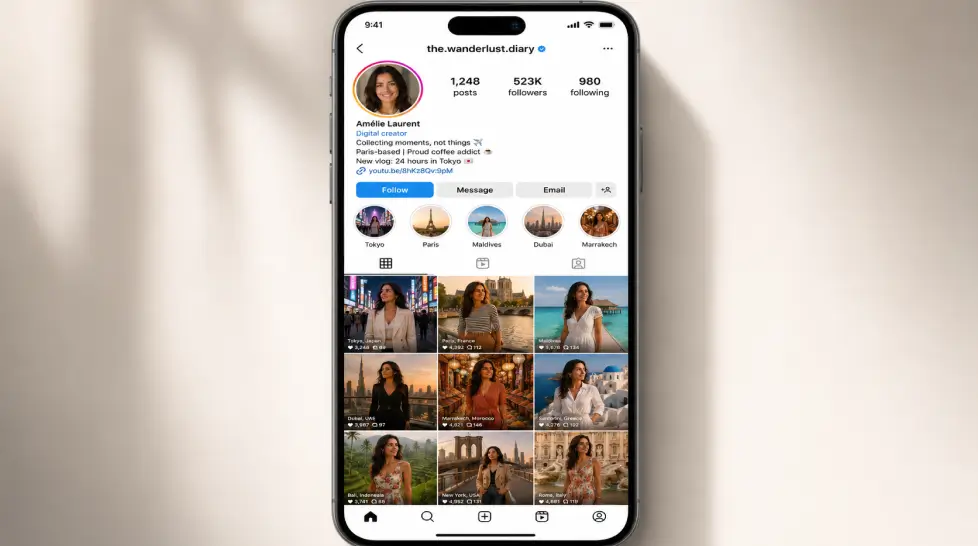
Pair it with AI Instagram Lifestyle for a full feed
One AI travel photo is fine. A whole curated lifestyle feed is something else entirely.
The trick is consistency. If your face looks slightly different in every photo, the illusion breaks. People scrolling notice. They don’t always realize what they’re noticing, but they sense it.
That’s why I usually recommend pairing Iconic Locations with the AI Instagram Lifestyle generator. Same source photo, multiple outputs, consistent face across the whole batch. You get the cafe shot, the beach shot, the rooftop bar shot, the airport shot — all of you, all believable.
And if you want even wilder scenes — fantasy castles, snowy mountains, sci-fi cities — the AI Adventure Generator handles that. Iconic Locations is for real places. Adventure Generator is for everywhere else.
Use both. Mix the feed up. Real-feeling travel shots, plus the occasional “on a hike in Patagonia” moment.
The honest limitation
It’s not perfect.
Sometimes the hands come out weird. Sometimes the AI adds a strap to your bag that wasn’t there, or invents a piece of jewelry, or gives you a watch when you weren’t wearing one. Tiny stuff. But if you’re going to post a high-resolution image, zoom in first. Check the fingers. Check the ears. Check the edges where your hair meets the background.
And realism varies by landmark. Eiffel Tower and Santorini look incredible. Some of the less-photographed locations have less training data, so the backgrounds can feel a bit generic.
That’s the honest answer. It’s not magic. It’s really, really good — but you still want to give it a good source photo and check the final result before hitting post.
Try it without overthinking
You can stand on the Great Wall in five minutes. You can have a Times Square selfie before your coffee gets cold. You can build an entire fake vacation. Whether that’s ethical is a different conversation — but the tool exists, it works, and it’s free to try.
Pick a location. Upload a photo. See what happens.
The worst case is you regenerate twice. The best case is your grandma frames it.
Frequently Asked Questions
Upload a clear photo of yourself to MagicShot’s Iconic Locations tool, pick Eiffel Tower from the location list, and let the AI composite you into the scene. Takes about 30 seconds.
Yes. MagicShot gives you free credits when you sign up so you can test the iconic locations feature before committing to a plan.
If you match the lighting in your selfie to the destination (golden hour photos work great for sunny landmarks) and use a clean, well-lit reference, most people won’t notice.
You can do both. Iconic Locations covers the famous spots, and AI Adventure Generator handles custom scenes like jungles, mountains, or fantasy environments.
A sharp, front-facing or three-quarter angle shot with even lighting and no harsh shadows. Avoid sunglasses, heavy filters, or busy backgrounds in the original.

Related blogs
Get the latest news, tips & tricks, and industry insights on the MagicShot.ai blogs.
June 10, 2026
AI Age Progression: See Yourself at Any Age with AI
June 9, 2026