How to See What Your Future Baby Will Look Like with AI
- How-to Guides
- 8 min read
- Published: June 9, 2026
- Harish Prajapat
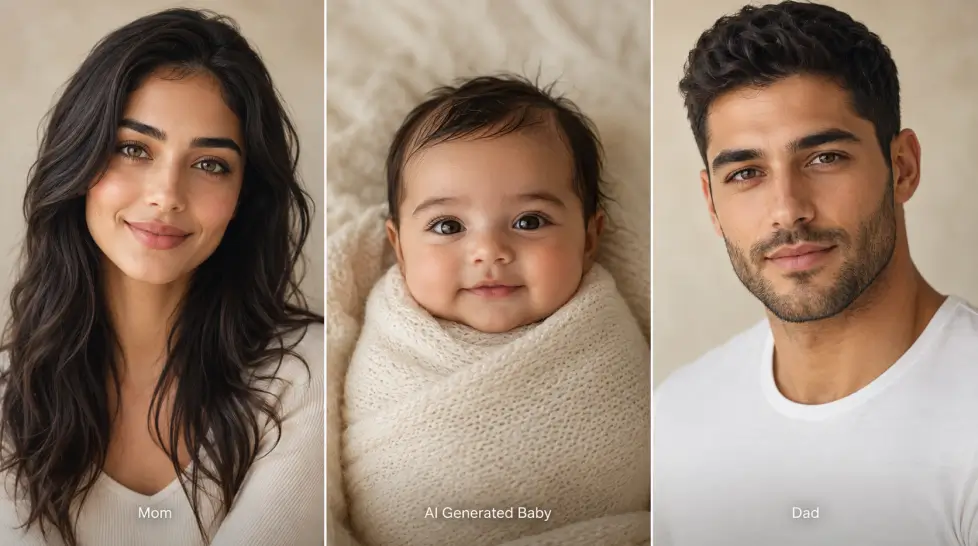
So you want to see what your future baby might look like. Without the whole, you know, having a baby part.
That’s basically what an AI future baby generator does. You upload two parent photos. The AI studies the faces — bone structure, eye shape, skin tone, hair texture, the little details — and stitches together a realistic baby face that mixes both. It’s not science. It’s pattern matching with a creative twist. But the results? Sometimes uncannily close to what real siblings or cousins actually look like.
I’ve tested a bunch of these tools. Most are mediocre. A few are weirdly good. Below I’ll walk through how they actually work, what makes a result believable, and how to get a decent baby photo out of MagicShot in a couple of minutes.
How an AI baby generator actually works
Here’s the short version. The model has been trained on millions of face images — parents, babies, kids of all ages and ethnicities. It learns which features tend to inherit visually. A round face here, a sharp jawline there, the way certain noses sit between certain brow shapes.
When you upload two photos, the AI does three things:
- Detects each face and maps the key landmarks (eyes, nose, mouth, jaw, hairline)
- Pulls visual features that commonly carry through generations
- Generates a new baby face that combines those features in a believable way
It’s not predicting genetics. Let’s be clear about that. Two brown-eyed parents can have a blue-eyed kid in real life. The AI doesn’t know that. It works off visuals only. So if both your photos show brown eyes, the baby will too.
Still. The results look like a real baby. That’s the part that surprises people.
What you actually need before you start
Two photos. That’s it. But the quality of those two photos basically decides everything.
Good photos to use:
- Front-facing, both eyes visible
- Natural light or soft indoor light (no harsh shadows)
- Face takes up at least half the frame
- No sunglasses, no heavy filters, no costume masks
- Neutral expression or light smile works best
Photos that’ll waste your time:
- Selfies from across the room
- Anything with a Snapchat filter still baked in
- Side profiles or three-quarter angles
- Group photos where you need to crop tightly
- Black and white pics (the AI guesses skin tone and it’s usually wrong)
Pro tip nobody mentions — match the lighting between the two photos if you can. If one parent is in golden hour sunlight and the other is under fluorescent office light, the baby’s skin tone gets confused. Same general lighting = cleaner result.
How to use the AI future baby generator on MagicShot
This part’s quick. Honestly, the upload takes longer than the generation does.
Step 1: Open the tool
Head to the AI Baby Generator on MagicShot. You’ll see two upload boxes — one for each parent. No account needed to look around, but you’ll want one to download high-res.
Step 2: Upload both parent photos
Drag and drop, or click to browse. The tool accepts JPG, PNG, and most common formats. Each photo should be under 10MB. The system will auto-detect the face and crop in.
Step 3: Pick gender (optional)
You can let the AI choose, or specify boy or girl. Some couples like generating both just to compare.
Step 4: Hit generate
Takes about 20 to 40 seconds. You’ll get a baby face that blends both parents. If the first result feels off, regenerate — the model produces slightly different variations each time, and the second or third try is often the keeper.
Step 5: Download or share
Save the image, share it with your partner, send it to the group chat that’s been asking. Done.
About accuracy. Let’s be honest.
Here’s where I have to push back on the marketing. Every AI baby tool claims to be accurate. None of them really are, in the genetic sense.
What they’re actually good at:
- Producing a baby that looks like it could belong to those two parents
- Blending facial proportions in a believable way
- Picking up obvious features — strong eyebrows, distinctive nose, dimples
What they can’t do:
- Predict recessive traits (red hair, blue eyes from brown-eyed parents)
- Account for grandparents or other genetic factors
- Tell you anything real about your future child
If you compare AI babies to actual babies from the same parents (yes, people do this), the resemblance is hit or miss. Sometimes shockingly close. Sometimes nowhere near. That’s just how it goes.
So treat it as entertainment, not prophecy. The fun is in the surprise, not the science.
The fun ways couples are actually using this
People aren’t just doing this once and moving on. There’s a whole pattern of how couples — and friends, and roommates being weird at midnight — actually use these tools.
Gender reveal teasers
Generate a baby with each gender setting and use both images in a reveal video. It’s less polished than a professional shoot but way more personal. And cheaper.
Pregnancy announcements
Real photo of the ultrasound + AI prediction of what baby might look like = a post your family will lose their minds over.
Just for fun on date night
This is the big one. Couples use it as a curiosity thing — maybe over wine, maybe early in a relationship as a joke, maybe years in just to see. There’s something weirdly bonding about staring at a face that’s supposedly part you and part them.
Best friend baby
You and your closest friend generate a hypothetical kid. It’s a meme at this point. And honestly? Funny every time.
Family heritage projects
Upload a grandparent and a grandchild. Or two siblings. See how the model interprets shared features. It’s not what the tool was built for, but it works.
Themed baby photos beyond just the face
Once you have the baby face, you can take it further with AI Baby Shoot — milestone themes, seasonal setups, storybook scenes. Some couples generate a full first-year of photos before the actual baby exists. Slightly chaotic. Also kind of sweet.
Privacy. This part matters.
You’re uploading face photos. Of yourself. Of your partner. That’s sensitive data, and you should care where it goes.
Things to check before using any AI baby tool:
- Are your photos stored after generation, or deleted?
- Are they used to train future models?
- Can you delete your account and all associated data?
- Is the platform a real company or a sketchy one-page site?
MagicShot handles uploads on a per-session basis, doesn’t sell user images, and doesn’t use customer photos for model training. The full privacy policy lives on the site if you want the legal version. But the short answer — your photos are yours.
Sketchy AI baby sites? Be careful. Some are clearly scraping uploads for their own data sets. If a tool has no contact info, no terms of service, and asks for way too many permissions, close the tab. Really.
What about free options?
You can absolutely try an AI future baby generator free. MagicShot offers free generations on signup, so you can test the tool with your photos before deciding if you want a paid plan. Paid plans get you more credits, higher resolution downloads, and access to the rest of the 56+ features — headshots, product photos, video tools, the whole stack — under one subscription.
If you only ever want the baby photo? Free tier handles it. If you’re a creator or want to play with the full creative suite? The paid plan is worth more than the price of one professional photoshoot. Way more.
One last thing
Don’t take it too seriously. An AI baby generator is a 2-minute moment of “oh that’s weird, that’s cute, that’s actually kind of us.” Not a window into the future.
But for a fun way to see future baby ai-style — or just kill an evening with someone you love — it’s hard to beat. Upload two photos. Hit generate. See what shows up.
That’s the whole pitch.
Frequently Asked Questions
It’s not a genetic forecast. AI baby tools blend visual features from both parents — eye shape, nose, skin tone, hair — and produce a plausible composite. Real genetics is way messier than that. Treat the result as a fun guess, not a medical prediction.
Clear, front-facing photos of both parents with good lighting, no sunglasses, no heavy filters, and faces taking up most of the frame. Two solid photos beat ten blurry ones every time.
On MagicShot, uploaded photos are used only to generate your output. They aren’t sold or used to train public models. Check the privacy policy for full details on storage and deletion.
Yes. The tool blends two faces regardless of relationship. Couples, friends, siblings — it works the same way. Lots of people use it just for fun, not as actual baby planning.