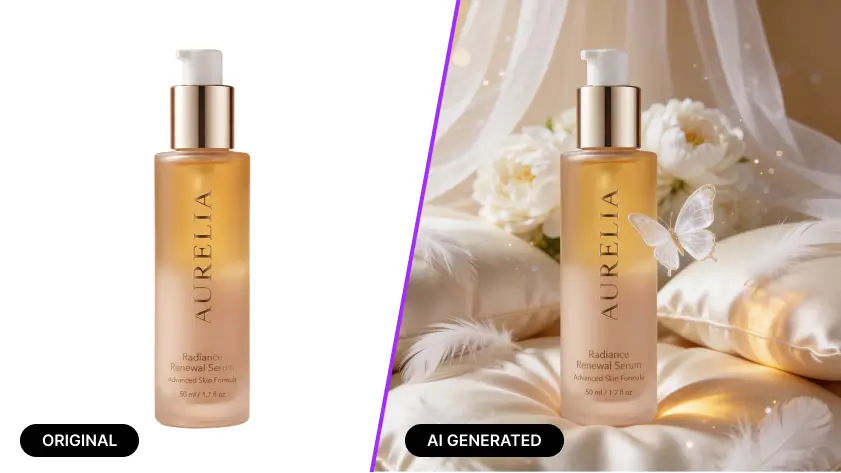
AI product photography lets you turn a normal captured product image into polished, studio-style visuals by combining your original photo with a simple description of the scene you want. Instead of booking a full product photoshoot, adjusting lights for an hour, and wondering why your bottle looks like it is sweating under a ring light, you upload the image, describe the background, mood, or campaign style, and generate realistic, sell-worthy product images in seconds.
That matters because shoppers rely heavily on product imagery. Baymard found that 56% of users start exploring product images as their first action on a product page, and its research also found that 25% of e-commerce sites still fail to provide product images with sufficient resolution or zoom. Google Merchant Center also recommends strong image quality, notes that images above 1024 pixels are considered high resolution, and recommends product images near or above 1500 x 1500 pixels for best performance across listing formats.
TL;DR
AI product photography helps you turn a normal product image into a studio-quality visual in seconds. With our AI Product Photography feature, you can:
Upload a simple captured product image
Describe the style, background, or shoot you want
Generate realistic, high-quality AI generated product images instantly
Result: polished product photos that are ready for e-commerce, product ads, and marketing without a traditional product photoshoot.
Why AI product photography matters now
Great product photography has always helped products sell, but the old workflow is slow, expensive, and hard to scale. Every new variant, seasonal campaign, ad format, and marketplace requirement can turn one photoshoot into ten. That is manageable for large brands with deep budgets. For everyone else, it is usually a stack of compromises wearing a confident smile.
AI product photography changes that workflow. Instead of rebuilding a set for every concept, you start with a usable product photo and use AI to generate the polished result you actually need. That makes it easier to create clean listing images, bold campaign visuals, seasonal creatives, and multiple styles for different channels without repeating the whole shoot from scratch.
This is especially useful in e-commerce because customers cannot touch the product. Adobe notes that product-only images help shoppers understand details like size, silhouette, and color, while Shopify highlights the continued importance of clean, high-quality e-commerce photography for selling online. In other words, your product image is doing part of the selling before your copy even gets a chance.
What our AI product photography feature actually does
Our feature is designed for people who have a normal captured product image but want a much better final result. You upload the product image, describe what kind of product shoot you want, and the tool creates an enhanced, realistic image based on your idea. That could mean a premium white-background packshot, a luxury shadow-rich studio frame, a bright skincare setup, a moody tech look, or an editorial-style campaign scene.
The real advantage is speed paired with creative control. You are not forced into one generic template. You can guide the outcome with your prompt, match your brand style, and create images that feel made for your store, your product ads, and your audience. That means less time fighting with backdrops and more time launching.
How to use AI product photography properly
Start with the clearest source photo you have. Your image does not need to be perfect, but the product should be visible, in focus, and separated from clutter as much as possible. If the original image is blurry, badly cropped, or too dark, even the best AI has to spend half its energy fixing chaos before it can create beauty.
Next, describe the result like a creative director, not a confused poet. “Make it nice” is technically a prompt, but it is not a helpful one. Better prompts mention the product type, background style, lighting mood, camera angle, realism level, and intended use case.
For example, instead of saying “create ad image,” say:
“Create a realistic studio product photoshoot for this perfume bottle on a soft beige background with luxury lighting, subtle shadow, reflective surface, and a premium beauty campaign look.”
Then generate a few directions instead of only one. One version may work for the PDP, another for product ads, and another for social. The smartest brands do not create one hero image and call it a day. They create a small visual system.
A simple workflow that gets better results
Use this order when creating ai generated product images:
Start with your clearest original image
Decide the use case before generating
Write a prompt with scene, lighting, angle, and mood
Generate multiple styles
Pick the most realistic option
Check color accuracy, edges, reflections, and label clarity
Resize or refine with an image enhancer if needed for platform requirements
This matters because Google’s current guidance emphasizes image quality and strong resolution, while Baymard’s UX research shows shoppers inspect images closely and often zoom in to evaluate details. Good creative is not only about aesthetics. It also needs to survive scrutiny.
Best prompts by category
Different products need different visual treatment. A single prompt style rarely works for everything.
Beauty and skincare
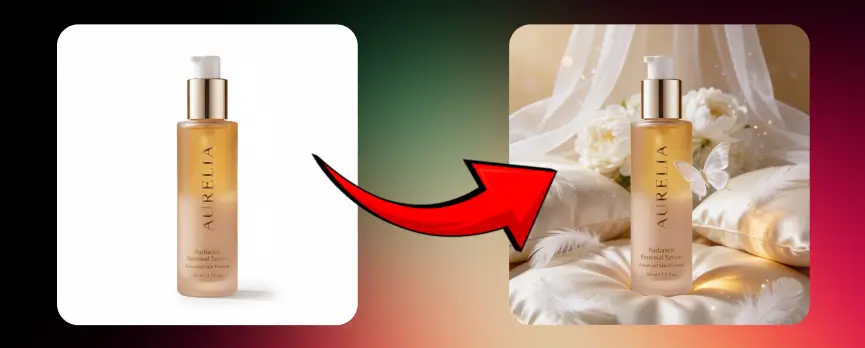
Beauty products benefit from softness, cleanliness, and premium detail. Think smooth backgrounds, elegant shadows, and reflections that feel intentional rather than accidental. A serum bottle can look expensive with a simple pastel surface, soft side light, and a fresh editorial composition.
Example prompt:
“Create a realistic skincare product photoshoot with soft natural lighting, clean cream background, gentle shadow, subtle reflection, and a premium wellness brand style.”
Jewelry and accessories
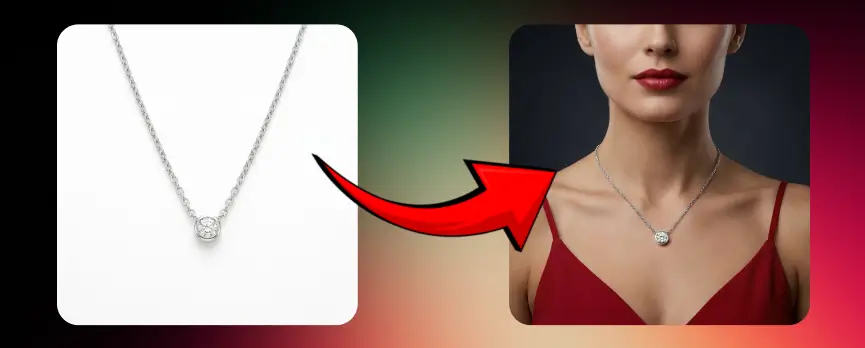
Jewelry needs precision. Tiny mistakes in highlights, edges, and texture are easy to notice. Keep the background simple and use prompts that emphasize realism, polished surfaces, and macro detail.
Example prompt:
“Generate a luxury jewelry studio image with crisp metallic highlights, soft dark background, sharp detail, elegant reflection, and premium editorial lighting.”
Food and beverage
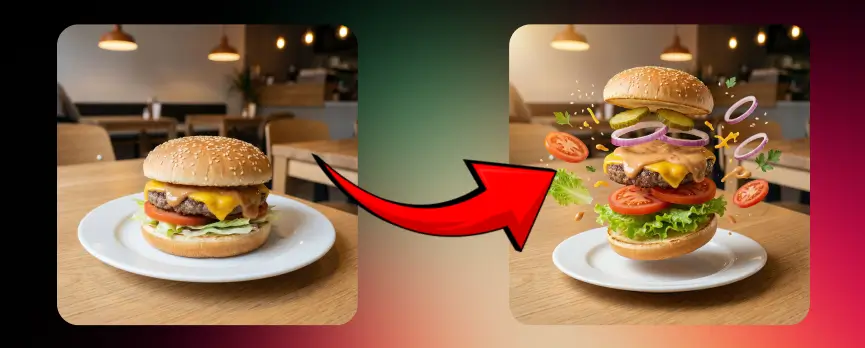
These products need appetite, freshness, and label clarity. Too much styling can make them look fake. Too little styling makes them look like they lost the will to compete.
Example prompt:
“Create a realistic beverage product image with bright commercial lighting, condensation detail, clean label visibility, vibrant color contrast, and a refreshing campaign look.”
Fashion accessories and small consumer goods
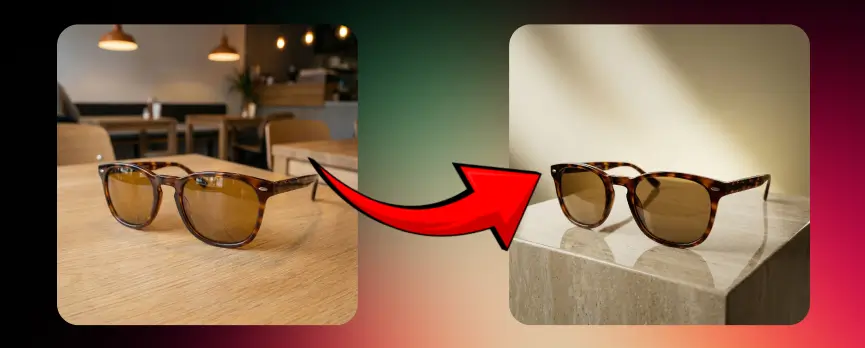
For items like sunglasses, watches, earbuds, candles, or phone accessories, modern minimal setups usually work best. Strong contrast, clean geometry, and controlled shadow can make simple products feel premium.
Example prompt:
“Create a modern studio product photo with directional lighting, clean background, defined shadow, realistic texture, and premium e-commerce styling.”
How it helps in different scenarios
For e-commerce product pages
Your store needs clean, accurate visuals that help people evaluate the item quickly. AI product photography helps create polished product photos without setting up a full studio every time. This is especially useful for catalogs with many SKUs, variants, or seasonal updates.
For catalog work where every product page needs to match, a dedicated tool like Nightjar keeps lighting and styling consistent across hundreds of listings.
For product ads
Ad creative needs stopping power. A plain packshot is useful, but product ads often need more mood, contrast, energy, and campaign styling. With AI, you can create ad-ready compositions around the same product image without reshooting. That means faster testing across Meta, Google, and marketplace creatives.
For marketplaces and feeds
Some platforms favor simple, compliant visuals. Google Merchant Center recommends strong image quality and clear presentation, and it disapproves images with obstructive text overlays in many cases. So while dramatic creative works for campaigns, your core feed images should still stay clear and product-first.
For social content and launches
When a new drop, holiday, or promo hits, you often need assets yesterday. AI product photography helps you create launch-ready visuals quickly without waiting on a full shoot schedule. That speed is useful for social teams, founders, solo sellers, and agencies juggling several brands at once.
For product video planning
Even if your current asset is a static image, strong AI-generated visuals can help define the look and direction for a future product video. You can use generated scenes as visual references, storyboard frames, or campaign mood starters. It is a smart bridge between still images and motion content.
Lighting tips that make your results look more expensive
Lighting is where average visuals become believable, premium, and clickable. Even when AI helps create the final scene, your source image and prompt should still respect lighting logic.
Use soft light for skincare, cosmetics, wellness, and lifestyle products
Use stronger directional light for tech, glass, metal, and luxury packaging
Keep shadows intentional rather than random
Match lighting to brand personality, bright and airy for fresh brands, darker and sculpted for premium or dramatic ones
Ask for realistic reflections only when the product surface suits them
Avoid overglow, neon spill, or dramatic lens effects unless the campaign truly needs them
Adobe recommends controlled environments and clean backgrounds for product shots, and Shopify’s guidance similarly emphasizes setup, lighting, and consistency. AI can make a scene look beautiful, but believable light still wins the argument with the customer.
What not to use
Some choices make AI product photography look less trustworthy, not more creative.
Blurry or low-resolution source images
Busy backgrounds behind the original product
Heavy text overlays on core shopping images
Unrealistic reflections that do not match the product shape
Wrong scale, floating shadows, or impossible angles
Over-stylized scenes for basic e-commerce listing images
Prompts that change the product itself instead of the environment around it
Google’s Merchant Center guidance is especially useful here. It recommends high-quality images, considers images above 1024 pixels high resolution, recommends images near or above 1500 x 1500 pixels for best performance, and flags issues like low image quality or obstructed product views. That is one reason clean inputs and realistic outputs matter so much.
When to use a clean packshot versus a styled AI scene
Use a clean packshot when the goal is clarity. This works best for marketplace listings, product pages, comparison views, and catalogs. Adobe notes that product-only imagery on a simple white background is commonly used for e-commerce because it helps shoppers focus on the item’s shape, color, and details.
Use a styled AI scene when the goal is persuasion. This works better for homepage banners, product ads, social campaigns, and hero visuals where mood and branding matter as much as the object itself. The smartest strategy is not choosing one over the other. It is using both on purpose.
Why realism matters more than flashy effects
Realism builds trust. If a generated image looks too synthetic, too glossy, or slightly off in shape, buyers notice. Maybe not consciously at first, but enough to hesitate. In e-commerce, hesitation is expensive.
That is why the best ai generated product images do not scream “Look what AI can do.” They quietly communicate “This product looks premium, clear, and worth considering.” Good visual selling is not magic. It is confidence without noise.
A practical checklist before you publish
Before using your final image, review it like a buyer would. Zoom in. Check the edges. Read the label. Make sure colors match the real product. Ask whether the background supports the product or steals the scene like an overconfident side character.
Also check whether the image suits the channel. A creative campaign visual may work beautifully on Instagram but fail in a shopping feed. A polished white-background image may work perfectly on a marketplace but feel too plain for an ad. Context decides quality more often than people admit.
One big authority resource worth bookmarking
For image standards that affect shopping visibility, the best authority page to reference is Google Merchant Center’s image guidance and image link documentation. It is directly relevant to how product images appear in ads and free listings, including quality, size, and image-related issues.
Final takeaway
AI product photography is not just about making products look prettier. It is about helping brands move faster, create better visuals from ordinary inputs, and produce images that are actually useful for selling. When someone can upload a regular product image, describe the shot they want, and get a polished result in seconds, that changes the economics of product photography for everyone from solo sellers to full e-commerce teams.
Used properly, it helps you create better listing images, better product ads, stronger launch creative, and a more scalable visual workflow. The key is simple: start with a decent source image, guide the AI clearly, stay realistic, and choose the style that matches the job.