Buying outfits online often feels like a gamble. You can see how a dress or jacket looks on a model, but it’s hard to imagine how it will look on you. Body shape, skin tone, fit, and fabric fall can completely change the final look.
Many shoppers face common problems like:
The outfit looks great online but feels wrong when worn
Size and fit don’t match expectations
Colors or styles don’t suit personal features
High return rates waste time and money
For designer outfits, the risk feels even bigger. These pieces are often expensive, limited, and not easy to return. Without trying them on, users hesitate to buy or delay decisions.
This gap between seeing an outfit and knowing how it will look on you is where traditional online shopping falls short - and where Fashion Try On becomes essential.
What Is Fashion Try On?
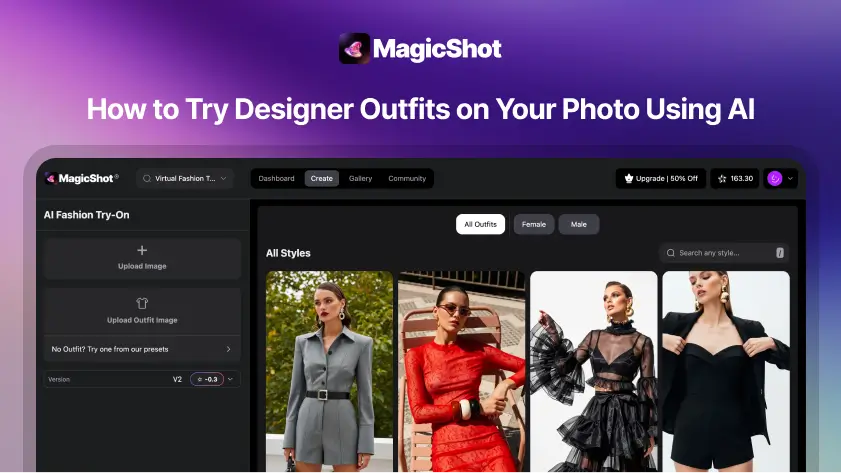
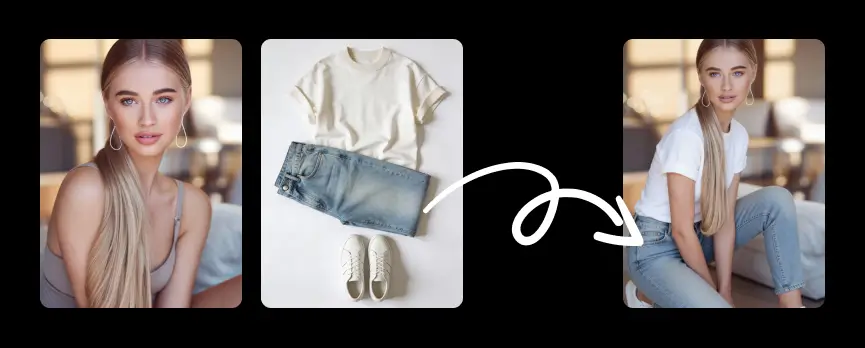
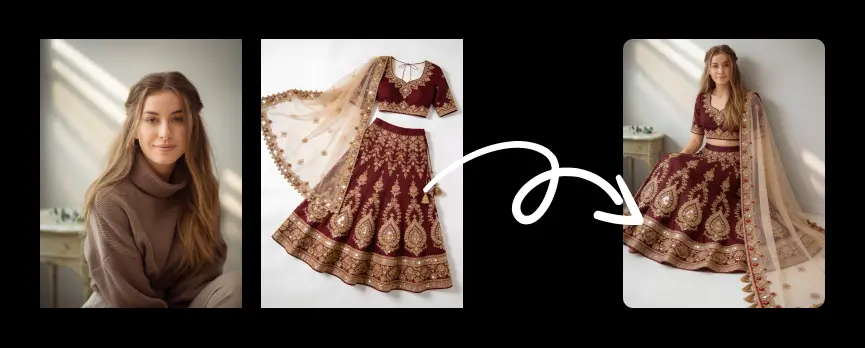
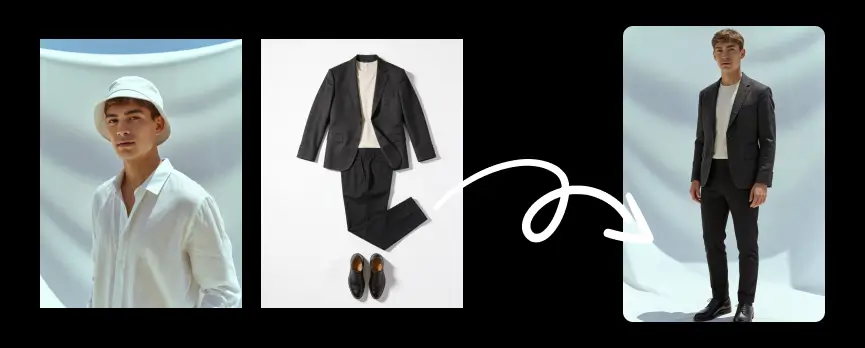
Fashion Try On is an AI-powered feature that lets you see how an outfit looks on you using just photos. Instead of imagining the fit or style, users can upload their own image and an outfit image, and the AI instantly shows the person wearing that outfit.
Users can also choose from a built-in clothing library featuring designer-made outfits. Within seconds, Fashion Try On creates a realistic preview that helps users visualize the final look before making a decision.
This removes guesswork from online fashion shopping. No physical try-on, no sizing doubts, and no waiting. Fashion Try On makes it easy to explore styles, compare outfits, and choose with confidence - all from a single photo.
How Fashion Try On Works
Fashion Try On is designed to be quick and simple. You don’t need any technical skills to use it.
Step 1: Upload Your Photo
Start by uploading a clear photo of yourself. This helps the AI understand body shape, pose, and proportions.
Step 2: Choose an Outfit
Upload an outfit image you like or select one from the designer clothing library. You can explore different styles, colors, and looks.
Step 3: AI Processes the Look
Our advanced AI analyzes both images and maps the outfit onto your photo with realistic fitting and alignment.
Step 4: See the Result Instantly
Within seconds, you’ll see a realistic preview of yourself wearing the outfit. You can try multiple looks and compare styles easily.
This simple process turns any outfit idea into a visual experience, helping you make better fashion decisions faster.
Fashion Try On vs Traditional Try-On: What’s Better?
Traditional try-on requires visiting a store, waiting for fitting rooms, and physically changing outfits. While it gives a real feel of the fabric, it takes time and limits how many styles you can try.
Fashion Try On offers a faster and more flexible experience. You can try multiple outfits in minutes, explore designer styles, and see how they look on your own photo, all without leaving your home.
Traditional Try-On
Requires physical presence
Limited outfit options per visit
Time-consuming
Not always available for designer or online-only items
Fashion Try On
Try outfits anytime, anywhere
Instant results in seconds
Access to designer clothing libraries
No waiting, no physical effort
For online shopping and digital fashion experiences, Fashion Try On is the better choice. It removes friction, saves time, and helps users feel confident before making a decision.
Ways to Use Fashion Try On
Fashion Try On can be used in many everyday fashion scenarios, making it useful for both personal and professional needs.
Try Before You Buy
See how an outfit looks on you before purchasing. This helps reduce uncertainty and avoids unwanted returns.
Explore New Styles
Experiment with different designs, colors, and fits that you might not normally choose. Fashion Try On makes style discovery easy and risk-free.
Compare Multiple Outfits
Try several outfits on the same photo to quickly compare looks and choose the best one.
Preview Designer Collections
Use the clothing library to try premium and designer-made outfits without visiting a store.
Create Content and Looks
Content creators and fashion influencers can use Fashion Try On to preview outfits, plan shoots, or create style content faster.
Fashion Try On turns outfit selection into a simple visual process, helping users make confident fashion decisions in minutes.
Real Examples You Can Try
Everyday outfit decisions
Events and occasions
Creator and brand examples
Fashion Try On for Designer and Personal Outfits
Fashion Try On gives you two simple ways to preview outfits on your own photo. You can explore designer-made styles from the clothing library or upload any outfit image you already like.
Try Designer Outfits from the Clothing Library
The clothing library features curated, designer-made outfits across multiple categories like casual, party, formal, ethnic, and streetwear. These outfits are optimized for quick and realistic try-on results.
This option is ideal when you want inspiration or want to explore trending styles without searching for outfit images.
Use cases:
Try multiple designer looks before an event
Compare colors and styles from the same collection
Discover new fashion trends instantly
Upload Your Own Outfit Image
If you already have a specific outfit in mind, you can upload any outfit image. This could be a screenshot from an online store, a Pinterest save, or a photo shared by a friend.
This option is perfect for high-intent shopping, especially for premium or designer outfits where you want to be sure before buying.
Use cases:
Preview an outfit before purchasing online
Test how a saved look suits your body and style
Plan outfits for special occasions
Best Results Tips
Use a clear, well-lit photo with a natural pose
Choose outfit images that show the full look clearly
Avoid heavy filters or blurry images
Whether you’re trying designer collections or your own saved looks, Fashion Try On helps you choose with confidence and style.
Industries Using Fashion Try On Today
Fashion Try On is being adopted across multiple industries to improve customer experience, reduce returns, and speed up decision-making.
Fashion and Apparel Brands
Clothing brands use Fashion Try On to help customers visualize outfits on their own photos. This builds confidence, increases conversions, and lowers return rates.
E-Commerce and Marketplaces
Online shopping platforms integrate Fashion Try On to reduce guesswork. Customers can preview outfits before buying, leading to better satisfaction and fewer size or style issues.
Designer Labels and Boutiques
Designer brands use Fashion Try On to showcase premium collections digitally. It allows customers to explore exclusive designs without in-store visits.
Fashion Influencers and Content Creators
Creators use Fashion Try On to test looks, plan shoots, and create outfit content faster. Multiple styles can be previewed without changing clothes.
Styling and Personal Shopping Services
Personal stylists and fashion consultants use Fashion Try On to present outfit options to clients and speed up approvals.
Advertising and Marketing Agencies
Agencies use Fashion Try On to test creative concepts, build lookbooks, and personalize fashion campaigns at scale.
Virtual Events and Digital Fashion Platforms
Fashion shows, virtual try-ons, and online style events use the technology to deliver interactive and engaging fashion experiences.
Fashion Try On is no longer just a shopping tool. It’s becoming a core part of how fashion is designed, marketed, and experienced digitally.
Fashion Try On Tips for Best Results
To get the most accurate and realistic results, a few simple tips can make a big difference.
Use a clear, well-lit photo with a natural standing pose
Face the camera and avoid extreme angles
Wear fitted or neutral clothing in your photo for better alignment
Choose outfit images that show the full outfit clearly
Following these steps helps the AI create a more accurate and natural-looking try-on result.
Privacy and Safety: What Happens to Your Photos?
User privacy is a top priority. Photos uploaded for Fashion Try On are used only to generate the try-on result.
Images are processed securely and are not shared with third parties. Uploaded photos are not used for training or public display unless explicitly permitted by the user.
Once the try-on process is complete, images are handled according to strict data protection standards to ensure user safety and trust.
What’s Next for Fashion Try On
Fashion Try On is continuously evolving. Future updates aim to improve realism, expand outfit categories, and offer more customization options.
Upcoming enhancements may include better fabric detailing, improved body alignment, and expanded designer collections. The goal is to make virtual try-on feel even closer to a real-life experience.
Fashion Try On will continue to redefine how people discover, try, and choose fashion online.
Try Fashion Try On Now
Ready to see how an outfit looks on you?
Upload your photo, choose a designer look or your own outfit, and experience instant Fashion Try On in seconds.
Make confident fashion choices with less effort and more style.